EasyManua.ls Logo

Sony STR-D360Z - Page 11

Sony STR-D360Z
23 pages
Print Icon
To Next Page IconTo Next Page
To Previous Page IconTo Previous Page
Loading...
Receiver
Operations
CEE
EE
RS
Receiving
Broadcasts
This
receiver
lets
you
enter
a
station's
frequency
directly
by
using
the
numeric
buttons
(direct
tuning).
If
you
don’t
know
the
frequency
of
the
station
you
want,
see
“Receiving
broadcasts
by
scanning
stations
(automatic
tuning)"
on
this
page.
Before
you
begin,
make
sure
you
have:
*
Connected
an
FM/AM
antenna
to
the
receiver
as
indicated
on
page
5
*
Selected
the
appropriatespeaker
system.
(See
“Selecting
the
speaker
system”
on
page
7.)
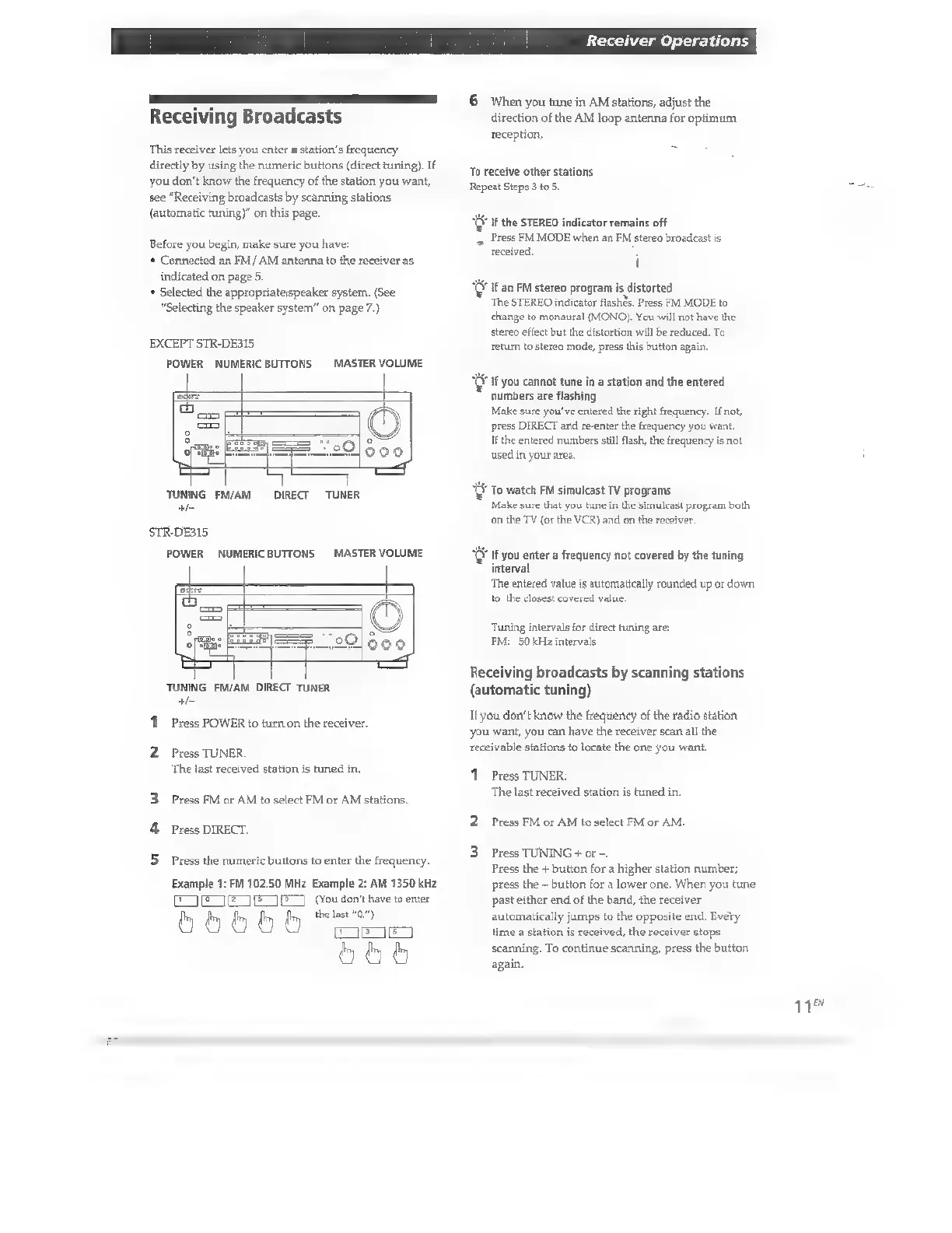
EXCEPT
STR-DE315
POWER
NUMERICBUTTONS
MASTER
VOLUME
TUNING
FM/AM
+
DIRECT
TUNER
STR-DE315
POWER
NUMERICBUTTONS
MASTER
VOLUME
TUNING
FM/AM
DIRECT
TUNER
+-
1
Press
POWER
to
turn
on
the
receiver.
2
Press
TUNER
The
last
received
station
is
tuned
in,
3
Press
FM
or
AM
to
select
FM
or
AM
stations
4
Press
DIRECT.
Press
the
numeric
buttons
to
enter
the
frequency.
Example
1:
FM
102.50
MHz
Example
2:
AM
1350
kHz
EQ
ETE
TENE)
(You
don't
have
to
enter
b
5
b
5
fm,
the
last
“0.")
On
bbb
6
When
you
tune
in
AM
stations,
adjust
the
direction
of
the
AM
loop
antenna
for
optimum
reception.
To
receive
other
stations
Repeat
Steps
3
to
5.
Ü
If
the
STEREO
indicator
remains
off
s
Press
FM
MODE
when
an
FM
stereo
broadcast
is
received,
l
Ý
If
an
FM
stereo
program
is
distorted
The
STEREO
indicator
flashès.
Press
FM
MODE
to
change
to
monaural
(MONO).
You
will
not
have
the
stereo
effect
but
the
distortion
will
be
reduced.
To
return
to
stereo
mode,
press
this
button
again.
v
If
you
cannot
tune
in
a
station
and
the
entered
numbers
are
flashing
Make
sure
you've
entered
the
right
frequency.
If
not,
press
DIRECT
and
re-enter
the
frequency
you
want.
If
the
entered
numbers
still
flash,
the
frequency
is
not
used
in
your
area.
EE
To
watch
FM
simulcast
TV
programs
Make
sure
that
you
tune
in
the
simulcast
program
both
on
the
TV
(or
the
VCR)
and
on
the
receiver.
XU
If
you
enter
a
frequency
not
covered
by
the
tuning
interval
The
entered
value
is
automatically
rounded
up
or
down.
to
the
closest
covered
value.
Tuning
intervals
for
direct
tuning
are:
FM:
50
kHz
intervals
Receiving
broadcasts
by
scanning
stations
(automatic
tuning)
I
you
don't
know
the
frequency
of
the
radio
station
you
want,
you
can
have
the
receiver
scan
all
the
receivable
stations
to
locate
the
one
you
want.
1
Press
TUNER.
The
last
received
station
is
tuned
in.
2
Press
FM
or
AM
to
select
FM
or
AM.
S
Press
TUNING
+
or
-.
Press
the
+
button
for
a
higher
station
number;
press
the
-
button
for
a
lower
one.
When
you
tune
past
either
end
of
the
band,
the
receiver
automatically
jumps
to
the
opposite
end.
Every
time
a
station
is
received,
the
receiver
stops
scanning.
To
continue
scanning,
press
the
button
again.
1

Other manuals for Sony STR-D360Z

Related product manuals