EasyManua.ls Logo

Sony STR-D360Z - Page 12

Sony STR-D360Z
23 pages
Print Icon
To Next Page IconTo Next Page
To Previous Page IconTo Previous Page
Loading...
127
Presetting
Radio
Stations
You'll
most
likely
want
to
preset
the
receiver
with
the
radio
stations
you
listen
to
often
so
that
you
don’t
have
to
tune
in
the
station
every
time.
The
receiver
can
store
a
total
of
30
FM
or
AM
stations.
You
can
store
the
stations
on
preset
numbers
combining
3
characters
(A,
B,
C)
and
numbers
(0-9).
For
example,
you
can
store
a
station
as
preset
number
A1,
B6
or
C9,
etc.
=
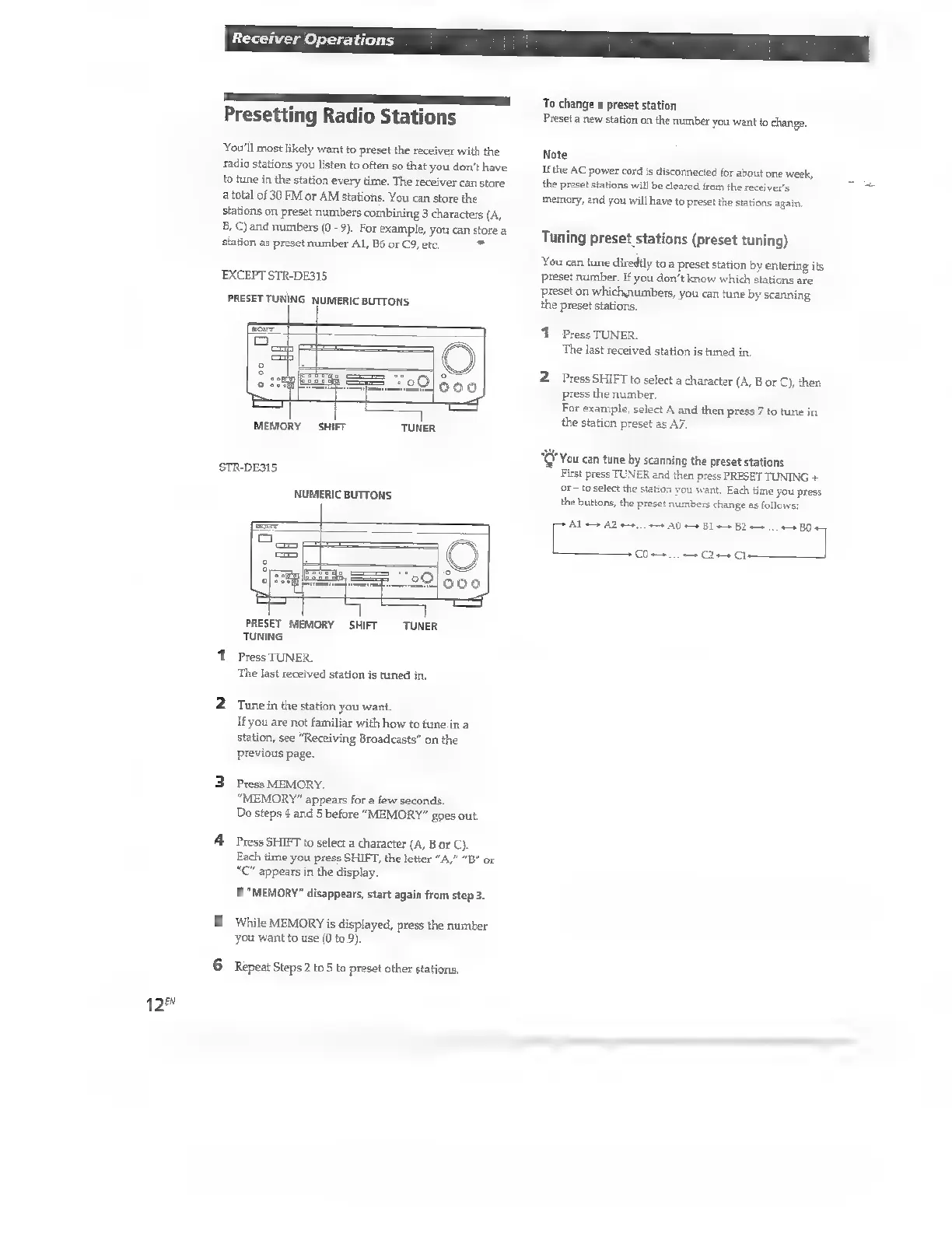
EXCEPT
STR-DE315
PRESET
TUNING
NUMERIC
BUTTONS
MEMORY
SHIFT
TUNER
STR-DE315
NUMERIC BUTTONS
PRESET
MEMORY
SHIFT
TUNER
TUNING
1
Press
TUNER.
The
last
received
station
is
tuned
in.
2
Tunein
the
station
you
want.
If
you
are
not
familiar
with
how
to
tune
in
a
station,
see
“Receiving
Broadcasts”
on
the
previous
page.
3
Press
MEMORY.
“MEMORY”
appears
for
a
few
seconds.
Do
steps
4
and
5
before
“MEMORY”
goes
out.
4
Press
SHIFT
to
select
a
character
(A,
B
or
C).
Each
time
you
press
SHIFT,
the
letter
"A,"
“B”
or
"C"
appears
in
the
display.
If
"MEMORY"
disappears,
start
again
from
step
3.
5
While
MEMORY
is
displayed,
press
the
number
you
want
to
use
(0
to
9).
6
Repeat
Steps
2
to
5
to
preset
other
stations.
To
change
a
preset
station
Preset
a
new
station
on
the
number
you
want
to
change.
Note
If
the
AC
power
cord
is
disconnected
for
about
one
week,
the
preset
stations
will
be
cleared
from
the
receiver's
memory,
and
you
will
have
to
preset
the
stations
again.
Tuning
preset
stations
(preset
tuning)
You
can
tune
diredtly
to
a
preset
station
by
entering
its
preset
number.
If
you
don’t
know
which
stations
are
preset
on
whichnumbers,
you
can
tune
by
scanning
the
preset
stations,
1
Press
TUNER.
The
last
received
station
is
tuned
in.
2
Press
SHIFT
to
select
a
character
(A,
B
or
C),
then
press
the
number.
For
example,
select
A
and
then
press
7
to
tune
in
the
station
preset
as
A7.
‘ou
can
tune
by
scanning
the
preset
stations
First
press
TUNER
and
then
press
PRESET
TUNING
+
or
-
to
select
the
st
‘ou
want,
Each
time
you
press
the
buttons,
the
preset
numbers
change
as
follows:
ket
A0
BI
BD
Co
C2
c

Other manuals for Sony STR-D360Z

Related product manuals