EasyManua.ls Logo

Sony STR-D360Z - Page 15

Sony STR-D360Z
23 pages
Print Icon
To Next Page IconTo Next Page
To Previous Page IconTo Previous Page
Loading...
Using
Surround
Sound
DR
er
EEE
Getting
the
Most
Out
of
Dolby
Pro
Logic
Surround
Sound
To
obtain
the
best
possible
Dolby
Pro
Logic
Surround
sound,
first
select
the
center
mode
according
to
the
speaker
system
you
have.
Then,
adjust
each
speaker
volume
and
delay
time,
Note
that
you
must
have
at
least
one
additional
pair
of
speakers
and
/or
one
center
speaker
to
do
the
following
adjustments.
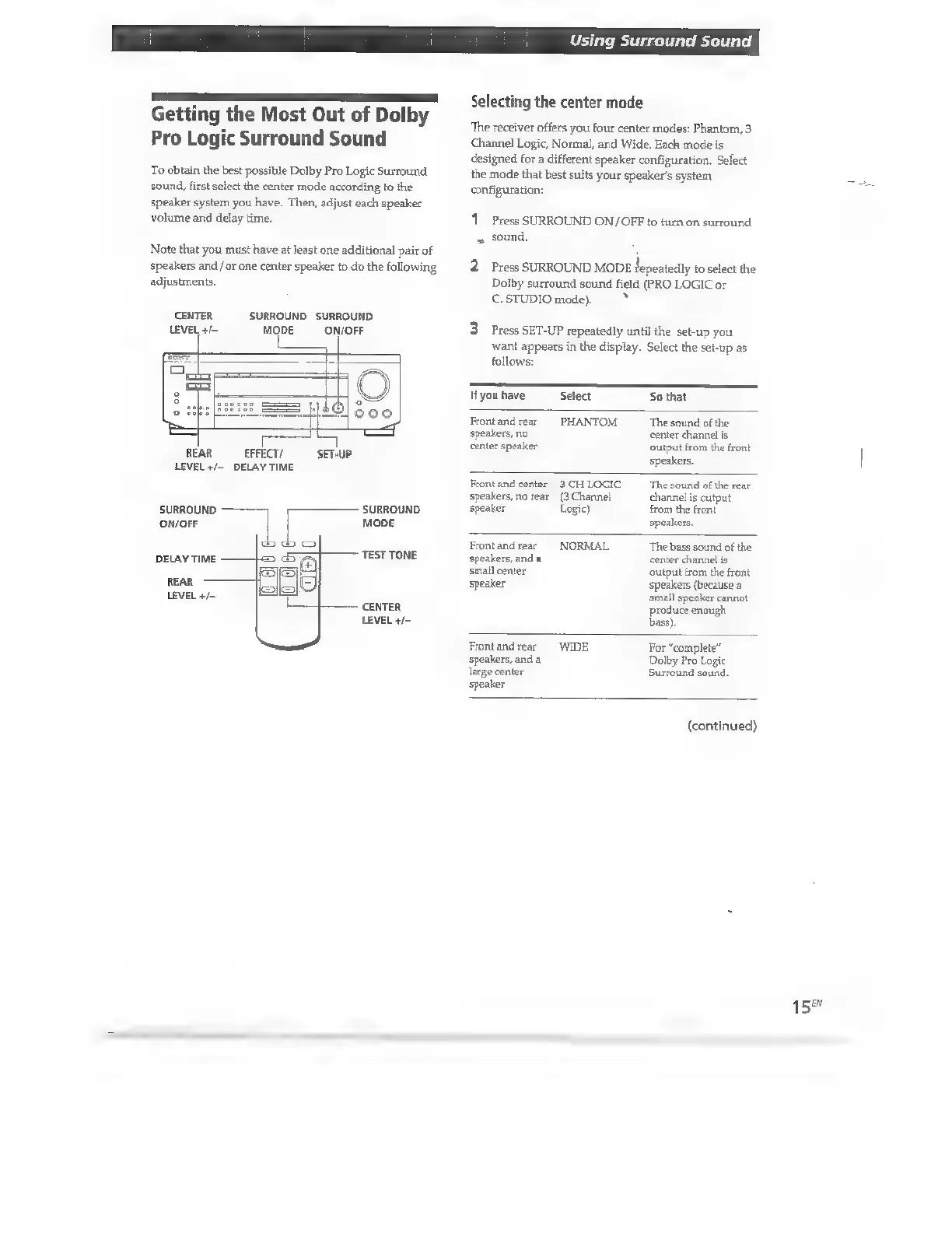
CENTER
LEVEL
+/—
MODE
|
p=
ED
SURROUND
SURROUND
ON/OFF
ooo
REAR
EFFECT/
SET-UP
LEVEL
+/-
DELAY
TIME
SURROUND
SURROUND
ON/OFF
|
MODE
TEST
TONE
DELAY
TIME
REAR
LEVEL
4/-
CENTER
LEVEL
+/—
Selecting
the
center
mode
‘The
receiver
offers
you
four
center
modes:
Phantom,
3
Channel
Logic,
Normal,
and
Wide.
Each
mode
is
designed
for
a
different
speaker
configuration.
Select
the
mode
that
best
suits
your
speaker's
system
configuration:
1
Press
SURROUND
ON/OFF
to
turn
on
surround
sound.
2.
Press
SURROUND
MODE
fepeatedly
to
select
the
Dolby
surround
sound
field
(PRO
LOGIC
or
€.
STUDIO
mode).
S
Press
SET-UP
repeatedly
until
the
set-up
you
want
appears
in
the
display.
Select
the
set-up
as
follows:
Ifyou
have
Select
So
that
Front
and
rear
speakers,
no
center
speaker
PHANTOM
The
sound
of
the
center
channel
is
output
from
the
front
speakers.
Front
and
center
3
CH
LOGIC
speakers,
no
rear
(3
Channel
speaker
Logic)
The
sound
of
the
rear
channel
is
output
from
the
front
speakers.
Front
and
rear
speakers,
and
a
small
center
speaker
NORMAL
‘The
bass
sound
of
the
center
channel
is
output
from
the
front
speakers
(because
a
small
speaker
cannot
produce
enough
bass)
Front
and
rear
WIDE
speakers,
and
a
large
center
speaker
For
“complete”
Dolby
Pro
Logic
Surround
sound.
(continued)
158

Other manuals for Sony STR-D360Z

Related product manuals