EasyManua.ls Logo

Sony STR-D360Z - Page 14

Sony STR-D360Z
23 pages
Print Icon
To Next Page IconTo Next Page
To Previous Page IconTo Previous Page
Loading...
14%
Using
Surround
Soui
EEE
ol
a
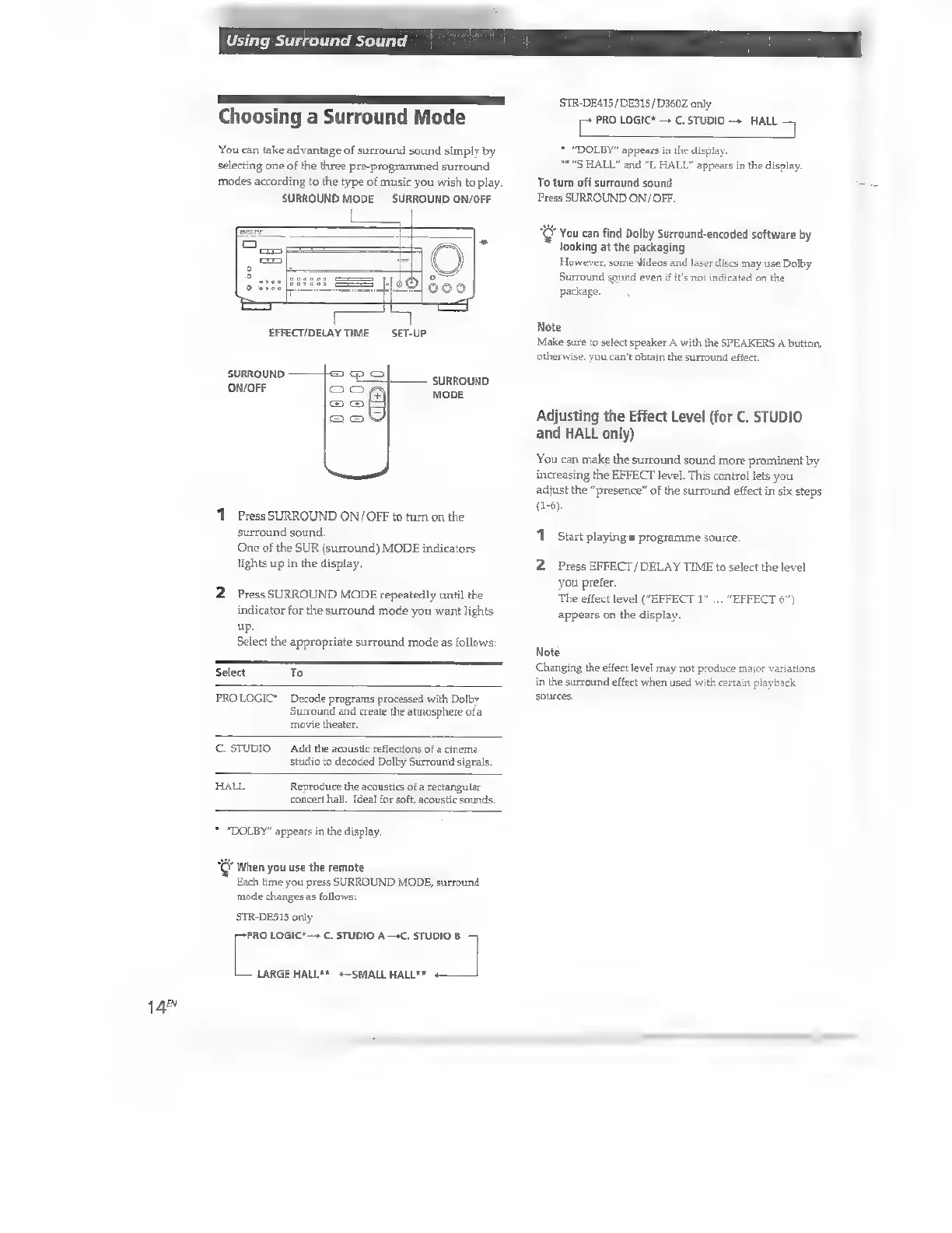
Choosing
a
Surround
Mode
You
can
take
advantage
of
surround
sound
simply
by
selecting
one
of
the
three
pre-programmed
surround
modes
according
to
the
type
of
music
you
wish
to
play.
SURROUND
MODE
SURROUND
ON/OFF
La
|
Of
pem
10]
350
EFFECT/DELAY
TIME
SET-UP
SURROUND
Swor
SURROUND
MODE
1
Press
SURROUND
ON/OFF
to
turn
on
the
surround
sound.
One
of
the
SUR
(surround)
MODE
indicators
lights
up
in
the
display.
2
Press
SURROUND
MODE
repeatedly
until
the
indicator
for
the
surround
mode
you
want
lights
up.
Select
the
appropriate
surround
mode
as
follows:
Select
To
PROLOGIC'
Decode
programs
processed
with
Dolby
Surround
and
create
the
atmosphere
of
a
movie
theater.
C.
STUDIO
Add
the
acoustic
reflections
of
a
cinema
studio
to
decoded
Dolby
Surround
signals.
HALL
Reproduce
the
acoustics
of
a
rectangular
concert
hall.
Ideal
for
soft,
acoustic
sounds.
*
“DOLBY”
appears
in
the
display.
"C
When
you
use
the
remote
Each
time
you
press
SURROUND
MODE,
surround
mode
changes
as
follows:
STR-DESIS
only
[^
LOGIC*—
C.
STUDIO
A
—C.
STUDIO
B
LARGE
HALL**
«—SMALL
HALL**
_]
STR-DE415/DE315/D360Z
only
E
PRO
LOGIC*
C.
STUDIO
HALL
*
“DOLBY”
appears
in
the
display
**
"S
HALL"
and
“L
HALL”
appears
in
the
display.
To
turn
off
surround
sound
Press
SURROUND
ON/OFF.
*
You
can
find
Dolby
Surround-encoded
software
by
looking
at
the
packaging
However,
some
dideos
and
laser
discs
may
use
Dolby
Surround
sound
even
if
it's
not
indicated
on
the
package.
Note
Make
sure
to
select
speaker
A
with
the
SPEAKERS
A
button,
otherwise,
you
can't
obtain
the
surround
effect.
Adjusting
the
Effect
Level
(for
C.
STUDIO
and
HALL
only)
You
can
make
the
surround
sound
more
prominent
by
increasing
the
EFFECT
level.
This
control
lets
you
adjust
the
"presence"
of
the
surround
effect
in
six
steps
(1-6).
1
Start
playing
a
programme
source.
2
Press
EFFECT/DELAY
TIME
to
select
the
level
you
prefer.
The
effect
level
("EFFECT
1”
...
appears
on
the
display.
"EFFECT
6")
Note
Changing
the
effect
level
may
not
produce
major
variations
in
the
surround
effect
when
used
with
certain
playback
sources

Other manuals for Sony STR-D360Z

Related product manuals