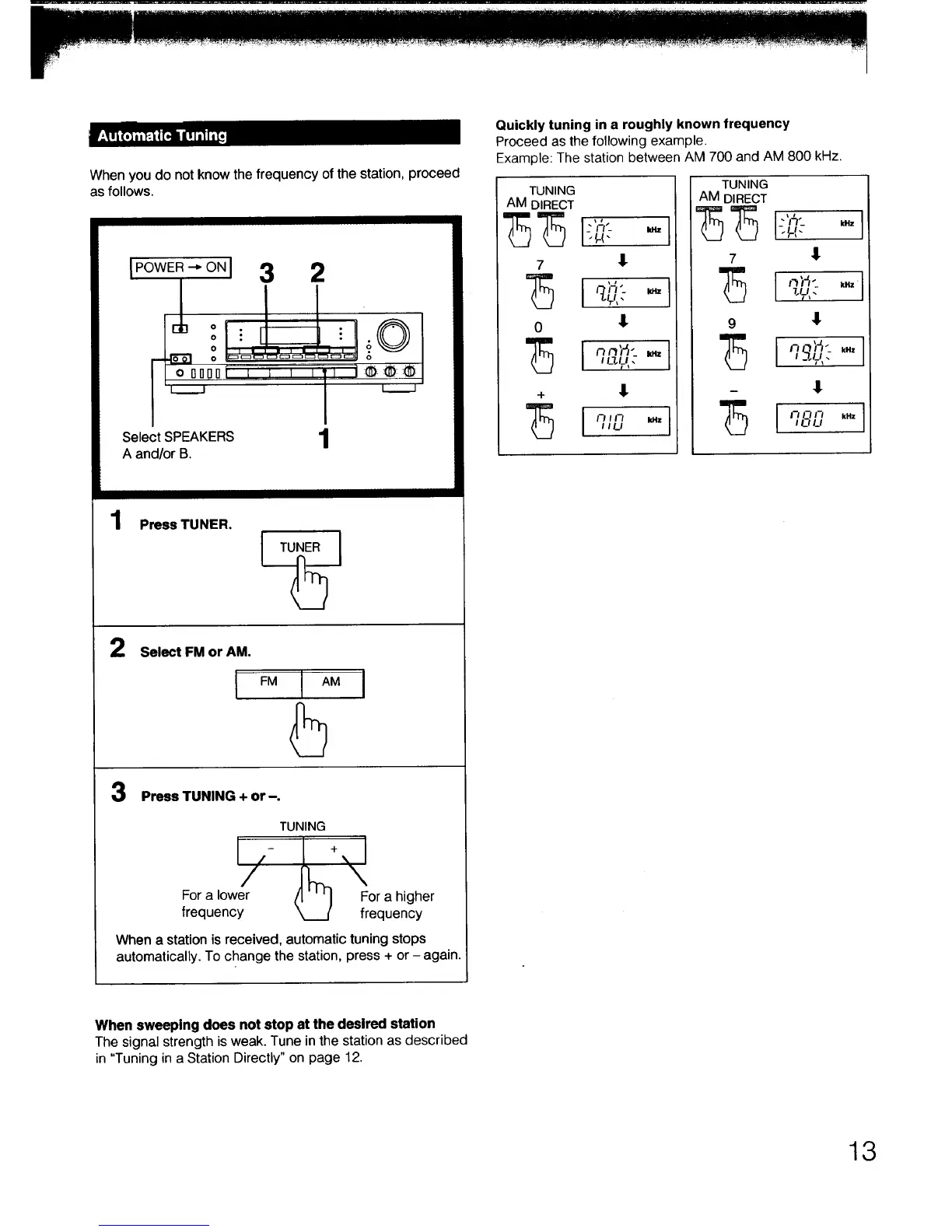
When you do not know the frequency of the station, proceed
as follows.
IPOWER--O.I3 2
lo
o
I o rll]nl] _ I i i
i i
Select SPEAKERS 1
A and/or B.
1
Press TUNER.
L TUNER
5
1
2
Select FM or AM.
3 Press TUNING + or-.
TUNING
For a lower (1 ' ' I For a higher
frequency _ frequency
When a station is received, automatic tuning stops
automatically. To change the station, press + or - again.
Quickly tuning in a roughly known frequency
Proceed as the following example.
Example: The station between AM 700 and AM 800 kHz.
TUNING
AM DIRECT
+ t
75 i,, -.I
I ILl
TUNING
AM DIRECT
7 ,II
9 1
I--I1-"_ l l_- kHz
aaJ,J,.
_ !
When sweeping does not stop at the desired station
The signal strength is weak. Tune in the station as described
in "Tuning in a Station Directly" on page 12.
13



 To Next Page