EasyManua.ls Logo

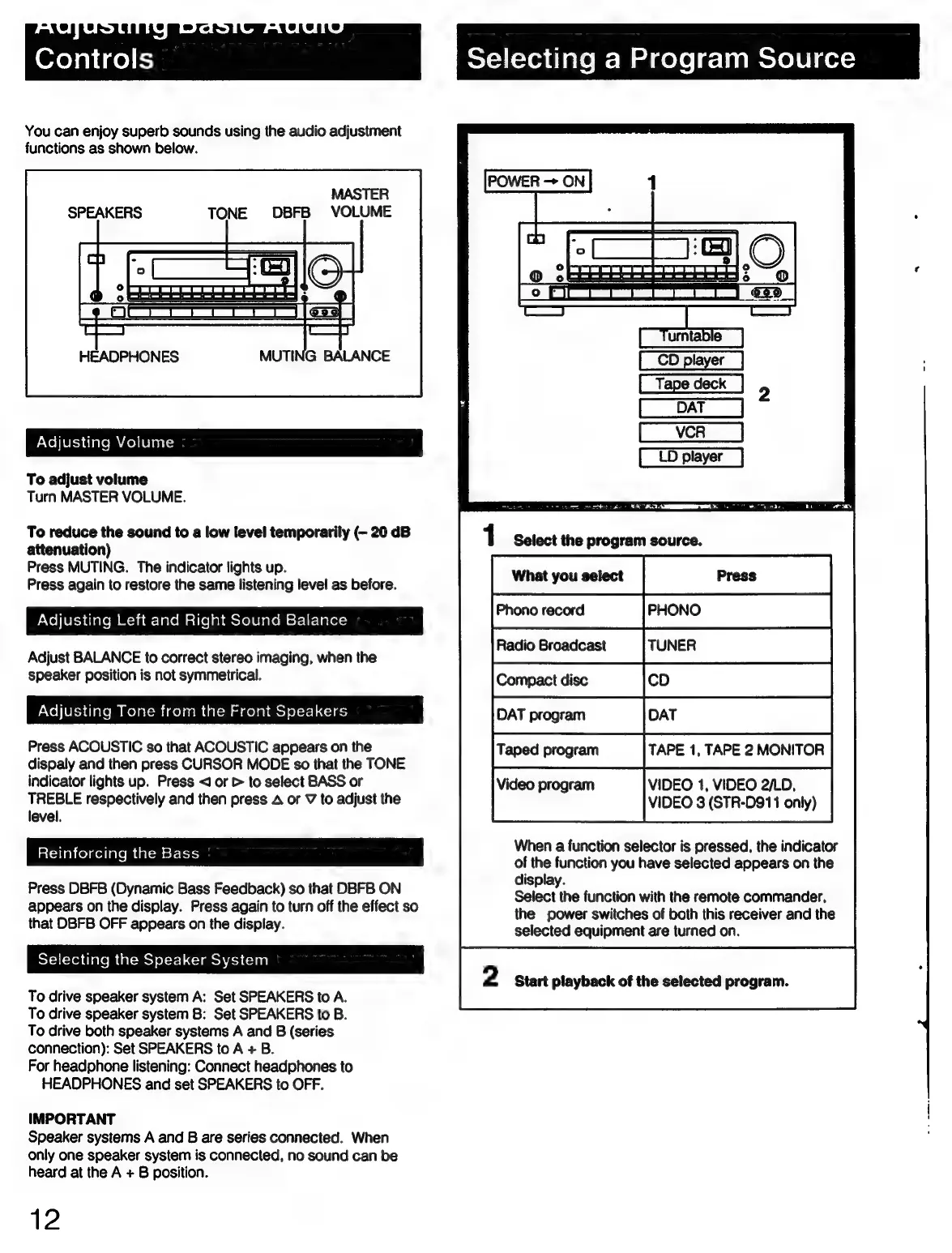
Sony STR-D911 - Basic Audio Adjustments and Source Selection; Volume, Balance, and Tone Control

Sony STR-D911
36 pages
Print Icon
To Next Page IconTo Next Page
To Previous Page IconTo Previous Page
Loading...
Ofey
alice)
t=)
Selecting
a
Program
Source
You
can
enjoy
superb
sounds
using
the
audio
adjustment
functions
as
shown
below.
MASTER
DBFB
VOLUME
Oo
a)
FCTrtst
ttt
tJji¢sg
|
a
—h
[_Tumtabie
2
|
[aT]
rd
LD
player
HEADPHONES
MUTING
BALANCE
To
adjust
volume
Turn
MASTER
VOLUME.
To
reduce
the
sound
to
a
low
level
temporarily
(-
20
dB
attenuation)
Press
MUTING.
The
indicator
lights
up.
Press
again
to
restore
the
same
listening
level
as
before.
What
you
select
1
Select
the
program
source.
PNohier-3
ciate
m
A
-lamcleleMatlelebaclolejalom
st-li-lever=
Phono
record
;
.
.
Radio
Broadcast
TUNER
Adjust
BALANCE
to
correct
stereo
imaging,
when
the
speaker
position
is
not
symmetrical.
Compact
disc
co
Adjusting
Tone
from
the
Front
Speakers
DAT
program
par
CD
DAT
Press
ACOUSTIC
so
that
ACOUSTIC
appears
on
the
Taped
program
TAPE
1,
TAPE
2
MONITOR
dispaly
and
then
press
CURSOR
MODE
so
that
the
TONE
indicator
lights
up.
Press
<J
or
>
to
select
BASS
or
i
VIDEO
1,
VIDEO
2/LD
TREBLE
respectively
and
then
press
A
or
V
to
adjust
the
VIDEO
3
(STR-D911
only)
level.
When
a
function
selector
is
pressed,
the
indicator
of
the
function
you
have
selected
appears
on
the
Press
DBFB
(Dynamic
Bass
Feedback)
so
that
DBFB
ON
display.
appears
on
the
display.
Press
again
to
turn
off
the
effect
so
SEIOC
LENG
TUNCHON
Wal
Me
Comte
Commander,
that
DBFB
OFF
appears
on
the
display.
the
power
switches
of
both
this
receiver
and
the
selected
equipment
are
turned
on.
Reinforcing
the
Bass
Selecting
the
Speaker
System
2
Start
playback
of
the
selected
program.
To
drive
speaker
system
A:
Set
SPEAKERS
to
A.
To
drive
speaker
system
B:
Set
SPEAKERS
to
B.
To
drive
both
speaker
systems
A
and
B
(series
connection):
Set
SPEAKERS
to
A
+
B.
For
headphone
listening:
Connect
headphones
to
HEADPHONES
and
set
SPEAKERS
to
OFF.
IMPORTANT
Speaker
systems
A
and
B
are
series
connected.
When
only
one
speaker
system
is
connected,
no
sound
can
be
heard
at
the
A
+
B
position.
12

Related product manuals