EasyManua.ls Logo

Sony STR-D911 - Page 19

Sony STR-D911
36 pages
Print Icon
To Next Page IconTo Next Page
To Previous Page IconTo Previous Page
Loading...
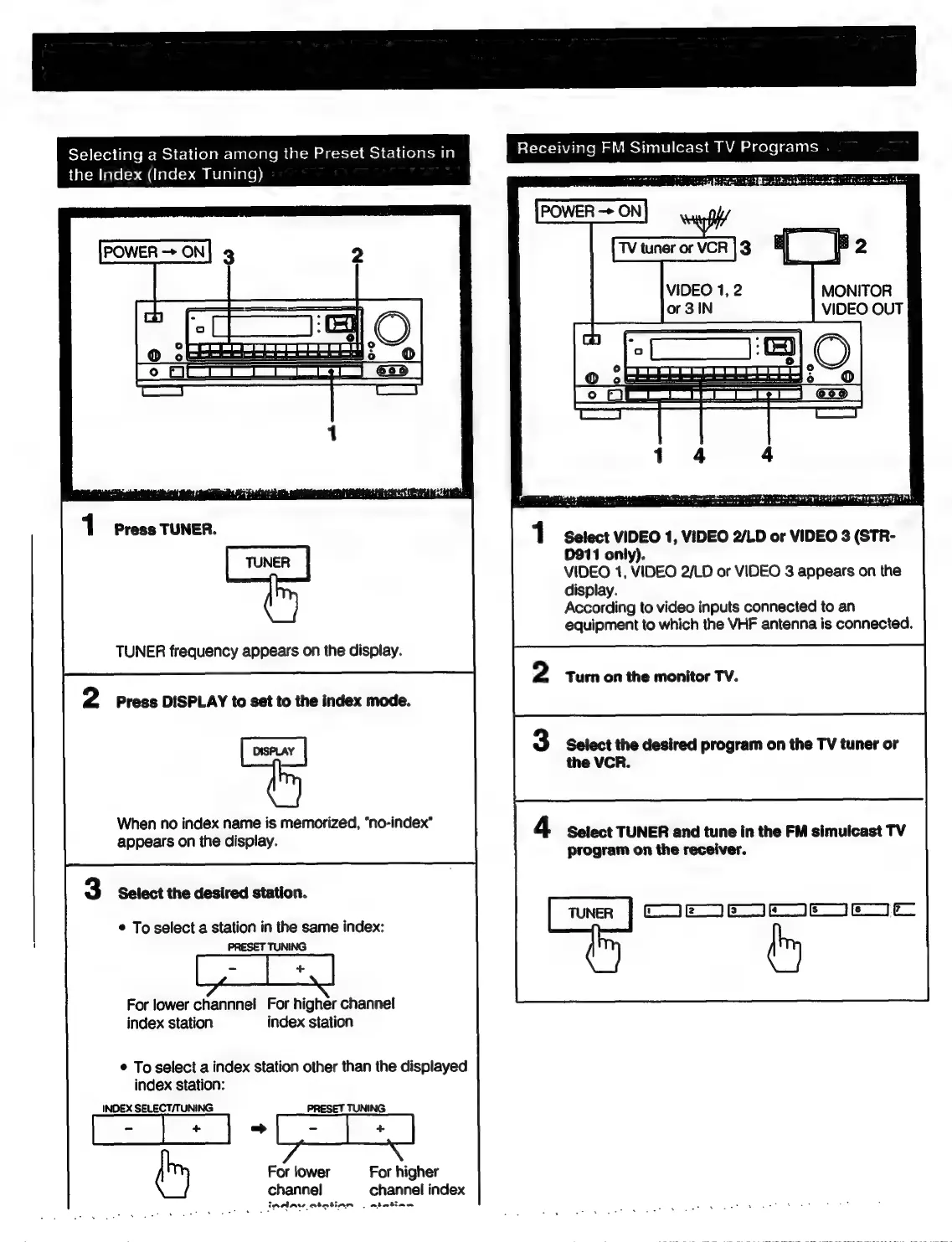
Selecting
a
Station
among
the
Preset
Stations
in
Receiving
FM
Simulcast
TV
Programs
idatem
lace
(=>
MC
ialei->
am
melariare))
POWER
—>
ON
MONITOR
VIDEO
OUT
prose
SUMNER,
1
Select
VIDEO
1,
VIDEO
2/LD
or
VIDEO
3
(STR-
D911
only).
VIDEO
1,
VIDEO
2/LD
or
VIDEO
3
appears
on
the
display.
According
to
video
inputs
connected
to
an
equipment
to
which
the
VHF
antenna
is
connected.
TUNER
frequency
appears
on
the
display.
2
Turn
on
the
monitor
TV.
Press
DISPLAY
to
set
to
the
index
mode.
When
no
index
name
is
memorized,
“no-index’”
appears
on
the
display.
3
Select
the
desired
program
on
the
TV
tuner
or
the
VCR.
4
Select
TUNER
and
tune
in
the
FM
simulcast
TV
program
on
the
receiver.
Select
the
desired
station.
Con
|
EY
me
|
Cm
|
YC
|
e
a
*
To
select
a
station
in
the
same
index:
:
PRESET
TUNING
For
lower
channnel
For
higher
channel
index
station
index
station
©
To
select
a
index
station
other
than
the
displayed
index
station:
INDEX
SELECT/TUNING
PRESET
TUNING
ame
(my
For
lower
For
higher
channel
channel
index
inAlAv
atatian
|
ateatiang

Related product manuals