EasyManua.ls Logo

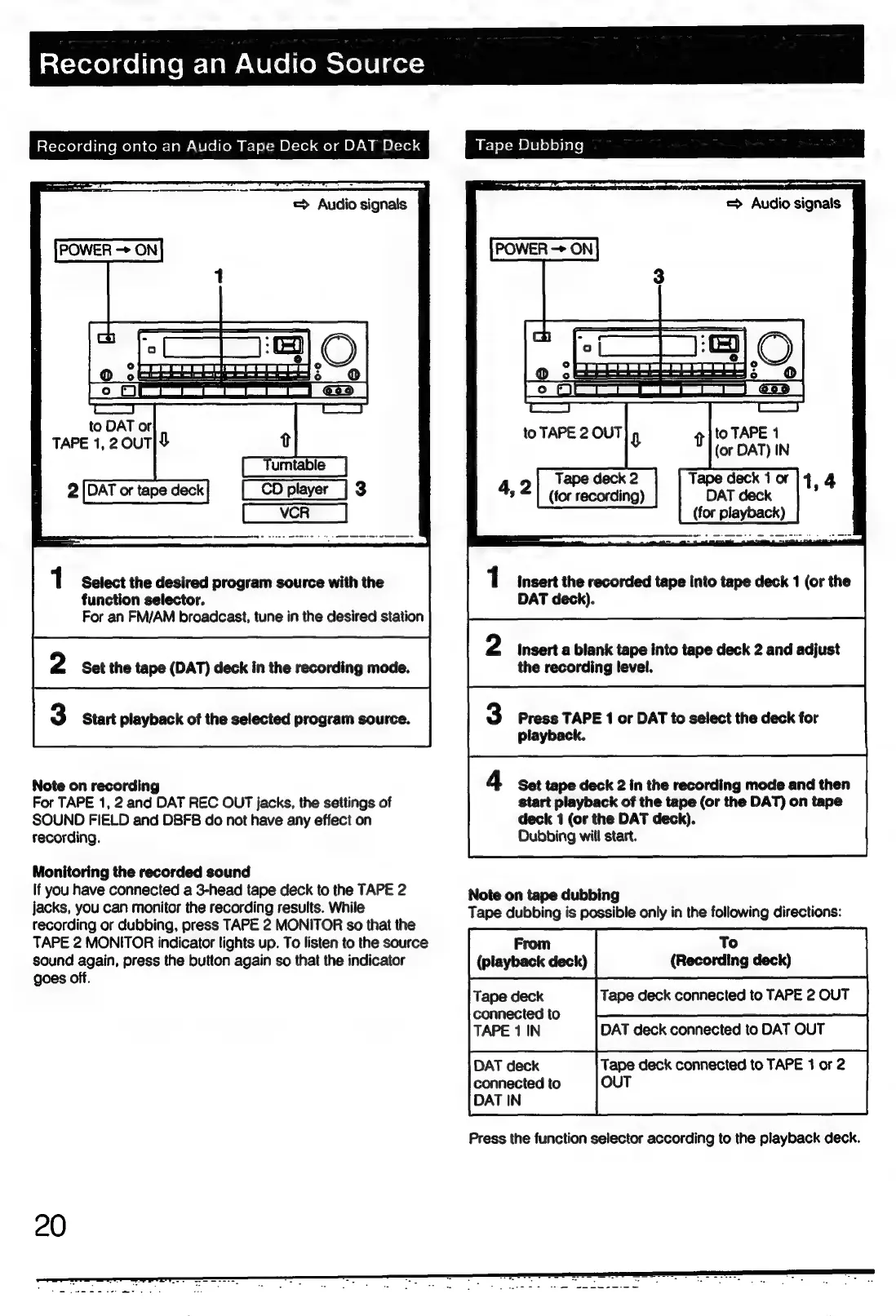
Sony STR-D911 - Audio Recording and Dubbing; Recording to Tape Decks or DAT

Sony STR-D911
36 pages
Print Icon
To Next Page IconTo Next Page
To Previous Page IconTo Previous Page
Loading...
atcxecelaeiialem-lam-lelei(emelelelger=
t-lorolgeltaremejalcomclam-
We
(ollom
&r-|
{=m
O]-1e]
ae]
alO720
MOI
=1e)
|
2
ms
ak
A
a
=D
to
DAT
or
TAPE
1,2
0uT|L
CD
player
|
3
1
Select
the
desired
program
source
with
the
function
selector.
For
an
FM/AM
broadcast,
tune
in
the
desired
station
Note
on
recording
For
TAPE
1,
2
and
DAT
REC
OUT
jacks,
the
settings
of
SOUND
FIELD
and
DBFB
do
not
have
any
effect
on
recording.
Monitoring
the
recorded
sound
If
you
have
connected
a
3-head
tape
deck
to
the
TAPE
2
jacks,
you
can
monitor
the
recording
results.
While
recording
or
dubbing,
press
TAPE
2
MONITOR
so
that
the
TAPE
2
MONITOR
indicator
lights
up.
To
listen
to
the
source
sound
again,
press
the
button
again
so
that
the
indicator
goes
off.
Tape
Dubbing
=
Audio
signals
-——
|
O
®
jt.
LL
LLL)
CG oe
q]'°
TAPE
1
(or
DAT)
IN
1
insert
the
recorded
tape
into
tape
deck
1
(or
the
DAT
deck).
insert
a
blank
tape
into
tape
deck
2
and
adjust
the
recording
level.
Press
TAPE
1
or
DAT
to
select
the
deck
for
playback.
Set
tape
deck
2
in
the
recording
mode
and
then
start
playback
of
the
tape
(or
the
DAT)
on
tape
deck
1
(or
the
DAT
deck).
Dubbing
will
start.
Note
on
tape
dubbing
Tape
dubbing
is
possible
only
in
the
following
directions:
DAT
deck
connected
to
DAT
OUT
Tape
deck
connected
to
TAPE
1
or
2
connected
to
OUT
DAT
IN
Press
the
function
selector
according
to
the
playback
deck.

Related product manuals