EasyManua.ls Logo

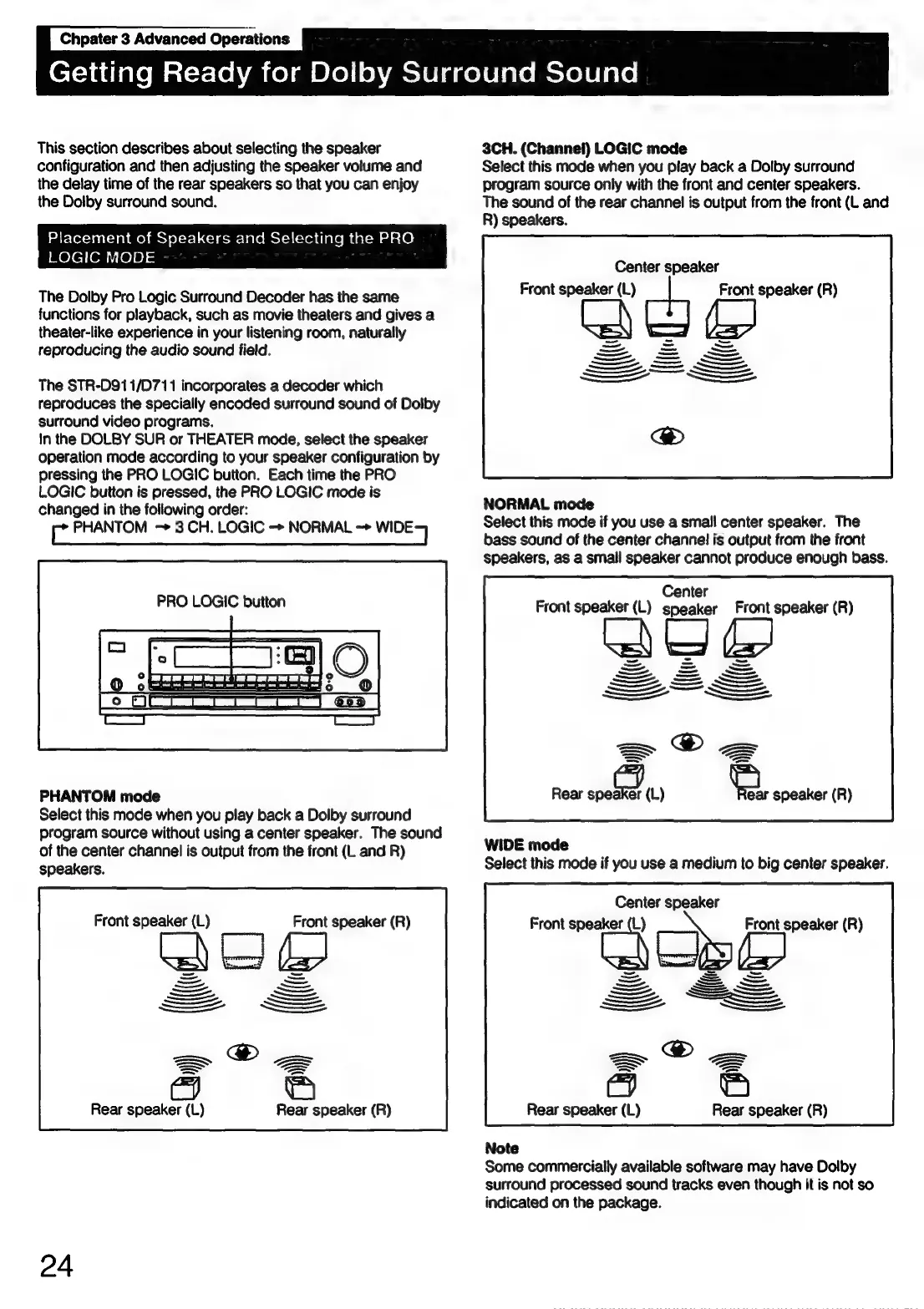
Sony STR-D911 - Advanced Operations: Dolby Surround; Speaker Placement and PRO LOGIC Modes

Sony STR-D911
36 pages
Print Icon
To Next Page IconTo Next Page
To Previous Page IconTo Previous Page
Loading...
Chpater
3
Advanced
Operations
C721
ddialeMat=r-(o
hace)
m
Olellohmolelagelelaremeyelelare,
This
section
describes
about
selecting
the
speaker
configuration
and
then
adjusting
the
speaker
volume
and
the
delay
time
of
the
rear
speakers
so
that
you
can
enjoy
the
Dolby
surround
sound.
Placement
of
Speakers
and
Selecting
the
PRO
/Reteilom'
(0]8)
=
The
Dolby
Pro
Logic
Surround
Decoder
has
the
same
functions
for
playback,
such
as
movie
theaters
and
gives
a
theater-like
experience
in
your
listening
room,
naturally
reproducing
the
audio
sound
field.
The
STR-D911/D711
incorporates
a
decoder
which
reproduces
the
specially
encoded
surround
sound
of
Dolby
surround
video
programs.
In
the
DOLBY
SUR
or
THEATER
mode,
select
the
speaker
operation
mode
according
to
your
speaker
configuration
by
pressing
the
PRO
LOGIC
button.
Each
time
the
PRO
LOGIC
button
is
pressed,
the
PRO
LOGIC
mode
is
changed
in
the
following
order:
c
PHANTOM
3
CH.
LOGIC
-
NORMAL
->
wile)
PRO
LOGIC
button
aa)
PHANTOM
mode
Select
this
mode
when
you
play
back
a
Dolby
surround
program
source
without
using
a
center
speaker.
The
sound
of
the
center
channel
is
output
from
the
front
(L
and
R)
speakers.
Front
speaker
(L)
Front
speaker
(R)
ee
>=
">
>=
-———
Rear
speaker
(L)
Rear
speaker
(R)
24
3CH.
(Channel)
LOGIC
mode
Select
this
mode
when
you
play
back
a
Dolby
surround
program
source
only
with
the
front
and
center
speakers.
The
sound
of
the
rear
channel
is
output
from
the
front
(L
and
R)
speakers.
Center
speaker
Front
speaker
ch
a\eys
ie
eS
(R)
NORMAL
mode
Select
this
mode
if
you
use
a
small
center
speaker.
The
bass
sound
of
the
center
channel!
is
output
from
the
front
speakers,
as
a
small
speaker
cannot
produce
enough
bass.
Center
Front
speaker
(L)
speaker
Front
speaker
(R)
>
Rear
aes
(L)
ize
speaker
(R)
WIDE mode
Select
this
mode
if
you
use
a
medium
to
big
center
speaker.
Center
speaker
Front
speaker
3
}
Front
speaker
(R)
—,
—,
Rear
speaker
(L)
Rear
speaker
(R)
Note
Some
commercially
available
software
may
have
Dolby
surround
processed
sound
tracks
even
though
it
is
not
so
indicated
on
the
package.

Related product manuals