EasyManua.ls Logo

Sony STR-D965 - Programming the Remote

Sony STR-D965
28 pages
Print Icon
To Next Page IconTo Next Page
To Previous Page IconTo Previous Page
Loading...
20
Advanced
Remote
Operations
Programming
the
Remote
(for
STR-D965
only)
The
RM-P351
remote
included
with
the
STR-D965
can
control
non-Sony
components
by
“learning”
the
control
signals
from
their
remotes.
Once
this
remote
learns
the
other
components
signals,
you
can
use
these
components
as
part
of
your
system.
Additionally,
if
you
have
any
Sony
components
that
fail
to
operate
with
this
remote,
use
this
programming
function.
This
remote
can
“learn”
signals
only
from
other
infrared
wireless
remotes.
Before
you
program
signals,
make
sure
that
the
two
remotes:
Face
straight
at
each
other
(see
Step
3
below)
e
Are
placed
at
a
distance
of
about
2
inches
(5
cm)
e
Are
not
moved
during
programming
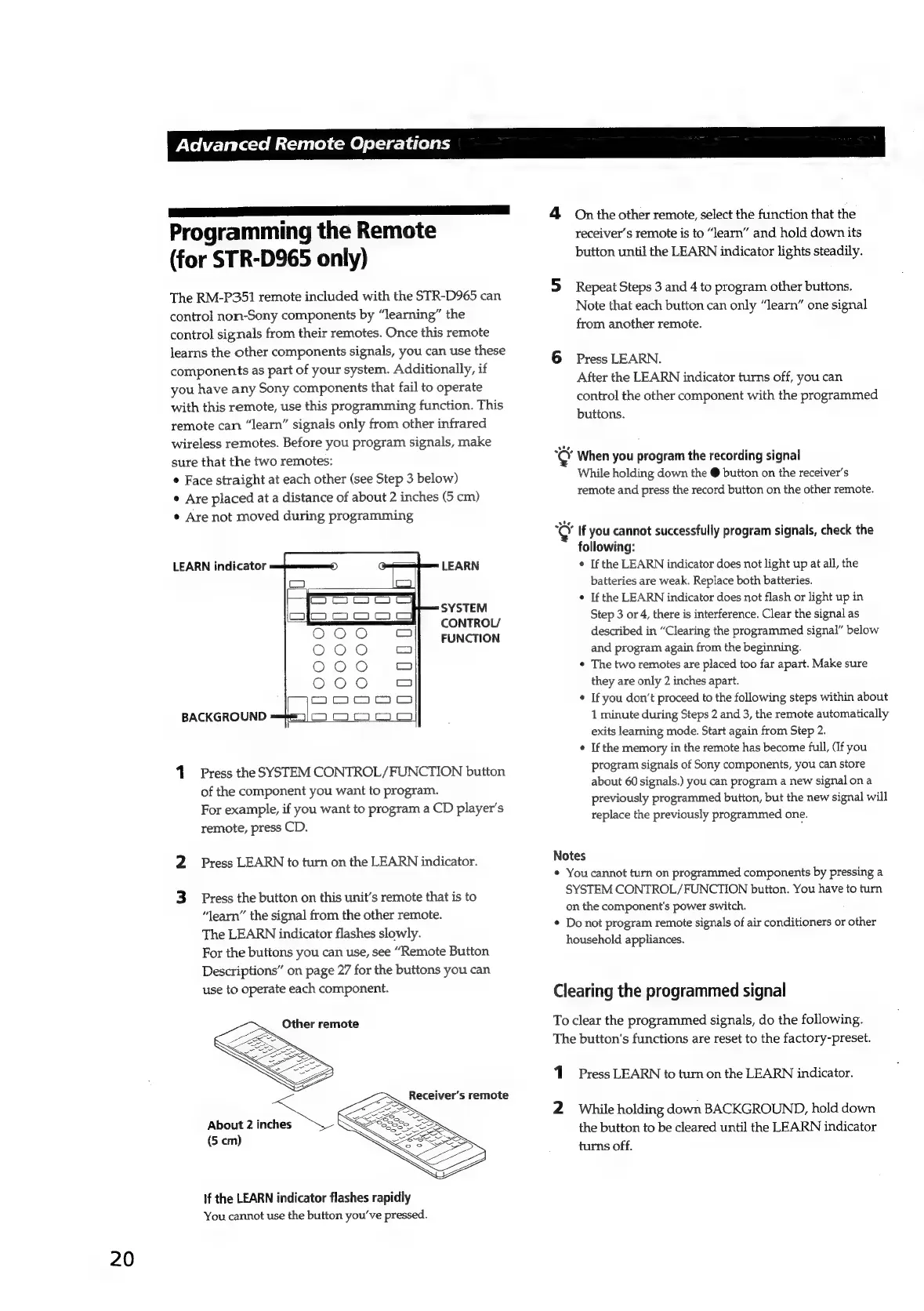
LEARN
indicator
LEARN
SYSTEM
BACKGROUND
1.
Press
the
SYSTEM
CONTROL/FUNCTION
button
of
the
component
you
want
to
program.
For
example,
if
you
want
to
program
a
CD
player's
remote,
press
CD.
2
Press
LEARN
to
turn
on
the
LEARN
indicator.
3
Press
the
button
on
this
unit’s
remote
that
is
to
“learn”
the
signal
from
the
other
remote.
The
LEARN
indicator
flashes
slowly.
For
the
buttons
you
can
use,
see
“Remote
Button
Descriptions”
on
page
27
for
the
buttons
you
can
use
to
operate
each
component.
Other
remote
=
About
2
oes
(5
cm)
If
the
LEARN
indicator
flashes
rapidly
You
cannot
use
the
button
you've
pressed.
CONTROL/
FUNCTION
Receiver’s
remote
4
On
the
other
remote,
select
the
function
that
the
receiver's
remote
is
to
“learn”
and
hold
down
its
button
until
the
LEARN
indicator
lights
steadily.
5
Repeat
Steps
3
and
4
to
program
other
buttons.
Note
that
each
button
can
only
“learn”
one
signal
from
another
remote.
6
Press
LEARN.
After
the
LEARN
indicator
turns
off,
you
can
control
the
other
component
with
the
programmed
buttons.
e
When
you
program
the
recording
signal
While
holding
down
the
@
button
on
the
receiver’s
remote
and
press
the
record
button
on
the
other
remote.
o
If
you
cannot
successfully
program
signals,
check
the
following:
¢
If
the
LEARN
indicator
does
not
light
up
at
all,
the
batteries
are
weak.
Replace
both
batteries.
If
the
LEARN
indicator
does
not
flash
or
light
up
in
Step
3
or
4,
there
is
interference.
Clear
the
signal
as
described
in
“Clearing
the
programmed
signal”
below
and
program
again
from
the
beginning.
¢
The
two
remotes
are
placed
too
far
apart.
Make
sure
they
are
only
2
inches
apart.
If
you
don’t
proceed
to
the
following
steps
within
about
1
minute
during
Steps
2
and
3,
the
remote
automatically
exits
learning
mode.
Start
again
from
Step
2.
e
If
the
memory
in
the
remote
has
become
full,
(If
you
program
signals
of
Sony
components,
you
can
store
about
60
signals.)
you
can
program
a
new
signal
ona
previously
programmed
button,
but
the
new
signal
will
replace
the
previously
programmed
one.
Notes
*
You
cannot
turn
on
programmed
components
by
pressing
a
SYSTEM
CONTROL/FUNCTION
button.
You
have
to
turn
on
the
component's
power
switch.
*
Do
not
program
remote
signals
of
air
conditioners
or
other
household
appliances.
Clearing
the
programmed
signal
To
clear
the
programmed
signals,
do
the
following.
The
button's
functions
are
reset
to
the
factory-preset.
1
Press
LEARN
to
turn
on
the
LEARN
indicator.
2
While
holding
down
BACKGROUND,
hold
down
the
button
to
be
cleared
until
the
LEARN
indicator
turns
off.

Related product manuals