EasyManua.ls Logo

Sony STR-D965 - Advanced Remote Control Features; Operating One Component While Using Another; Changing Function Button Settings

Sony STR-D965
28 pages
Print Icon
To Next Page IconTo Next Page
To Previous Page IconTo Previous Page
Loading...
~
Advanced
Remote
Operations
er
a
|
Operating
One
Component
While
Using
Another
(background
operation)
You
can
temporality
operate
other
components
while
listening
to
or
watching
a
program.
i]
f
mn
0
00
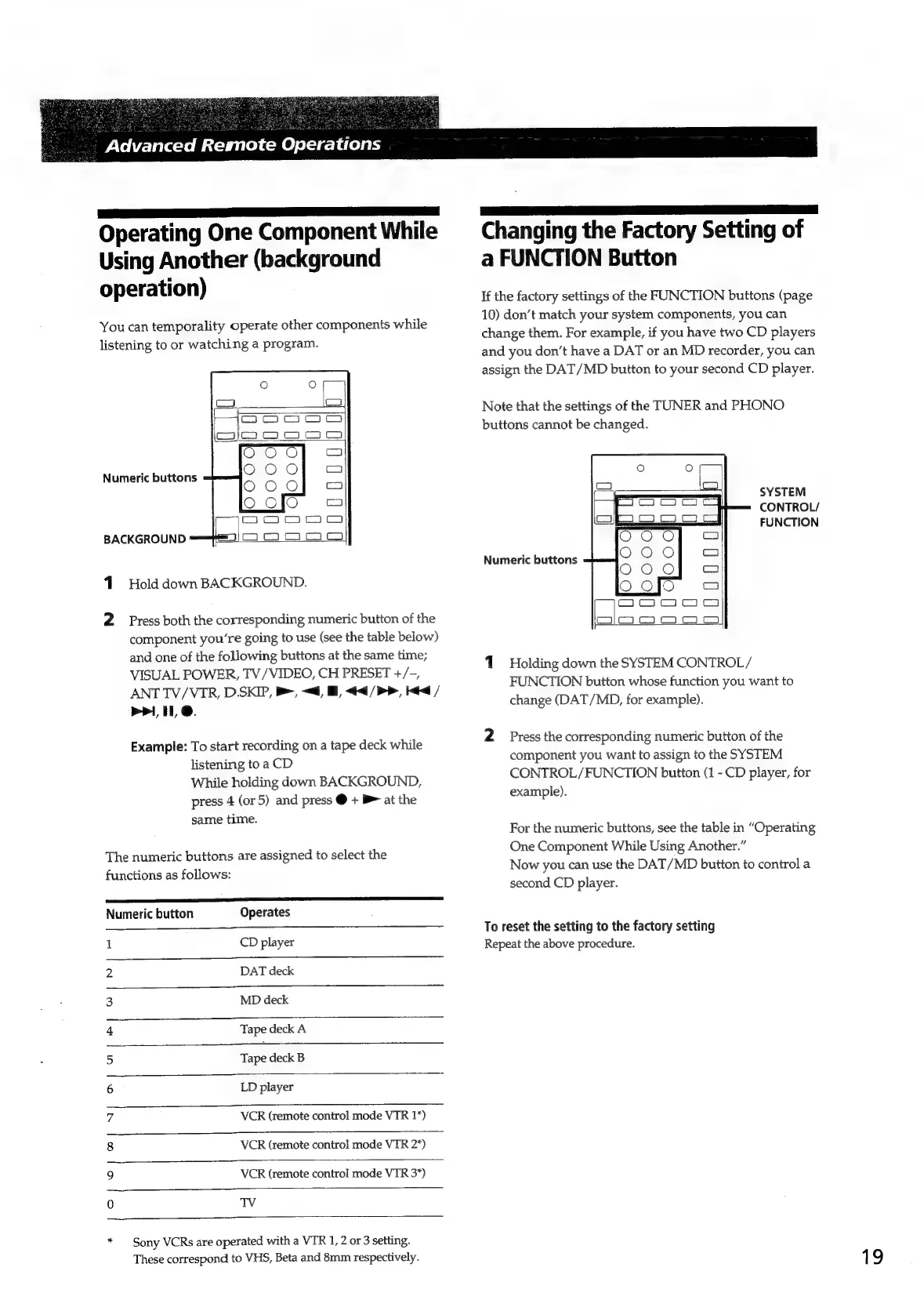
Numeric
buttons
U
Hjooood
uv
U
BACKGROUND
1.
Hold
down
BACKGROUND.
2
Press
both
the
corresponding
numeric
button
of
the
component
youre
going
to
use
(see
the
table
below)
and
one
of
the
following
buttons
at
the
same
time;
VISUAL
POWER,
TV/VIDEO,
CH
PRESET
+/-,
ANT
TV/VTR,
D.SKIP,
>,
~<d,
,
<4<4/PP,
Hed
/
mri,
11
@.
Example:
To
start
recording
on
a
tape
deck
while
listening
to
a
CD
While
holding
down
BACKGROUND,
press
4
(or
5)
and
press
@
+
B>
at
the
same
time.
The
numeric
buttons
are
assigned
to
select
the
functions
as
follows:
el
Numeric
button
Operates
1
CD
player
2
DAT
deck
3
MD
deck
4
Tape
deck
A
5
Tape
deck
B
6
LD
player
7
VCR
(remote
control
mode
VTR
1*)
8
VCR
(remote
control
mode
VTR
2*)
9
VCR
(remote
control
mode
VTR
3*)
0
TV
*
Sony
VCRs
are
operated
with
a
VTR
1,
2
or
3
setting.
These
correspond
to
VHS,
Beta
and
8mm
respectively.
Changing
the
Factory
Setting
of
a
FUNCTION
Button
If
the
factory
settings
of
the
FUNCTION
buttons
(page
10)
don’t
match
your
system
components,
you
can
change
them.
For
example,
if
you
have
two
CD
players
and
you
don’t
have
a
DAT
or
an
MD
recorder,
you
can
assign
the
DAT/MD
button
to
your
second
CD
player.
Note
that
the
settings
of
the
TUNER
and
PHONO
buttons
cannot
be
changed.
Oo
esa)
SYSTEM
=
=)
FUNCTION
Numeric
buttons
JJOOOO
UJoooo
JOU
O00
oqooont
1
Holding
down
the
SYSTEM
CONTROL/
FUNCTION
button
whose
function
you
want
to
change
(DAT/MD,
for
example).
2
Press
the
corresponding
numeric
button
of
the
component
you
want
to
assign
to
the
SYSTEM
CONTROL/FUNCTION
button
(1
-
CD
player,
for
example).
For
the
numeric
buttons,
see
the
table
in
“Operating
One
Component
While
Using
Another.”
Now
you
can
use
the
DAT/MD
button
to
control
a
second
CD
player.
To
reset
the
setting
to
the
factory
setting
Repeat
the
above
procedure.
19

Related product manuals