EasyManua.ls Logo

Sony STR-D965 - Antenna Hookups; Audio Component Hookups

Sony STR-D965
28 pages
Print Icon
To Next Page IconTo Next Page
To Previous Page IconTo Previous Page
Loading...
Antenna
Hookups
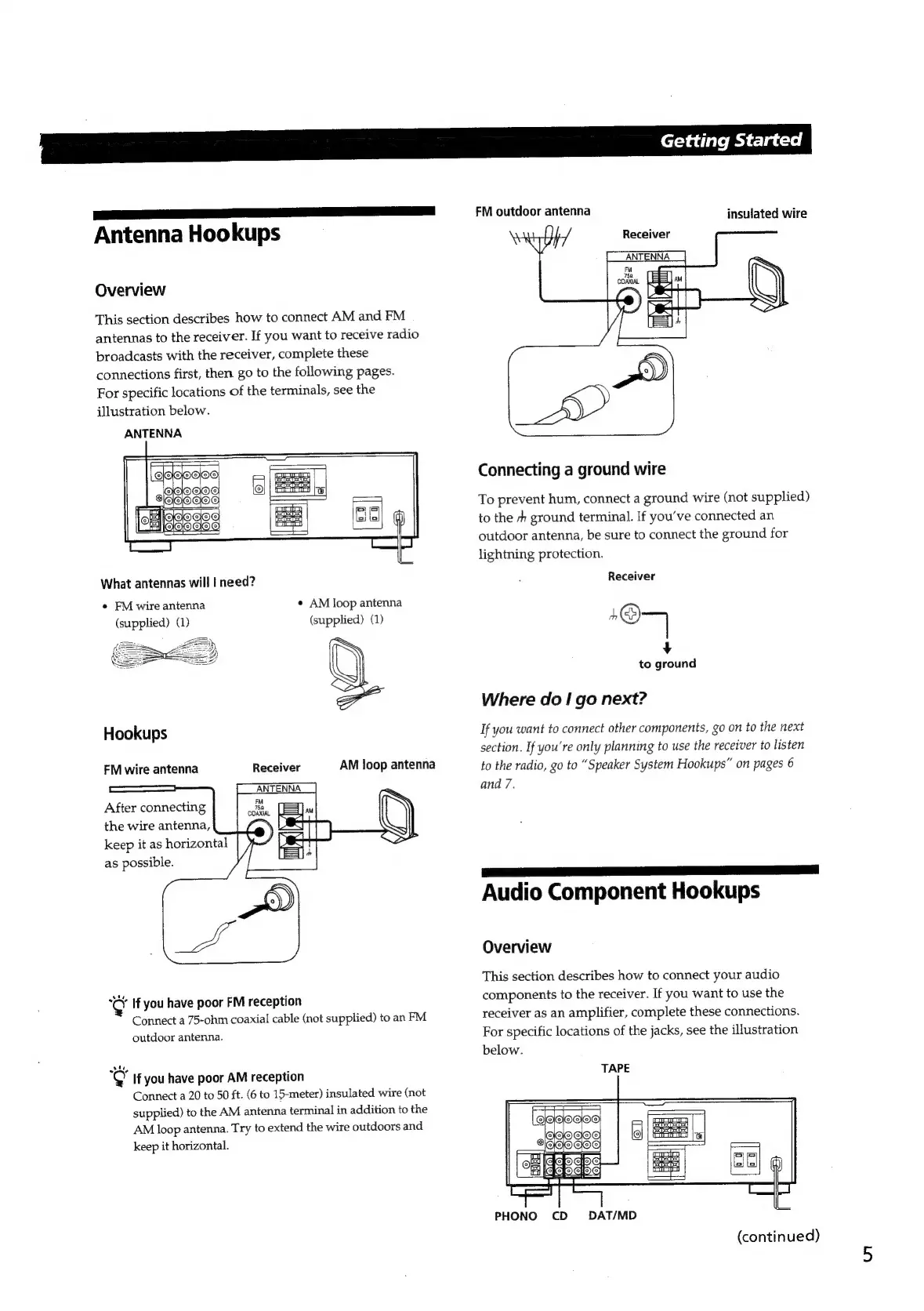
Overview
This
section
describes
how
to
connect
AM
and
FM
antennas
to
the
receiver.
If
you
want
to
receive
radio
broadcasts
with
the
receiver,
complete
these
connections
first,
then
go
to
the
following
pages.
For
specific
locations
of
the
terminals,
see
the
illustration
below.
ANTENNA
What
antennas
will
|
need?
¢
AM
loop
antenna
(supplied)
(1)
e
FM
wire
antenna
(supplied)
(1)
Hookups
Receiver
ANTENNA
FM
wire
antenna
After
connecting
the
wire
antenna,
.
keep
it
as
horizontal
}
A
as
possible.
“CY
If
you
have
poor
FM
reception
Connect
a
75-ohm
coaxial
cable
(not
supplied)
to
an
FM
outdoor
antenna.
¢
If
you
have poor
AM
reception
Connect
a
20
to
50
ft.
(6
to
15-meter)
insulated
wire
(not
supplied)
to
the
AM
antenna
terminal
in
addition
to
the
AM
loop
antenna.
Try
to
extend
the
wire
outdoors
and
keep
it
horizontal.
Getting
Started
FM
outdoor
antenna
insulated
wire
Receiver
ANTENNA
Connecting
a
ground
wire
To
prevent
hum,
connect
a
ground
wire
(not
supplied)
to
the
sh
ground
terminal.
If
you've
connected
an
outdoor
antenna,
be
sure
to
connect
the
ground
for
lightning
protection.
Receiver
n
7
4
to
ground
Where
do
I
go
next?
If
you
want
to
connect
other
components,
go
on
to
the
next
section.
If
you're
only
planning
to
use
the
receiver
to
listen
to
the
radio,
go
to
“Speaker
System
Hookups”
on
pages
6
and
7.
Se
ae
Audio
Component
Hookups
Overview
This
section
describes
how
to
connect
your
audio
components
to
the
receiver.
If
you
want
to
use
the
receiver
as
an
amplifier,
complete
these
connections.
For
specific
locations
of
the
jacks,
see
the
illustration
below.
TAPE
[eeclocloo
JOO
GOS
VOGOGOE
——
Bale
e
Se
Fe
Gis
PHONO
CD
DAT/MD
(continued)

Related product manuals