EasyManua.ls Logo

Sony STR-D965 - Receiver Operations and Functions; Selecting a Component

Sony STR-D965
28 pages
Print Icon
To Next Page IconTo Next Page
To Previous Page IconTo Previous Page
Loading...
Receiver
Operations
a
eer
ees
Selecting
a
Component
|
To
listen
to
or
watch
a
connected
component,
first
select
the
function
on
the
receiver
or
with
the
remote.
Before
you
begin,
make
sure
you
have:
*
Connected
all
components
securely
and
correctly
as
indicated
on
pages
5
to
8.
*
Turned
MASTER
VOLUME
to
the
leftmost
position
(0)
to
avoid
damaging
your
speakers.
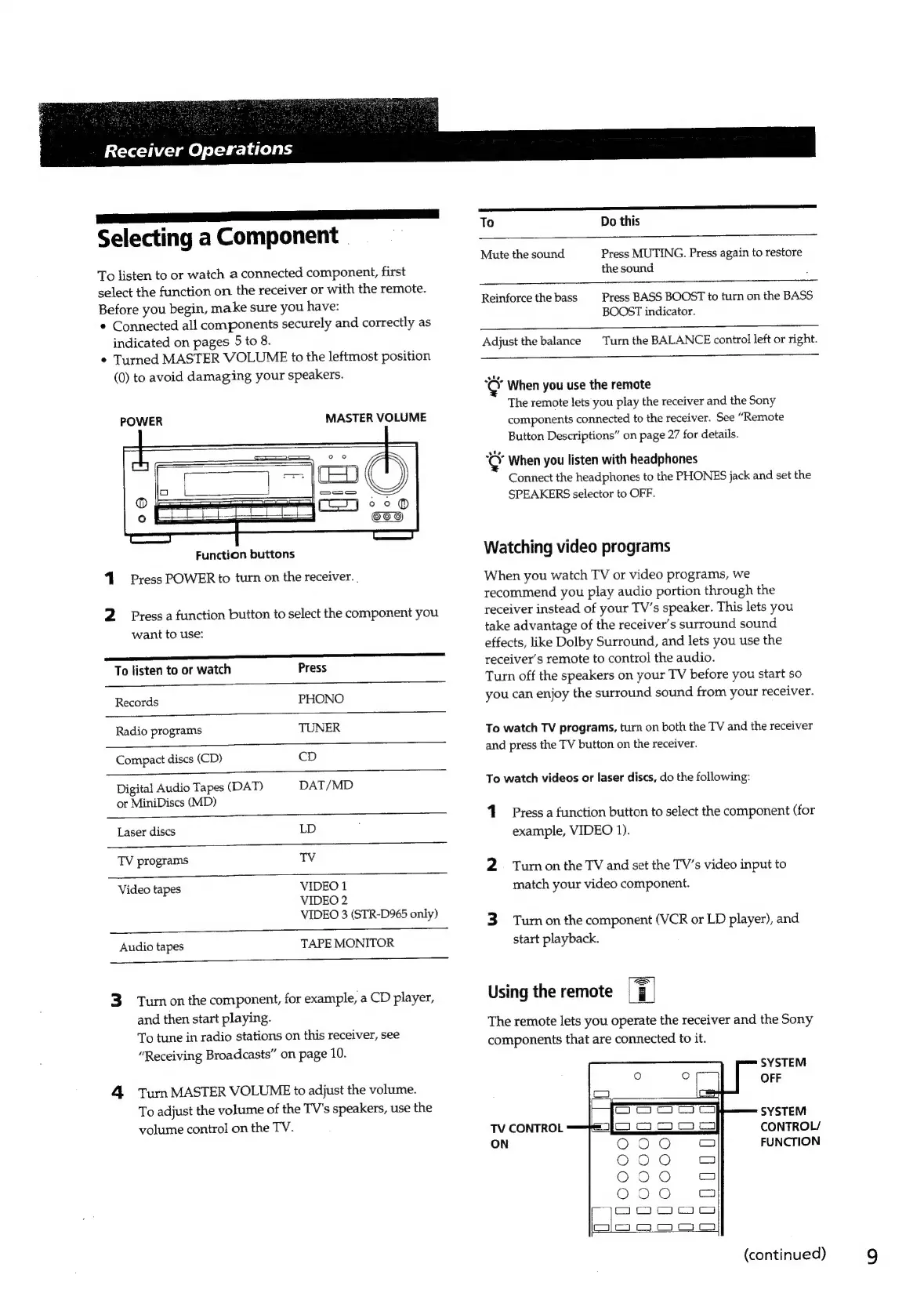
POWER
MASTER
VOLUME
Function
buttons
4
Press
POWER
to
turn
on
the
receiver.
.
2
Press
a
function
button
to
select
the
component
you
want
to
use:
To
listen
to
or
watch
Press
Records
PHONO
Radio
programs
TUNER
Compact
discs
(CD)
CD
Digital
Audio
Tapes
(DAT)
DAT/MD
or
MiniDiscs
(MD)
Laser
discs
LD
TV
programs
TV
Video
tapes
VIDEO
1
VIDEO
2
VIDEO
3
(STR-D965
only)
Audio
tapes
TAPE
MONITOR
3.
Turnonthe
component,
for
example,
a
CD
player,
and
then
start
playing.
To
tune
in
radio
stations
on
this
receiver,
see
“Receiving
Broadcasts”
on
page
10.
4
Tum
MASTER
VOLUME
to
adjust
the
volume.
To
adjust
the
volume
of
the
TV's
speakers,
use
the
volume
control
on
the
TV.
SS
To
Do
this
Mute
the
sound
Press
MUTING.
Press
again
to
restore
the
sound
Reinforce
the
bass
Press
BASS
BOOST
to
turn
on
the
BASS
BOOST
indicator.
Adjust
the
balance
Turn
the
BALANCE
control
left
or
right.
Kor
When
you
use
the
remote
The
remote
lets
you
play
the
receiver
and
the
Sony
components
connected
to
the
receiver.
See
“Remote
Button
Descriptions”
on
page
27
for
details.
5&3
When
you
listen
with
headphones
Connect
the
headphones
to
the
PHONES
jack
and
set
the
SPEAKERS
selector
to
OFF.
Watching
video
programs
When
you
watch
TV
or
video
programs,
we
recommend
you
play
audio
portion
through
the
receiver
instead
of
your
TV’s
speaker.
This
lets
you
take
advantage
of
the
receiver's
surround
sound
effects,
like
Dolby
Surround,
and
lets
you
use
the
receiver's
remote
to
control
the
audio.
Turn
off
the
speakers
on
your
TV
before
you
start
so
you
can
enjoy
the
surround
sound
from
your
receiver.
To
watch
TV
programs,
turn
on
both
the
TV
and
the
receiver
and
press
the
TV
button
on
the
receiver.
To
watch
videos
or
laser
discs,
do
the
following:
1
Press
a
function
button
to
select
the
component
(for
example,
VIDEO
1).
2
=
Turnon
the
TV
and
set
the
TV’s
video
input
to
match
your
video
component.
3
Turon
the
component
(VCR
or
LD
player),
and
start
playback.
Using
the
remote
ri
The
remote
lets
you
operate
the
receiver
and
the
Sony
components
that
are
connected
to
it.
SYSTEM
OFF
SYSTEM
CONTROL/
FUNCTION
TV
CONTROL
ON
(continued)
9

Related product manuals