EasyManua.ls Logo

Sony STR-D965 - Receiving Broadcasts

Sony STR-D965
28 pages
Print Icon
To Next Page IconTo Next Page
To Previous Page IconTo Previous Page
Loading...
10
Receiver
Operations
1.
Press
one
of
the
SYSTEM
CONTROL/FUNCTION
buttons
to
select
the
component
you
want
to
use.
The
SYSTEM
CONTROL/FUNCTION
buttons
on
the
remote
are
factory-set
as
follows:
(SL
To
listen
to
or
watch
Press
Records
PHONO
Radio
programs
TUNER
Compact
discs
(CD)
cD
Digital
Audio
Tapes
(DAT)
DAT/MD
Audio
tapes
TAPE
TV
programs
TV
Laser
discs
LD
Video
tapes
VIDEO
1
(VHS)
VIDEO
2
(Beta)
VIDEO
3
(8mm)
The
receiver
and
the
selected
component
turn
on.
If
you
want
to
change
the
factory
setting
of
a
button,
see
page
19.
If
the
component
does
not
turn
on
Press
the
power
switch
on
the
component.
2
Start
playing.
Refer
to
“Remote
Button
Descriptions”
on
page
27
for
details.
To
turn
off
the
components
Press
SYSTEM
OFF.
You
can
turn
off
the
video
and
audio
components
connected
to
the
SWITCHED
AC
OUTLETs
on
the
back
of
this
unit
at
the
same
time.
¢
If
you
use
a
Sony
TV
When
you
press
TV
to
watch
a
TV
program,
the
TV
turns
on
and
switches
to
the
TV
input.
The
TV
also
turns
on
automatically
and
switches
to
the
appropriate
video
input
when
you
press
LD,
VIDEO
1,
VIDEO
2
or
VIDEO
3
(STR-
D965
only).
If
the
TV
does
not
switch
to
the
appropriate
input
automatically,
press
TV/VIDEO
on
the
remote.
as
Watching
TV
without
the
receiver
(for
Sony
TVs
only)
Press
TV
CONTROL
ON
to
set
the
remote
to
operate
TV
functions
only
(see
“Remote
Button
Descriptions”
on
page
26
for
details).
When
you
press
this
button,
the
TV
turns
on
and
switches
to
the
TV
input.
If
the
TV
does
not
automatically
switch
to
the
TV
input,
press
TV/
VIDEO.
|
SN
a
mA
OE
eee
Receiving
Broadcasts
This
receiver
lets
you
enter
a
station’s
frequency
directly
by
using
the
numeric
buttons
(direct
tuning).
If
you
don’t
know
the
frequency
of
the
station
you
want,
see
“Receiving
broadcasts
by
scanning
stations”
(automatic
tuning).
Before
you
begin,
make
sure
you
have:
*
Connected
an
FM/AM
antenna
to
the
receiver
as
indicated
on
page
5.
¢
Selected
the
appropriate
speaker
system.
(For
details,
see
“Selecting
the
speaker
system”
on
page
7.)
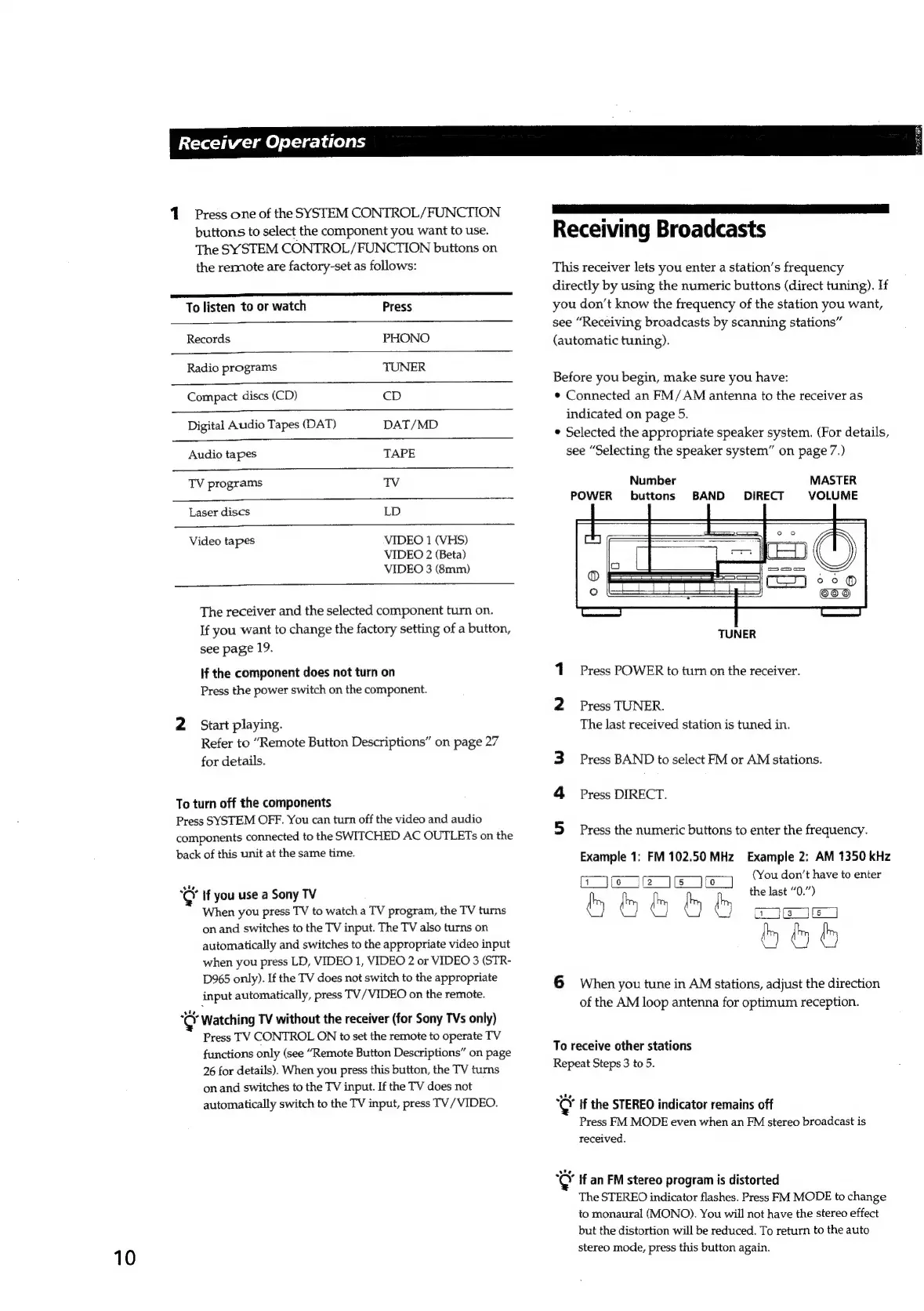
Number
buttons
BAND
MASTER
POWER
VOLUME
DIRECT
~
659
TUNER
1
Press
POWER
to
turn
on
the
receiver.
2
Press
TUNER.
The
last
received
station
is
tuned
in.
Press
BAND
to
select
FM
or
AM
stations.
4
Press
DIRECT.
Press
the
numeric
buttons
to
enter
the
frequency.
Example
1:
FM
102.50
MHz
Example
2:
AM
1350
kHz
TISTI
RENEE
(You
don’t
have
to
enter
the
last
“0.”)
a
ny
(
a
ul
(3
5
6
When
you
tune
in
AM
stations,
adjust
the
direction
of
the
AM
loop
antenna
for
optimum
reception.
To
receive
other
stations
Repeat
Steps
3
to
5.
¢
If
the
STEREO
indicator
remains
off
Press
FM
MODE
even
when
an
FM
stereo
broadcast
is
received.
cer
if
an
FM
stereo
program
is
distorted
The
STEREO
indicator
flashes.
Press
FM
MODE
to
change
to
monaural
(MONO).
You
will
not
have
the
stereo
effect
but
the
distortion
will
be
reduced.
To
return
to
the
auto
stereo
mode,
press
this
button
again.

Related product manuals