7
Hooking Up the Components
AC OUTLET
RL
AUDIO OUT VIDEO
OUT
OUTPUT
INOUT
ç
ç
INOUT
ç
ç
VIDEO
OUT
VIDEO
IN
AUDIO
OUT
AUDIO
IN
INPUT OUTPUT
L
RL
AUDIO OUT VIDEO
OUT
OUTPUT
VIDEO
IN
INPUT
VIDEO
OUT
VIDEO
IN
AUDIO
OUT
AUDIO
IN
L
INPUT OUTPUT
+
–
SPEAKERS
IMPEDANCE USE 4 - 16Ω
FRONTREAR CENTER B A
LRLRLR
R
L
R
L
R
IN
REC
OUT
IN
IN
OUT
IN
IN
IN
OUT
IN
CENTER
SUB WOOFERREARFRONT
CENTER
SUB
WOOFER
REARFRONT
TV/
SAT
DVD/
LD
VIDEO 1
MONITOR OUT
VIDEO 2
REC
OUT
L
R AUDIO
S-VIDEO
DVD/LD
IN COAX
CD
IN COAX
DVD/LD
IN OPT
TV/SAT
IN OPT
MD/DAT
IN OPT
MD/DAT
OUT OPT
CD
IN OPT
MONITOR
CTRL S
IN
STATUS
IN
CTRL S
OUT
VIDEO 1
DVD/
LD
TV/
SAT
VIDEO
L
2ND AUDIO OUT
PRE OUT5.1CH INPUT
4 Ω 8 Ω
IMPEDANCE
SELECTOR
CONTROL
A1
TAPE
MD/
DAT
CD
R
R
L
SIGNAL GND
AM
y
y
FM 75
Ω
COAXIAL
ANTENNA
PHONO
R
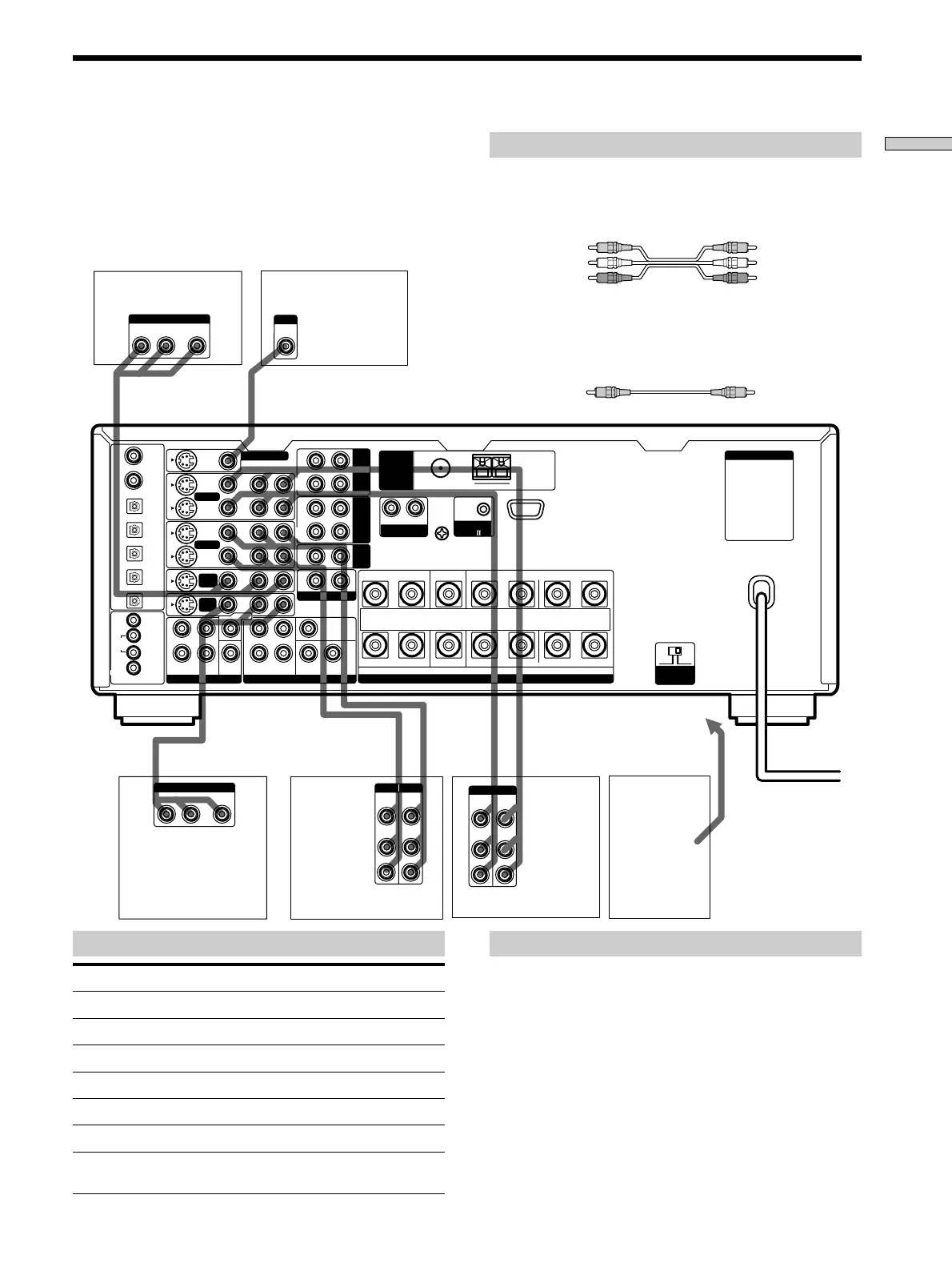
Required cords
Audio/video cords (not supplied)
When connecting a cord, be sure to match the color-coded pins to
the appropriate jacks on the components.
Video cord for connecting a TV monitor (not supplied)
You can use the video cord of the supplied audio/video/control
S cord (see pages 11 and 12 for details).
Yellow (video) Yellow (video)
White (L/audio) White (L/audio)
Red (R/audio) Red (R/audio)
Yellow Yellow
To the front panel
Note on video component hookups
You can connect your TV’s audio output jacks to the TV/
SAT* (or TV/LD) AUDIO IN jacks on the receiver and
apply sound effects to the audio from the TV. In this case,
do not connect the TV’s video output jack to the TV/SAT*
(or TV/LD) VIDEO IN jacks on the receiver. If you are
connecting a separate TV tuner (or satellite tuner), connect
both the audio and video output jacks to the receiver as
shown above.
*
U.S.A./Canada models only.
z
When using the S-video jacks instead of the video jacks
Your monitor must also be connected via an S-video jack. S-video
signals are on a separate bus from the video signals and will not
be output through the video jacks.
Jacks for connecting video components
Connect a To the
Satellite tuner* or TV tuner TV/SAT* or TV/LD jacks
VCR VIDEO 1 jacks
Additional VCR VIDEO 2 jacks
DVD player DVD/LD* or DVD jacks
LD player DVD/LD* or TV/LD jacks
TV monitor MONITOR VIDEO OUT jack
Camcorder or video game VIDEO 3 INPUT jacks on the
front panel
*
U.S.A./Canada models only.
Video Component Hookups
Camcorder
or video
game
TV monitor
Satellite tuner*
or TV tuner
DVD player
VCR
VCR
*
U.S.A./Canada models
only.














 To Next Page