To Next Page


L
Lisa GreeneAug 18, 2025
How to improve poor FM reception on my Sony Stereo Receiver?
- DDawn AllisonAug 19, 2025
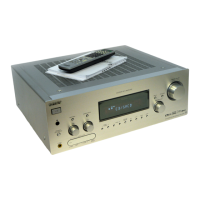
If the FM reception is poor on your Sony Stereo Receiver, use a 75-ohm coaxial cable to connect the receiver to an outdoor FM antenna.

How to improve poor FM reception on my Sony Stereo Receiver?
If the FM reception is poor on your Sony Stereo Receiver, use a 75-ohm coaxial cable to connect the receiver to an outdoor FM antenna.
What to do if there is no sound on my Sony STR-DA1500ES?
If your Sony Stereo Receiver isn't producing any sound, regardless of the selected component, or the sound is very low, try the following: * Ensure speakers and components are securely and correctly connected. * Verify all speaker cords are properly connected. * Confirm both the receiver and all components are powered on. * Check that the MASTER VOLUME isn't set too low (try VOL –40.0 dB). * Ensure SPEAKERS is not set to OFF. * Disconnect any connected headphones. * Deactivate the muting function by pressing MUTING. * Select the correct component using the input buttons. If the receiver's protective device has activated, turn off the receiver, resolve any short-circuit issues, and then turn the power back on.
Why is there severe hum or noise coming from my Sony STR-DA1500ES Stereo Receiver?
If there's severe humming or noise coming from your Sony Stereo Receiver, ensure that the speakers and components are securely connected. Also, keep connecting cords away from transformers, motors, TVs, and fluorescent lights (at least 3 meters away). Move your audio components away from the TV. If the plugs and jacks are dirty, wipe them with a cloth slightly moistened with alcohol.
Why does my Sony STR-DA1500ES remote not function?
If your Sony Stereo Receiver remote isn't working, make sure to point it directly at the remote sensor on the receiver. Remove any obstructions between the remote and the receiver. If the batteries are weak, replace them with new ones. Also, ensure that you've selected the correct input on the remote.
What to do if there is no sound from a specific component on my Sony STR-DA1500ES?
If you're not getting sound from a specific component connected to your Sony Stereo Receiver, first, double-check that the component is properly connected to the correct audio input jacks. Also, make sure the cords are fully inserted into the jacks on both the receiver and the component.
Why is there no picture or an unclear picture on the TV screen with my Sony STR-DA1500ES?
If there's no picture or the picture is unclear on your TV screen when using your Sony Stereo Receiver, first select the appropriate input using the input buttons on the receiver. Then, set your TV to the correct input mode. Try moving your audio components away from the TV. Note that depending on the DIGITAL MEDIA PORT adapter, video output may not be possible.
How to fix unbalanced left and right sound on Sony STR-DA1500ES Stereo Receiver?
If you experience unbalanced or reversed left and right sounds on your Sony Stereo Receiver, ensure that the speakers and components are securely and correctly connected. You can also adjust the balance parameters using the LEVEL menu.
What to do if there is no sound from one of the front speakers on my Sony STR-DA1500ES Stereo Receiver?
If there's no sound coming from one of the front speakers on your Sony Stereo Receiver, first, connect a pair of headphones to the PHONES jack to see if sound is output. If only one channel works in the headphones, the component may not be correctly connected to the receiver. If both channels work in the headphones, the front speaker may not be correctly connected to the receiver. Check that all the cords are fully inserted into the jacks on both the receiver and the component and check the connection of the front speaker which is not outputting any sound. Ensure you've connected to both the L and R jacks of an analog component, and not just one.
Why radio stations cannot be tuned in on my Sony STR-DA1500ES?
If you cannot tune into radio stations with your Sony Stereo Receiver, first, check that the antennas are securely connected. If the signal strength is too weak, use direct tuning. Make sure you have set the tuning interval correctly. If no stations have been preset, or they have been cleared, preset the stations. Press DISPLAY repeatedly on the receiver so that the frequency appears on the display.
Why recording cannot be carried out on my Sony Stereo Receiver?
If recording cannot be carried out on your Sony Stereo Receiver, check that the components are connected correctly. Also, make sure you select the source component using the input buttons.
Crucial warnings to prevent fire and electric shock.
Key instructions for safe operation and maintenance.
Warnings about modifications and connections to the equipment.
Identifies front and rear panel controls, indicators, and connections.
Introduction to the remote controller and its functions.
Guidance on connecting speakers to the receiver.
Instructions for connecting audio and video sources.
Setting up and managing channel restrictions for Sirius radio.
Diagnosing and resolving problems related to audio output.
 General
| Power Output | 100 W per channel (8 ohms) |
|---|---|
| Channels | 7.1 |
| HDMI Outputs | 1 |
| Dimensions | 17 x 13.25 x 6.5 inches |
| Weight | 22 lbs |
| Tuning range | AM/FM |
| Frequency response | 10 Hz - 100 kHz |
| Total harmonic distortion | 0.09% |
| Input sensitivity | 200 mV |
| Audio Formats Supported | Dolby TrueHD, DTS-HD Master Audio, Dolby Digital, Dolby Digital EX, Dolby Pro Logic II, Dolby Pro Logic IIx, DTS, DTS-ES, DTS Neo:6 |
| Speaker load impedance | 8 ohms |
| Digital inputs | Optical, Coaxial |
| Video Connections | Component, Composite, HDMI |
| Signal-to-Noise Ratio | 96 dB |
| Speaker Impedance | 6-16 ohms |