Connecting
a
satellite
radio
tuner
Preparing
to
listen
to
a
satellite
radio
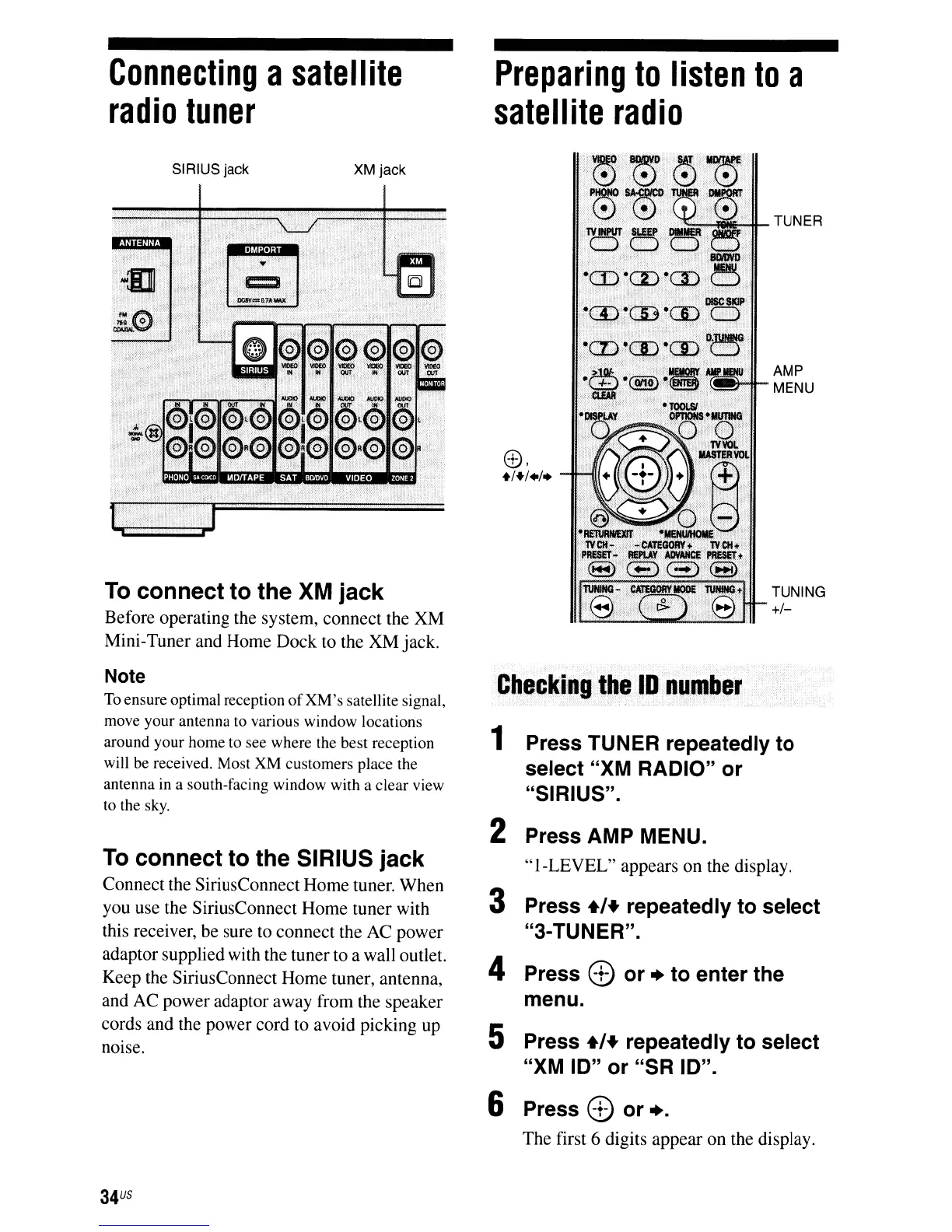
To
connect to the SIRIUS jack
Connect the SiriusConnect Home tuner. When
you use the SiriusConnect Home tuner with
this receiver, be sure to connect the AC power
adaptor supplied with the tuner to a wall outlet.
Keep the SiriusConnect Home tuner, antenna,
and AC power adaptor away from the speaker
cords and the power cord to avoid picking up
noise.
To
connect to the XM jack
Before operating the system, connect the XM
Mini-Tuner and Home Dock to the
XMjack.
Note
To
ensure optimal reception
of
XM's
satellite signal,
move your antenna to various window locations
around your home to see where the best reception
will be received. Most
XM
customers place the
antenna in a south-facing window with a clear view
to the sky.
TUNER
AMP
MENU
TUNING
+/-
1 Press TUNER repeatedly to
select "XM RADIO" or
"SIRIUS".
2 Press AMP MENU.
"I-LEVEL"
appears on the display.
3 Press
+'+
repeatedly to select
"3-TUNER".
4 Press 8
or.
to enter the
menu.
5 Press
+'+
repeatedly to select
"XM
10"
or "SR 10".
6
Press 8 or
•.
The first 6 digits appear on the display.
XM jackSIRIUS jack
34
US













 To Next Page