7
Press
+.
The
last 6 digits appear on the display.
8
Check
the
XM
Radio
10
or
Sirius
Radio
10
on
the
display
and
write
it
in
the
space
provided
here.
XM ID: _
SR
ID: _
Using the
controls
on the
receiver
1 Turn INPUT SELECTOR to select "XM
RADIO" or "SIRIUS".
2 Press TUNING MODE repeatedly to
select "AUTO", and then turn TUNING
+ or TUNING - to select channel
O.
3 Check the XM Radio ID or Sirius Radio
ID on the display and write it
in
the
space provided here.
XM
ID: _
SR ID: _
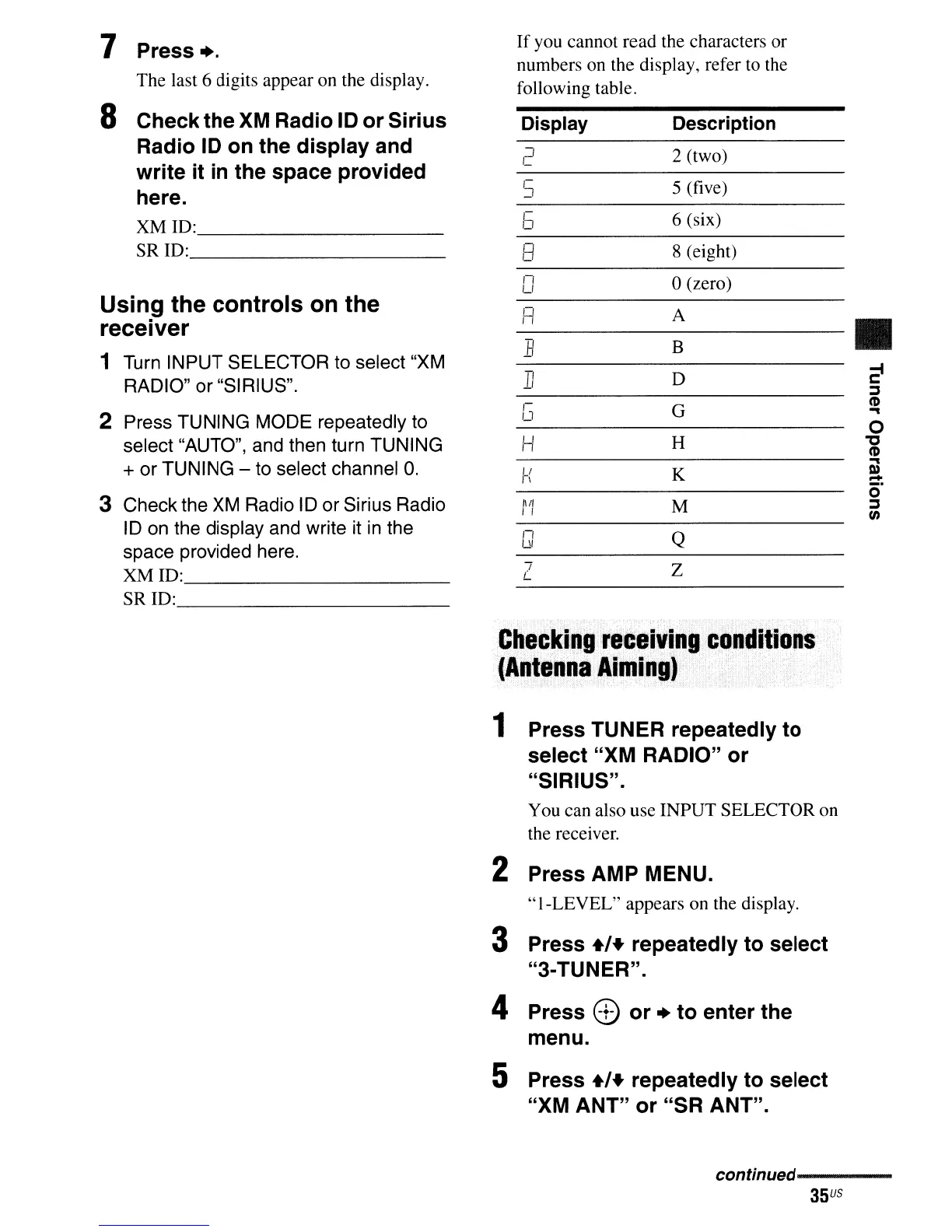
If
you cannot
read
the characters or
numbers on the display, refer to the
following table.
Display
Description
"]
2 (two)
c...
S
5 (five)
c;
6 (six)
1-
,-;
8 (eight)
tI
n
o(zero)
u
1=1
A
•
B
B
-,
D
-e
11
:::J
1-
G
~
u
...
0
H
H
"'C
~
...
II
K
D)
n
=:
0
nil
M
:::J
I!
en
n
Q
UI
7
Z
t:...
Checking
receiving
conditions
(Antenna
Aiming)
1
Press
TUNER repeatedly
to
select
"XM
RADIO"
or
"SIRIUS"
.
You can also use
INPUT
SELECTOR on
the receiver.
2
Press
AMP MENU.
"I-LEVEL"
appears on the display.
3 Press
+'+
repeatedly
to
select
"3-
TUNER".
4 Press
8)
or
+
to
enter
the
menu.
5 Press
+'+
repeatedly
to
select
"XM
ANT"
or
"SR
ANT".
conffnued----------
35
US













 To Next Page