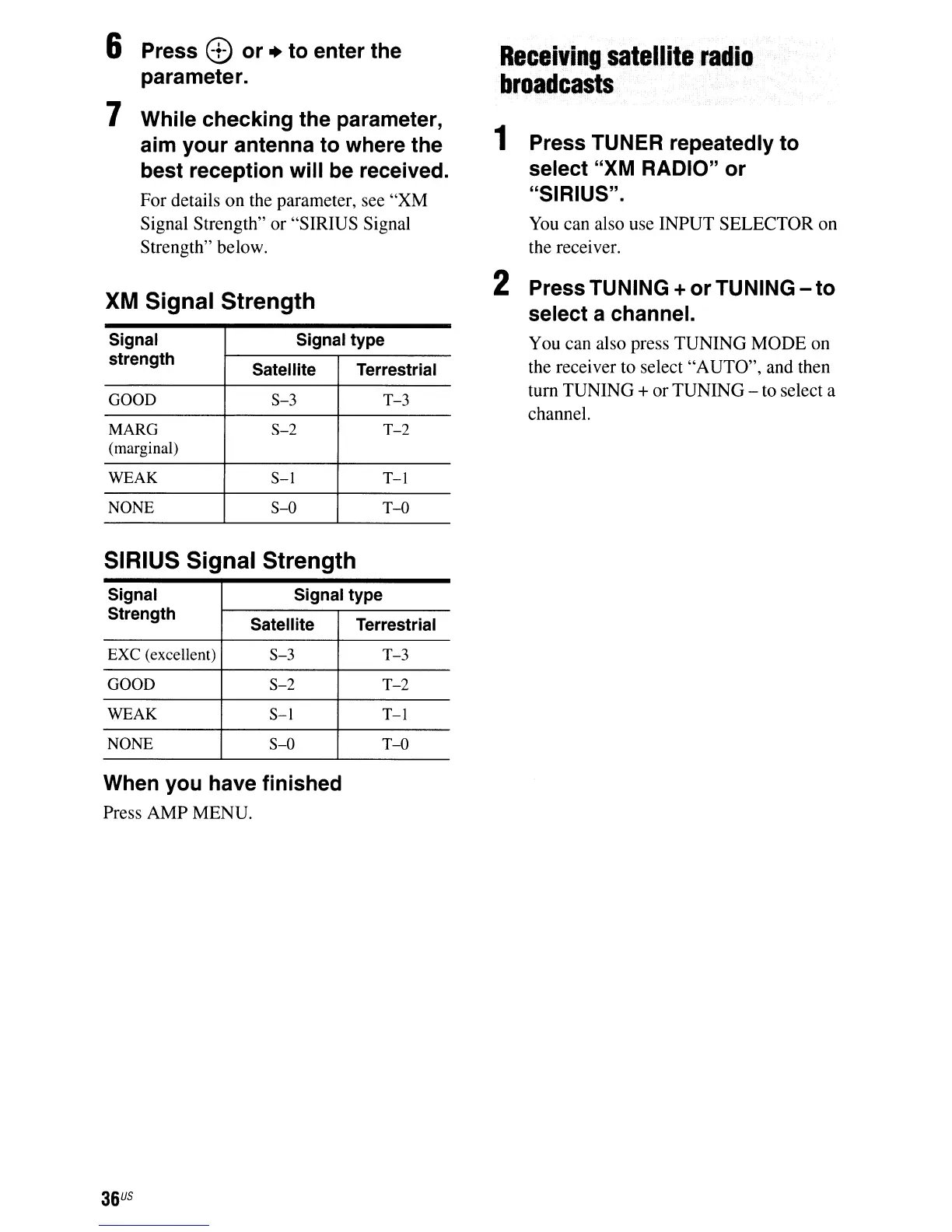
6 Press e or + to enter the
parameter.
7 While checking the parameter,
aim your antenna to where the
best reception will be received.
For details
on
the parameter, see "XM
Signal Strength" or "SIRIUS Signal
Strength" below.
XM
Signal Strength
Signal
Signal type
strength
Satellite Terrestrial
GOOD
$-3
T-3
MARG
$-2
T-2
(marginal)
WEAK
$-1
T-L
NONE
$-0
T-O
SIRIUS Signal Strength
Signal Signal type
Strength
Satellite
Terrestrial
EXC
(excellent)
$-3
T-3
GOOD
$-2
T-2
WEAK
S-I
T-l
NONE
$-0
T-o
When you have finished
Press AMP MENU.
36
US
Receiving
satellite
radio
broadcasts
1 Press TUNER repeatedly to
select "XM RADIO" or
"SIRIUS".
You
can also use INPUT SELECTOR on
the receiver.
2 Press TUNING + or TUNING - to
select a channel.
You can also press TUNING MODE on
the receiver to select "AUTO", and then
turn TUNING
+or TUNING - to select a
channel.













 To Next Page