EasyManua.ls Logo

Sony STR-VX10L - Tape Recording

Sony STR-VX10L
15 pages
Print Icon
To Next Page IconTo Next Page
To Previous Page IconTo Previous Page
Loading...
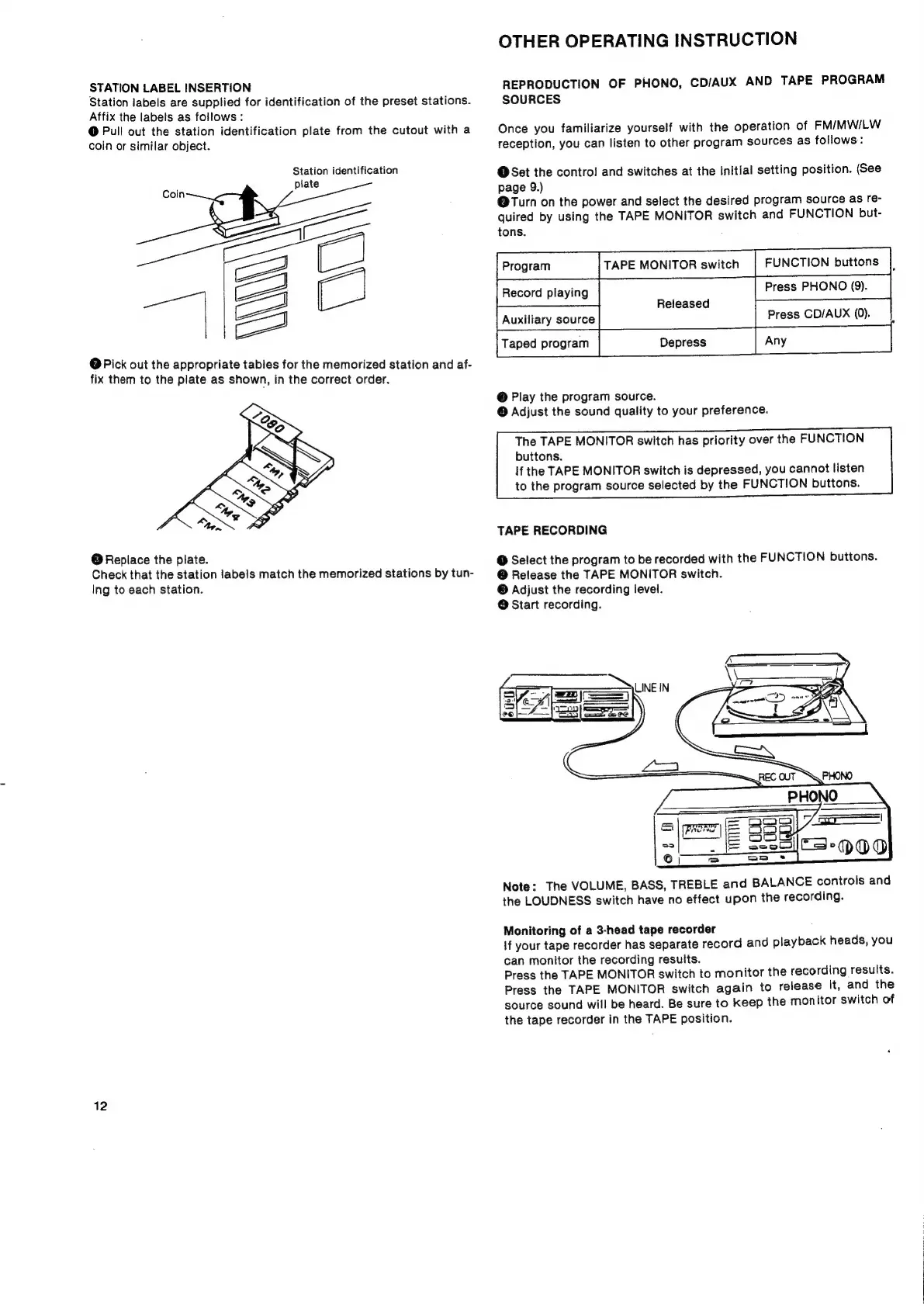
STATION
LABEL
INSERTION
Station
labels
are
supplied
for
identification
of
the
preset
stations.
Affix
the
labels
as
follows
:
@
Pull
out
the
station
identification
plate
from
the
cutout
with
a
coin
or
similar
object.
Station
identification
aw
a
=
@
Pick
out
the
appropriate
tabies
for
the
memorized
station
and
af-
fix
them
to
the
plate
as
shown,
in
the
correct
order.
@
Replace
the
plate.
Check
that
the
station
labels
match
the
memorized
stations
by
tun-
ing
to
each
station.
12
OTHER
OPERATING
INSTRUCTION
REPRODUCTION
OF
PHONO,
CD/AUX
AND
TAPE
PROGRAM
SOURCES
Once
you
familiarize
yourself
with
the
operation
of
FM/MW/LW
reception,
you
can
listen
to
other
program
sources
as
follows:
@Set
the
controi
and
switches
at
the
initial
setting
position.
(See
page
9.)
@Turn
on
the
power
and
select
the
desired
program
source
as
re-
quired
by
using
the
TAPE
MONITOR
switch
and
FUNCTION
but-
tons.
:
TAPE
MONITOR
switch
FUNCTION
buttons
Record
playing
Press
PHONO
(9).
Released
Press
CD/AUX
(0).
@
Play
the
program
source.
@
Adjust
the
sound
quality
to
your
preference.
The
TAPE
MONITOR
switch
has
priority
over
the
FUNCTION
buttons.
If
the
TAPE
MONITOR
switch
is
depressed,
you
cannot
listen
to
the
program
source
selected
by
the
FUNCTION
buttons.
TAPE
RECORDING
@
Select
the
program
to
be
recorded
with
the
FUNCTION
buttons.
@
Release
the
TAPE
MONITOR
switch.
©
Adjust
the
recording
level.
@
Start
recording.
Note:
The
VOLUME,
BASS,
TREBLE
and
BALANCE
controls
and
the
LOUDNESS
switch
have
no
effect
upon
the
recording.
Monitoring
of
a
3-head
tape
recorder
\f
your
tape
recorder
has
separate
record
and
playback
heads,
you
can
monitor
the
recording
results.
Press
the
TAPE
MONITOR
switch
to
monitor
the
recording
results.
Press
the
TAPE
MONITOR
switch
again
to
release
it,
and
the
source
sound
will
be
heard.
Be
sure
to
keep
the
monitor
switch
of
the
tape
recorder
in
the
TAPE
position.

Related product manuals