EasyManua.ls Logo

Sony STR-VX10L - Broadcast Reception; Direct Access Tuning

Sony STR-VX10L
15 pages
Print Icon
To Next Page IconTo Next Page
To Previous Page IconTo Previous Page
Loading...
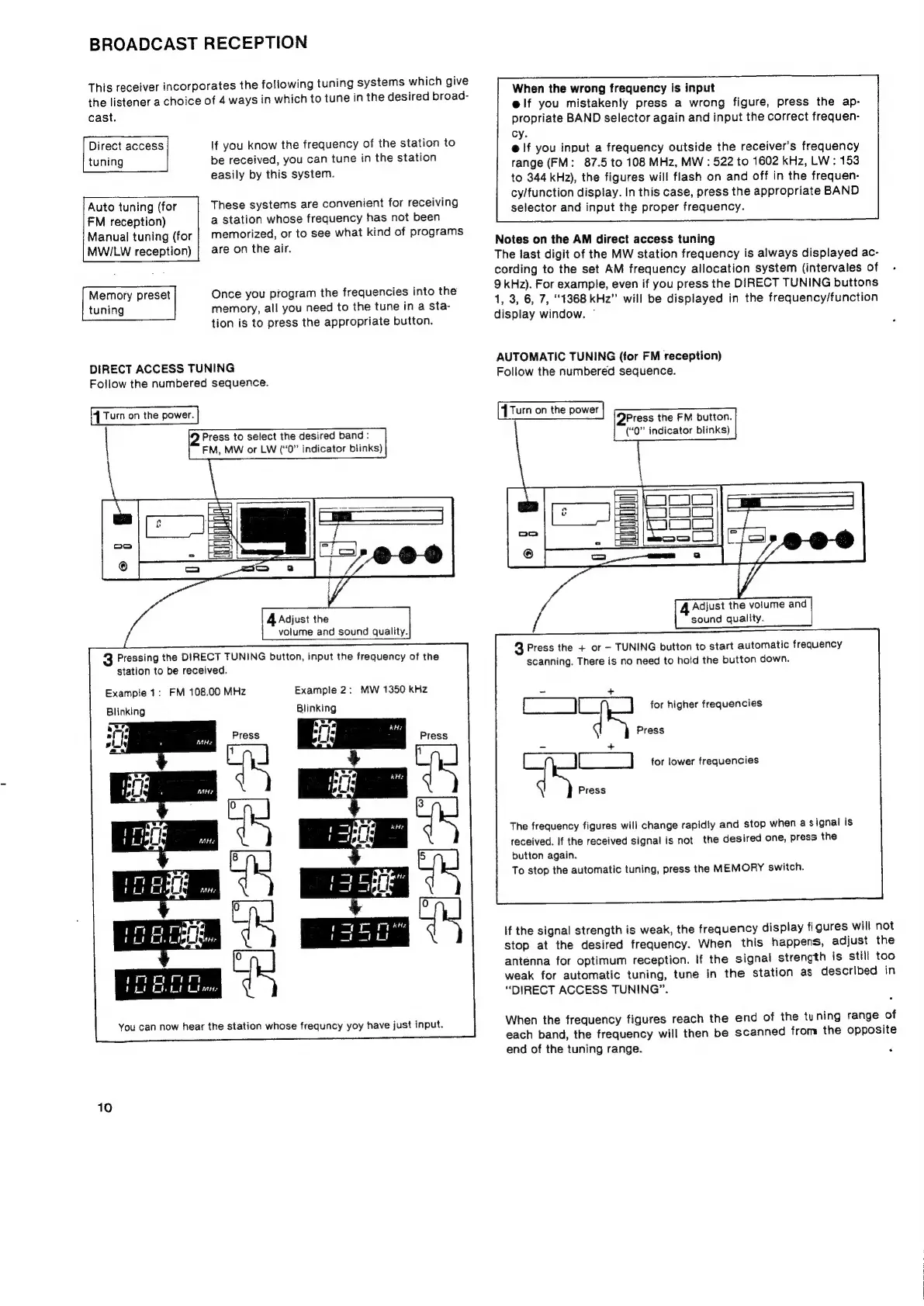
BROADCAST
RECEPTION
This
receiver
incorporates
the
following
tuning
systems
which
give
the
listener
a
choice
of
4
ways
in
which
to
tune
in
the
desired
broad-
cast.
Direct
access
tuning
Auto
tuning
(for
FM
reception)
Manual
tuning
(for
MWILW
reception)
If
you
know
the
frequency
of
the
station
to
be
received,
you
can
tune
in
the
station
easily
by
this
system.
These
systems
are
convenient
for
receiving
a
station
whose
frequency
has
not
been
memorized,
or
to
see
what
kind
of
programs
are
on
the
air.
Once
you
program
the
frequencies
into
the
memory,
all
you
need
to
the
tune
in
a
sta-
tion
is
to
press
the
appropriate
button.
Memory
preset
tuning
r
DIRECT
ACCESS
TUNING
Follow
the
numbered
sequence.
{
Turn
on
the
power.
2
Press
to
select
the
desired
band
:
FM,
MW
or
LW
(‘‘0”
indicator
blinks)
3
Pressing
the
DIRECT
TUNING
button,
input
the
frequency
of
the
station
to
be
received.
Example
1:
FM
108.00
MHz
Blinking
Example
2:
MW
1350
kHz
Blinking
You
can
now
hear
the
station
whose
frequncy
yoy
have
just
input.
10
When
the
wrong
frequency
is
input
elf
you
mistakenly
press
a
wrong
figure,
press
the
ap-
propriate
BAND
selector
again
and
input
the
correct
frequen-
cy.
@
If
you
input
a
frequency
outside
the
receiver's
frequency
range
(FM:
87.5
to
108
MHz,
MW
:
522
to
1602
kHz,
LW:
153
to
344
kHz),
the
figures
will
flash
on
and
off
in
the
frequen-
cy/function
display.
In
this
case,
press
the
appropriate
BAND
selector
and
input
the
proper
frequency.
Notes
on
the
AM
direct
access
tuning
The
last
digit
of
the
MW
station
frequency
is
always
displayed
ac-
cording
to
the
set
AM
frequency
allocation
system
(intervales
of
9
kHz).
For
example,
even
if
you
press
the
DIRECT
TUNING
buttons
1,
3, 6, 7,
“1368
kHz”
will
be
displayed
in
the
frequency/function
display
window.
AUTOMATIC
TUNING
(for
FM
reception)
Follow
the
numbered
sequence.
{Turn
on
the
power
QPress
the
FM
button.
(“0”
indicator
blinks)
3
Press
the
+
or
TUNING
button
to
start
automatic
frequency
scanning.
There
is
no
need
to
hold
the
button
down.
for
higher
frequencies
Press
=
+
ee
for
lower
frequencies
Press
The
frequency
figures
will
change
rapidly
and
stop
when
a
signal
is
received.
If
the
received
signal
is
not
the
desired
one,
press
the
button
again.
To
stop
the
automatic
tuning,
press
the
MEMORY
switch.
If
the
signal
strength
is
weak,
the
frequency
display
figures
will
not
stop
at
the
desired
frequency.
When
this
happens,
adjust
the
antenna
for
optimum
reception.
If
the
signal
strength
is
still
too
weak
for
automatic
tuning,
tune
in
the
station
as
described
in
“DIRECT
ACCESS
TUNING”.
When
the
frequency
figures
reach
the
end
of
the
tuning
range
of
each
band,
the
frequency
will
then
be
scanned
from
the
opposite
end
of
the
tuning
range.
F

Related product manuals