EasyManua.ls Logo

Sony TA-V50 - Page 2

Sony TA-V50
13 pages
Print Icon
To Next Page IconTo Next Page
To Previous Page IconTo Previous Page
Loading...
TA-V50
MODEL
INDENTIFICATION
~—
Specification
Label
SONY:
MODEL
NO,
WILL
LLL
AEP,
G-AEP
Model:
AC220V
50/60Hz
110W
UK
Model:
AC240V
50/60Hz
230W
E
Model:
AC120/220/240V
50/60Hz
110W
AN
A
AN
NA
A
A
i
A
A
RA
A A
AA
A A
AAR
AN
LA
A
A
NE
A
RR
RN
NR
A
A
A
A
I
A
A
A
RA
AIL
AN
eH
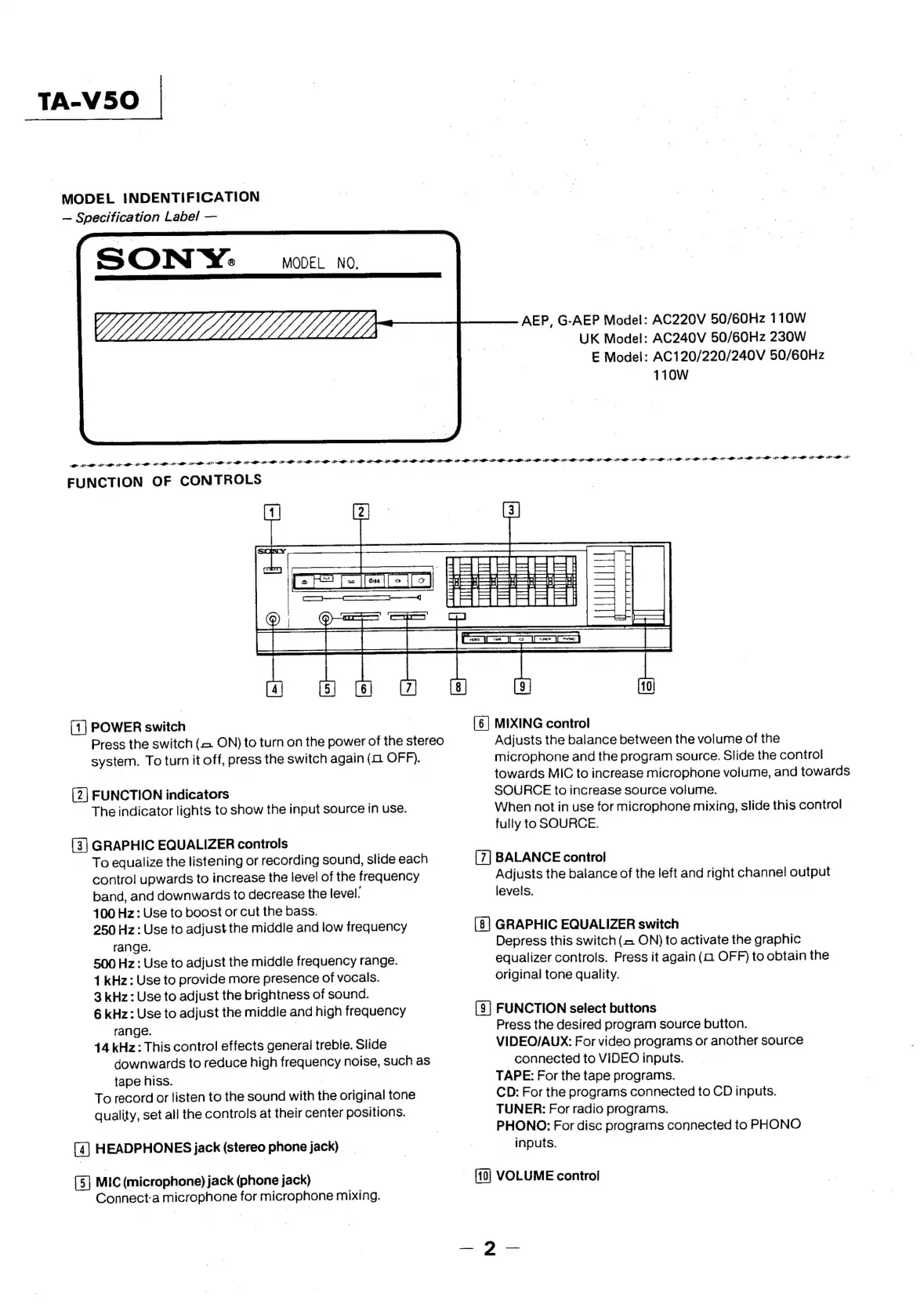
FUNCTION
OF
CONTROLS
-1@)
mooie
Sa
ee
SOOO
sc
“a
(eee)
|
@)
|
[6]
MIXING
control
Adjusts
the
balance
between
the
volume
of
the
microphone
and
the
program
source.
Slide
the
control
towards
MIC
to
increase
microphone
volume,
and
towards
SOURCE
to
increase
source
volume.
When
not
in
use
for
microphone
mixing,
slide
this
control
fully
to
SOURCE.
[1]
POWER
switch
Press
the
switch
(<2
ON)
to
turn
on
the
power
of
the
stereo
system.
To
turn
it
off,
press
the
switch
again
(a
OFF).
[2]
FUNCTION
indicators
The
indicator
lights
to
show
the
input
source
in
use.
(3]
GRAPHIC
EQUALIZER
controls
To
equalize
the
listening
or
recording
sound,
slide
each
BALANCE
control
control
upwards
to
increase
the
level
of
the
frequency
Adjusts
the
balance
of
the
left
and
right
channel
output
band,
and
downwards
to
decrease
the
level.
levels.
|
4100
Hz:
Use
to
boost
or
cut
the
bass.
250
Hz:
Use
to
adjust
the
middle
and
low
frequency
GRAPHIC
EQUALIZER
switch
range.
Depress
this
switch
(2
ON)
to
activate
the
graphic
500
Hz:
Use
to
adjust
the
middle
frequency
range.
equalizer
controls.
Press
it
again
(a2
OFF)
to
obtain
the
1
kHz:
Use
to
provide
more
presence
of
vocals.
original
tone
quality.
3
kHz
:
Use
to
adjust
the
brightness
of
sound.
6
kHz:
Use
to
adjust
the
middle
and
high
frequency
[9]
FUNCTION
select
buttons
range.
|
Press
the
desired
program
source
button.
14
kHz:
This
control
effects
general
treble.
Slide
VIDEO/AUX:
For
video
programs
or
another
source
downwards
to
reduce
high
frequency
noise,
such
as
tape
hiss.
, |
To
record
or
listen
to
the
sound
with
the
original
tone
quality,
set
all
the
controls
at
their
center
positions.
(4)
HEADPHONES
jack
(stereo
phone
jack)
[5]
MIC
(microphone)
jack
(phone
jack)
Connect:a
microphone
for
microphone
mixing.
connected
to
VIDEO
inputs.
TAPE:
For
the
tape
programs.
CD:
For
the
programs
connected
to
CD
inputs.
TUNER:
For
radio
programs.
PHONO:
For
disc
programs
connected
to
PHONO
inputs.
VOLUME
contro!
—-2?—

Related product manuals