POWER SOURCES
Batteries
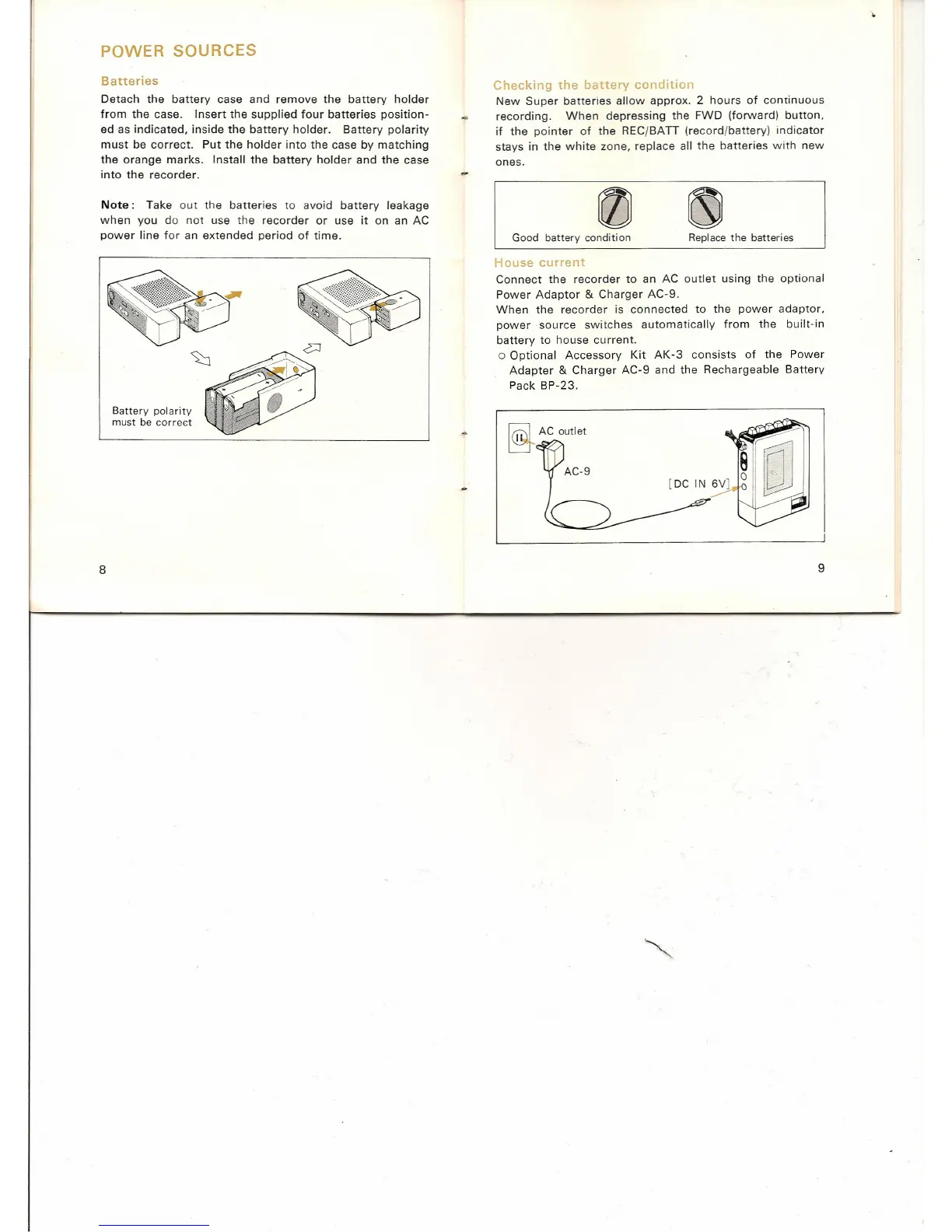
Detach the battery case and remove the battery holder
from the case. Insert the supplied four batteries position-
ed as indicated, inside the battery holder. Battery polarity
must be correct. Put the holder into the case by matching
the orange marks. Install the battery holder and the case
into the recorder.
Note:
Take out the batteries to avoid battery leakage
when you do not use the recorder or use it on an AC
power line for an extended period of time.
Battery polarity
must be correct
8
Checking the battery condition
New Super batteries allow approx. 2 hours of continuous
recording. When depressing the FWD (forward) button,
if the pointer of the REC/BA
IT
(record/battery) indicator
stays in the white zone, replace all the batteries with new
ones.
Good battery condition Replacethe batteries
House current
Connect the recorder to an AC outlet using the optional
Power Adaptor & Charger AC-9.
When the recorder is connected to the power adaptor,
power source switches automatically from the built-in
battery to house current.
o Optional Accessory Kit AK-3 consists of the Power
Adapter
&
Charger AC-9 and the Rechargeable Battery
Pack BP-23.
~.AC outlet
9


 To Next Page