EasyManua.ls Logo

Sony TC-765 - Component Removal Procedures

Sony TC-765
62 pages
Print Icon
To Next Page IconTo Next Page
To Previous Page IconTo Previous Page
Loading...
SONY-00527
/
DRUCK
5
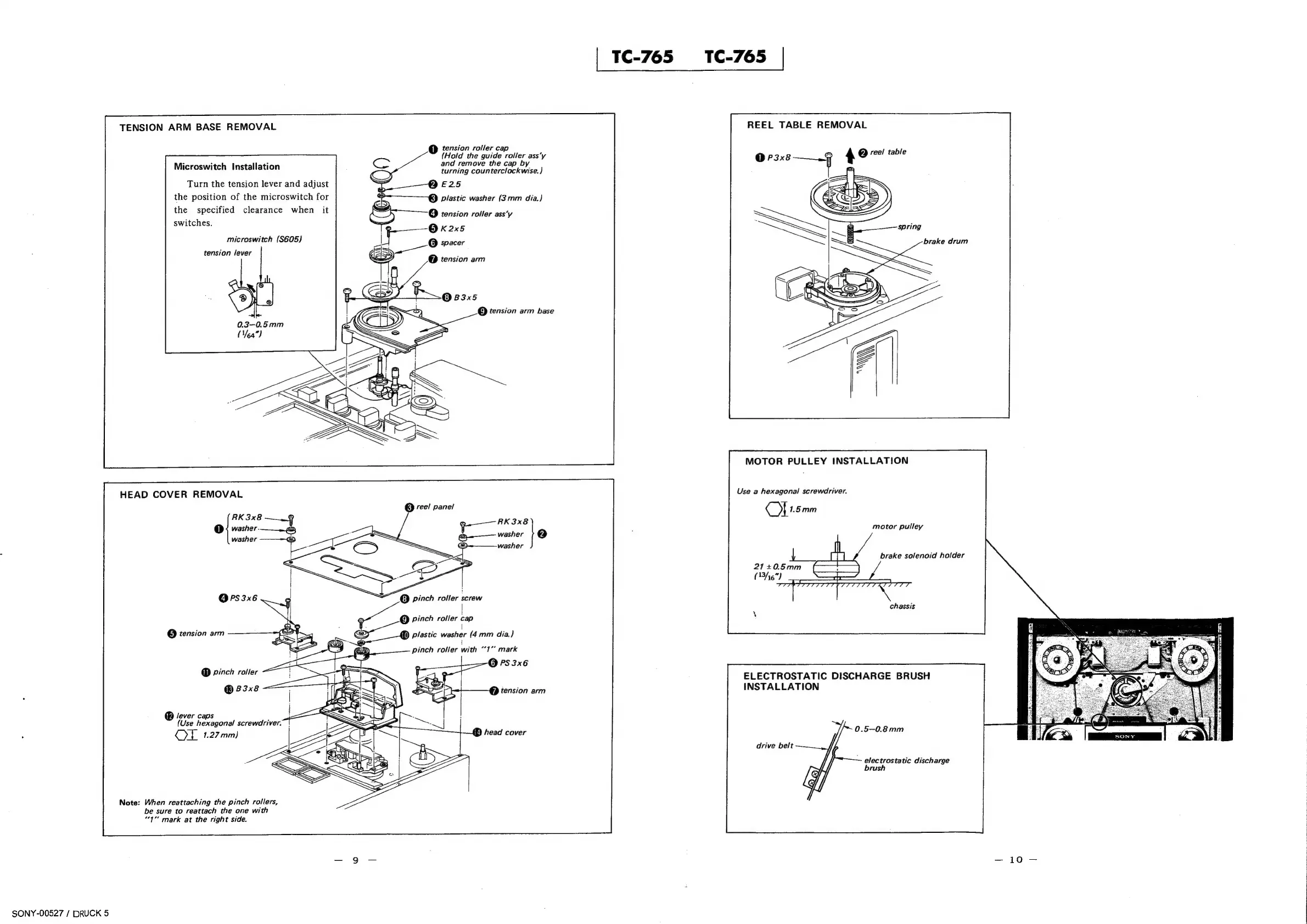
TENSION
ARM
BASE
REMOVAL
Microswitch
Installation
Turn
the
tension
lever
and
adjust
the
position
of
the
microswitch
for
the
specified
clearance
when
switches.
microswitch
(S605)
tension
lever
HEAD
COVER
REMOVAL
RK3x8
@
washer.
OPS3x6
@
tension
arm
@
pinch
roller
-
®
83x8
lever
caps
(Use
hexagonal
screwdriver.
OL
1.27
mm)
Note:
When
reattaching
the
pinch
rollers,
be
sure
to
reattach
the
one
with
“1”
mark
at
the
right
side.
@
tension
roller
cap
(Hold
the
guide
roller
ass’y
and
remove
the
cap
by
turning
counterclockwise.)
E25
plastic
washer
(3mm
dia.)
(4)
tension
roller
ass‘y
@O
kK2x5
@
spacer
@
tension
arm
©
B3x5
@Q
tension
arm
base
@
vee!
panel
RK3x8
washer
}@
washer
©
pinch
roller
screw
!
@
pinch
roller
cap
()
plastic
washer
(4mm
dia.}
!
pinch
roller
with
“1”
mark
'p
tension
arm
{E}
head
cover
|
TC-765
TC-765
|
REEL
TABLE
REMOVAL
/
0
P3x8
—_¢
49
table
MOTOR
PULLEY
INSTALLATION
Use
a
hexagonal
screwdriver.
©)
1.5mm
motor
pulley
brake
solenoid
holder
chassis
ELECTROSTATIC
DISCHARGE
BRUSH
INSTALLATION
0.5-0.8mm
drive
belt
~
electrostatic
disch
arge
brush

Other manuals for Sony TC-765

Related product manuals