EasyManua.ls Logo

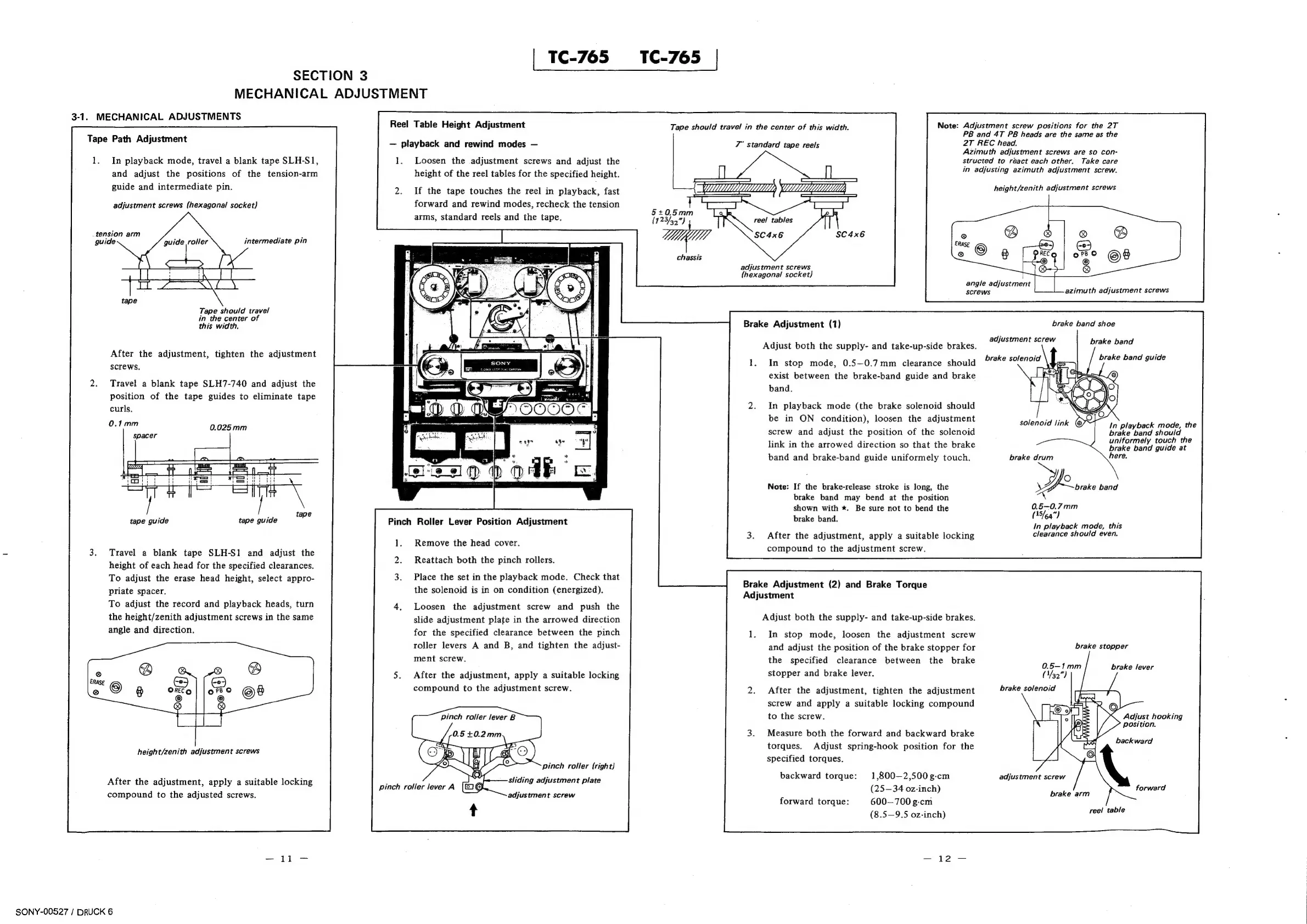
Sony TC-765 - Section 3: Mechanical Adjustments; Tape Path and Head Height Adjustments; Roller, Brake, and Torque Adjustments

Sony TC-765
62 pages
Print Icon
To Next Page IconTo Next Page
To Previous Page IconTo Previous Page
Loading...
SECTION
3
MECHANICAL
ADJUSTMENT
3-1.
MECHANICAL
ADJUSTMENTS
Tape
Path
Adjustment
1.
In
playback
mode,
travel
a
blank
tape
SLH-S1,
and
adjust
the
positions
of
the
tension-arm
guide
and
intermediate
pin.
adjustment
screws
(hexagonal
socket)
tension
arm
guide
guide
roller
intermediate
pin
Tape
should
travel
in
the
center
of
this
width.
After
the
adjustment,
tighten
the
adjustment
screws.
Travel
a
blank
tape
SLH7-740
and
adjust
the
position
of
the
tape
guides
to
eliminate
tape
curls.
2.
0.025mm
tape
guide
tape
guide
Travel
a
blank
tape
SLH-S1
and
adjust
the
height
of
each
head
for
the
specified
clearances.
To
adjust
the
erase
head
height,
select
appro-
priate
spacer.
To
adjust
the
record
and
playback
heads,
turn
the
height/zenith
adjustment
screws
in
the
same
angle
and
direction.
height/zenith
adjustment
screws
After
the
adjustment,
apply
a
suitable
locking
compound
to
the
adjusted
screws.
SONY-00527
/
DRUCK
6
Reel
Table
Height
Adjustment
|
TC-765
TC-765
|
playback
and
rewind
modes
1.
Loosen
the
adjustment
screws
and
adjust
the
height
of
the
reel
tables
for
the
specified
height.
If
the
tape
touches
the
reel
in
playback,
fast
forward
and
rewind
modes,
recheck
the
tension
arms,
standard
reels
and
the
tape.
Pinch
Roller
Lever
Position
Adjustment
Remove
the
head
cover.
Reattach
both
the
pinch
rollers.
Place
the
set
in
the
playback
mode.
Check
that
the
solenoid
is
in
on
condition
(energized).
Loosen
the
adjustment
screw
and
push
the
slide
adjustment
plate
in
the
arrowed
direction
for
the
specified
clearance
between
the
pinch
roller
levers
A
and
B,
and
tighten
the
adjust-
ment
screw.
After
the
adjustment,
apply
a
suitable
locking
compound
to
the
adjustment
screw.
Pinch
roller
lever
B
pinch
roller
{right}
sliding
adjustment
plate
adjustment
screw
Note:
Adjustment
screw
positions
for
the
2T
PB
and
4T
PB
heads
are
the
same
as
the
2T
REC
head.
Azimuth
adjustment
screws
are
so
con-
structed
to
react
each
other.
Take
care
in
adjusting
azimuth
adjustment
screw.
Tape
should
travel
in
the
center
of
this
width.
7"
standard
tape
reels
height/zenith
adjustment
screws
5+0.5mm
(123/39)
reel
tables
SC4x6
chassis
adjustment
screws
(hexagonal
socket}
angle
adjustment
screws
azimuth
adjustment
screws
Brake
Adjustment
(1)
brake
band
shoe
adjustment
screw
brake
band
Adjust
both
the
supply-
and
take-up-side
brakes.
brake
solenoid
brake
band
guide
In
stop
mode,
0.5—0.7mm
clearance
should
exist
between
the
brake-band
guide
and
brake
band.
In
playback
mode
(the
brake
solenoid
should
be
in
ON
condition),
loosen
the
adjustment
screw
and
adjust
the
position
of
the
solenoid
link
in
the
arrowed
direction
so
that
the
brake
band
and
brake-band
guide
uniformely
touch.
solenoid
link
@
In
playback
mode,
the
brake
band
should
uniformely
touch
the
brake
band
guide
at
brake
drum
here.
ge
brake
band
0.5~0.7mm
(35/6q")
In
playback
mode,
this
clearance
should
even.
Note:
If
the
brake-release
stroke
is
long,
the
brake
band
may
bend
at
the
position
shown
with
*.
Be
sure
not
to
bend
the
brake
band.
After
the
adjustment,
apply
a
suitable
locking
compound
to
the
adjustment
screw.
Brake
Adjustment
(2)
and
Brake
Torque
Adjustment
Adjust
both
the
supply-
and
take-up-side
brakes.
In
stop
mode,
loosen
the
adjustment
screw
and
adjust
the
position
of
the
brake
stopper
for
the
specified
clearance
between
the
brake
stopper
and
brake
lever.
brake
stopper
brake
lever
After
the
adjustment,
tighten
the
adjustment
screw
and
apply
a
suitable
locking
compound
to
the
screw.
Adjust
hooking
position.
Measure
both
the
forward
and
backward
brake
torques.
Adjust
spring-hook
position
for
the
specified
torques.
backward
1,800—2,500g-cm
(25-34
oz-inch)
600—700
g-cm
(8.5—9.5
oz-inch)
backward
torque:
adjustment
screw
forward
brake
arm
forward
torque:
reel
table

Other manuals for Sony TC-765

Related product manuals