EasyManua.ls Logo

Sony TC-765 - Tension and Back Tension Adjustments

Sony TC-765
62 pages
Print Icon
To Next Page IconTo Next Page
To Previous Page IconTo Previous Page
Loading...
TC-765
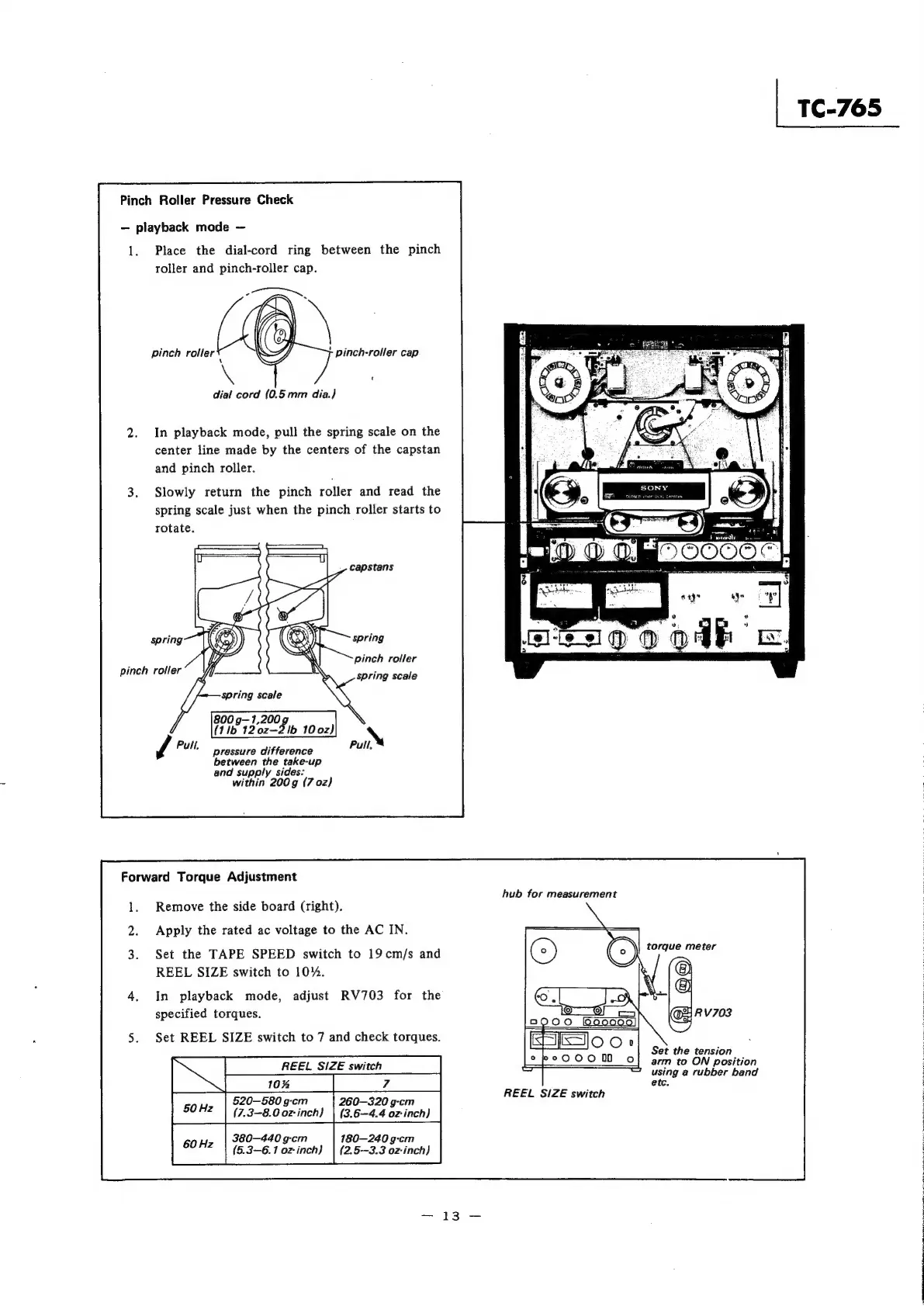
Pinch
Roller
Pressure
Check
playback
mode
1.
Place
the
dial-cord
ring
between
the
pinch
roller
and
pinch-roller
cap.
pinch
roller
pinch-roller
cap
t
dial
cord
(0.5mm
dia.)
In
playback
mode,
pull
the
spring
scale
on
the
center
line
made
by
the
centers
of
the
capstan
and
pinch
roller.
3.
Slowly
return
the
pinch
roller
and
read
the
spring
scale
just
when
the
pinch
roller
starts
to
rotate.
i
:
SF)
®
OOOO
ae
=
Senn
eee
pinch
roller
spring
scale
800
g—1,200
g,
(1lb
120z—2
lb
10
0z)
\
pressure
difference
Pull.
between
the
take-up
and
supply
sides:
within
200g
(7
02)
Forward
Torque
Adjustment
; ;
hub
for
measurement
Remove
the
side
board
(right).
Apply
the
rated
ac
voltage
to
the
AC
IN.
Set
the
TAPE
SPEED
switch
to
19
cm/s
and
REEL
SIZE
switch
to
10%.
In
playback
mode,
adjust
RV703
for
the
specified
torques.
Set
REEL
SIZE
switch
to
7
and
check
torques.
2
Set
the
tension
REEL
SIZE
switch
arm
to
ON
position
using
a
rubber
band
etc.
"
soz
|
520-580g0m
|
260-320
gem
PRES
Cees
(7.3-8.0
oz
inch}
|
(3.6-4.4
oz
inch}
380-440
g-cm
180—240
g-cm
(5.3-6.1
oz-inch}
|
(2.5—3.3
oz-inch}

Other manuals for Sony TC-765

Related product manuals