EasyManua.ls Logo

Sony TCM-S63 - Recording; Cassette Insertion and Erasure Prevention; Tape Type Recommendations; Microphone Sensitivity Settings

Sony TCM-S63
7 pages
Print Icon
To Next Page IconTo Next Page
To Previous Page IconTo Previous Page
Loading...
79%
9001
0g
9,
Inserting
a
Cassette
ies
sas
ee
TS
Cs
n
Systenise-
sa
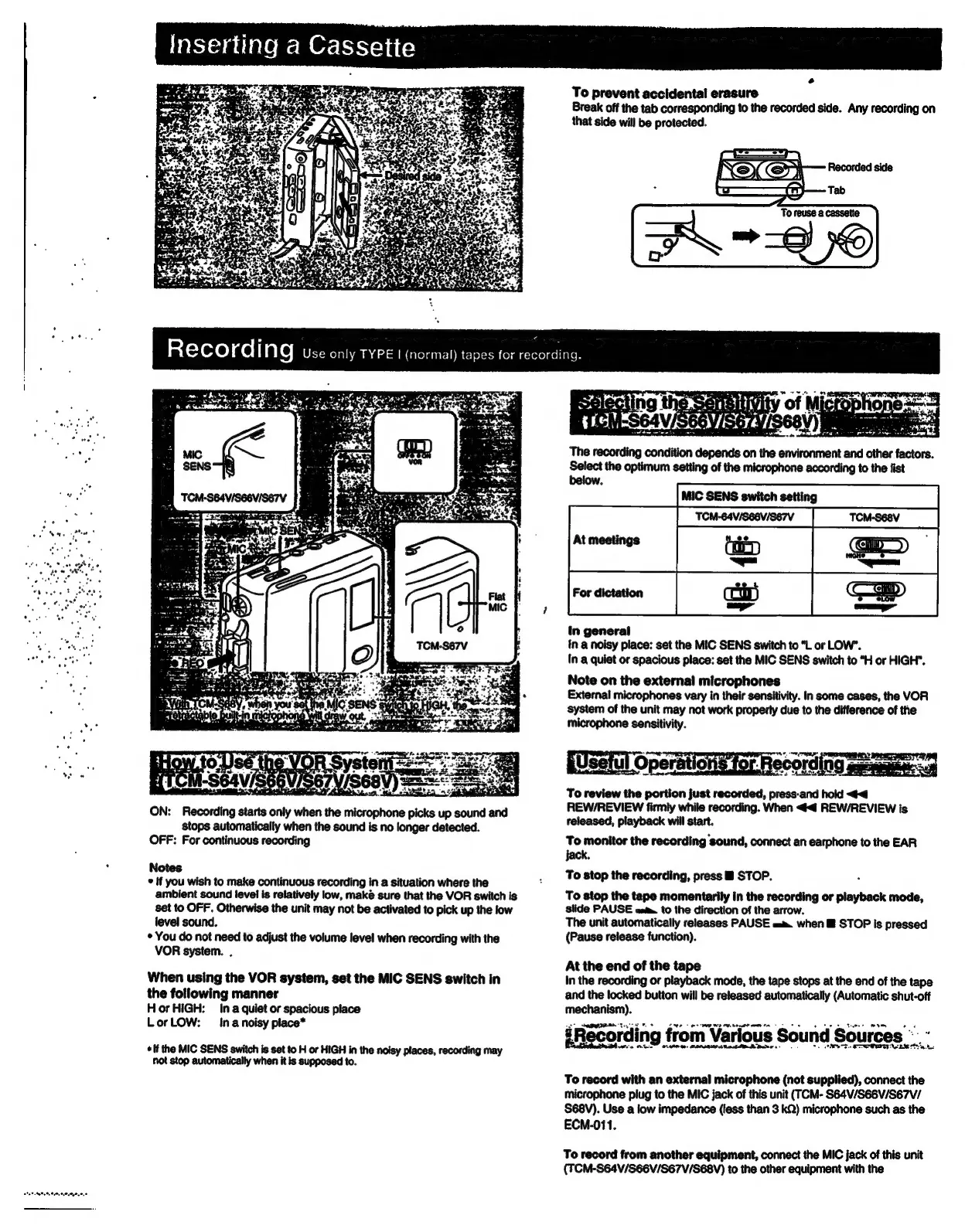
ON:
Recording
starts
only
when
the
microphone
picks
up
sound
and
stops
automatically
when
the
sound
is
no
longer
detected.
OFF:
For
continuous
recording
Notes
©
If
you
wish
to
make
continuous
recording
in
a
situation
where
the
ambient
sound
level
is
relatively
low,
maké
sure
that
the
VOR
switch
is
set
to
OFF.
Otherwise
the
unit
may
not
be
activated
to
pick
up
the
low
level
sound.
You
do
not
need
to
adjust
the
volume
level
when
recording
with
the
VOR
system.
.
When
using
the
VOR
system,
set
the
MIC
SENS
switch
in
the
following
manner
Hor
HIGH:
Ina
quiet
or
spacious
place
LorLOW:
Ina
noisy
place*
Ric
adpeien
fall
tal
tara
a
a
a
not
stop
automatically
when
it is
supposed
to.
oe
To
prevent
accidental
erasure
Break
off
the
tab
corresponding
to
the
recorded
side.
Any
recording
on
that
side
will
be
protected.
The
recording
condition
depends
on
the
environment
and
other
factors.
Select
the
optimum
setting
of
the
microphone
according
to
the
fist
below.
in
general
in
a
noisy
place:
set
the
MIC
SENS
switch
to
“L
or
LOW’.
In
a
quiet
or
spacious
place:
set
the
MIC
SENS
switch
to
“H
or
HIGH".
Note
on
the
external
microphones
External
microphones
vary
in
their
sensitivity.
In
some
cases,
the
VOR
system
of
the
unit
may
not
work
properly
due
to
the
difference
of
the
microphone
sensitivity.
(Wsetul
Opersticne
for
Recording
se
To
review
the
portion
just
recorded,
press-and
hold
<4
REW/REVIEW
firmly
while
recording.
When
<4
REW/REVIEW
is
released,
playback
will
start.
To
monitor
the
recording
sound,
connect
an
earphone
to
the
EAR
jack.
To
stop
the
recording,
press
B
STOP.
To
stop
the
tape
momentarily
in
the
recording
or
playback
mode,
slide
PAUSE
eat.
to
the
direction
of
the
arrow.
The
unit
automatically
releases
PAUSE
am
when
®
STOP
is
pressed
(Pause
release
function).
At
the
end
of
the
tape
In
the
recording
or
playback
mode,
the
tape
stops
at
the
end
of
the
tape
and
the
locked
button
will
be
released
automatically
(Automatic
shut-off
yaesteeis
#Recording
from
Various
Sound
Sources
".
Ae
ee
To
record
with
an
external
microphone
(not
supplied),
connect
the
microphone
plug
to
the
MIC
jack
of
this
unit
(TCM-
S64V/S66V/S67V/
S68V).
Use
a
low
impedance
(less
than
3
kQ)
microphone
such
as
the
ECM-011.
To
record
from
another
equipment,
connect
the
MIC
jack
of
this
unit
(TCM-S64V/S66V/S67V/SEBV)
to
the
other
equipment
with
the