system with your TV. Outdoor antennas or cable TV
systems usually provide the best picture quality.
Connecting an Indoor, Outdoor
or Cable Antenna
I
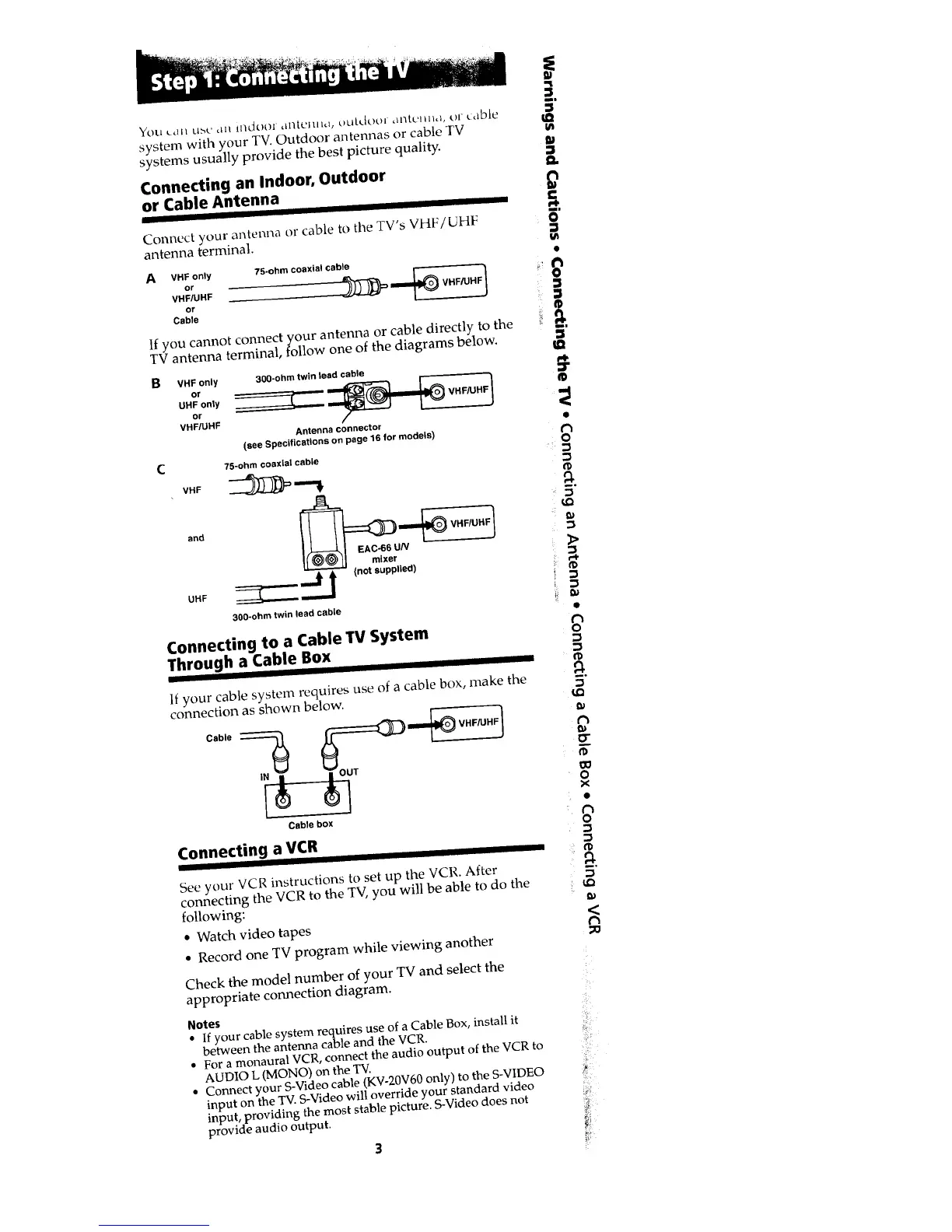
Connect your antenna or cable to the TV's VHF/UHF
antenna terminal.
A VHF only 75-ohm coaxial cable
or 1
VHF/UHF VHF/UHF
or
Cable
If you cannot connect your antenna or cable directly to the
TV antenna terminal, follow one of the diagrams below.
B
C
VHF only
or
UHF only
or
VHF/UHF
30g-ohm twin lead cable
Antenna connector
(see Specifications on page 16 far models)
75-ohm coaxial cable
V.F _ "'€
and _UN_ VHF/UHF)
UHF _ _ (not supplied)
300-ohm twin lead cable
Connecting to a Cable TV System
Through a Cable Box
]111111
If your cable system requires use of a cable box, make the
connection as shown below.
Cable box
Connecting a VCR
See your VCR instructions to set up the VCR. After
connecting the VCR to the TV, you will be able to do the
following:
s Watch video tapes
a Record one TV program while viewing another
Check the model number of your TV and select the
appropriate connection diagram.
Notes
• If your cable system requires use of a Cable Box, install it
between the antenna cable and the VCR.
• For a monaural VCR, connect the audio output of the VCR to
AUDIO L (MONO) on the TV.
• Connect your S-Video cable (KV-20V60 only) to the S-VIDEO
input on the TV. S-Video will override your standard video
input, providing the most stable picture. S-Video does not
provide audio output.
3
m=
€o
m
Q.
£
mD
O
=
g-,
ID
€'3
o-
o
x
e
o
I,Q
Ji!"
!ilia'








 To Next Page