Setting Cable IV On or Off
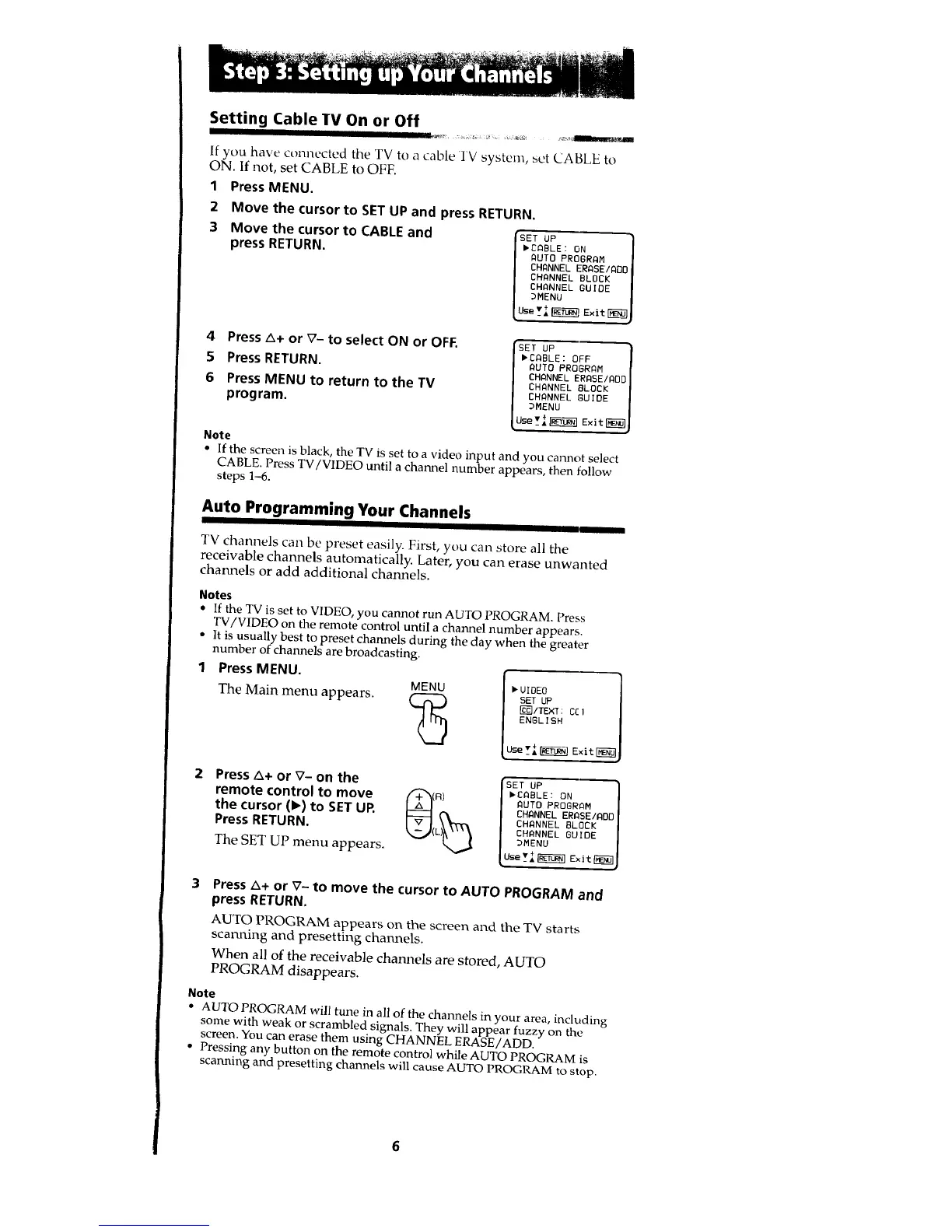
If you have connected the TV to a cable TV system, set CABLE to
ON. If not, set CABLE to OFF.
1 Press MENU.
2
3
Move the cursor to SET UP and press RETURN.
Move the cursor to CABLE and (_ET UP
press RETURN. /'CABLE: ON
I AUTO PROGRAM
| CHANNEL ERASEIAOO
| CHANNEL BLOCK
I CHANNEL GUIDE
I _MENU
4 Press A+ or V- to select ON or OFF.
5 Press RETURN.
6 PressMENU to return to the TV
program.
Note
GET UP
,CABLE: OFF
AUTO PROGRAM
CHANNEL ERABE/AOC
CHANNEL BLOCK
CHANNEL GUIDE
DMENU
• If the screen is black, the TV is set to a video input and you cannot select
CABLE. Press TV/VIDEO until a channel number appears, then follow
steps 1-6.
Auto Programming Your Channels
J III I II I I
TV channels can be preset easily. First, you can store all the
receivable channels automatically. Later, you can erase unwanted
channels or add additional channels.
Notes
• If the TV is set to VIDEO, you cannot run AUTO PROGRAM. Press
TV/VIDEO on the remote control until a channel number appears.
• It is usually best to preset channels during the day when the greater
number of channels are broadcasting.
Press MENU.
MENU
The Main menu appears.
25
, IOEO
SET UP
Fc_]ITEXT: C[I
ENGLISH
Use _I _ Exit_
Press A+ or V- on the
remote control to move
the cursor (1_)to SETUR
Press RETURN.
The SET UP menu appears.
'SET UP
,CABLE: ON
(R) AUTO PROGRAM
L)_ CHANNEL ERASEIADD
CHANNEL BLOCK
_._( CHANNEL GUIDE
I _MENU
Press A+ or V- to move the cursor to AUTO PROGRAM and
press RETURN.
AUTO PROGRAM appears on the screen and the TV starts
scanning and presetting channels.
When all of the receivable channels are stored, AUTO
PROGRAM disappears.
Note
• AUTO PROGRAM will tune in all of the channels in your area, including
some with weak or scrambled signals. They will appear fuzzy on the
screen. You can erase them using CHANNEL ERASE/ADD,
• Pressing any button on the remote control while AUTO PROGRAM is
scanning and presetting channels will cause AUTO PROGRAM to stop.








 To Next Page