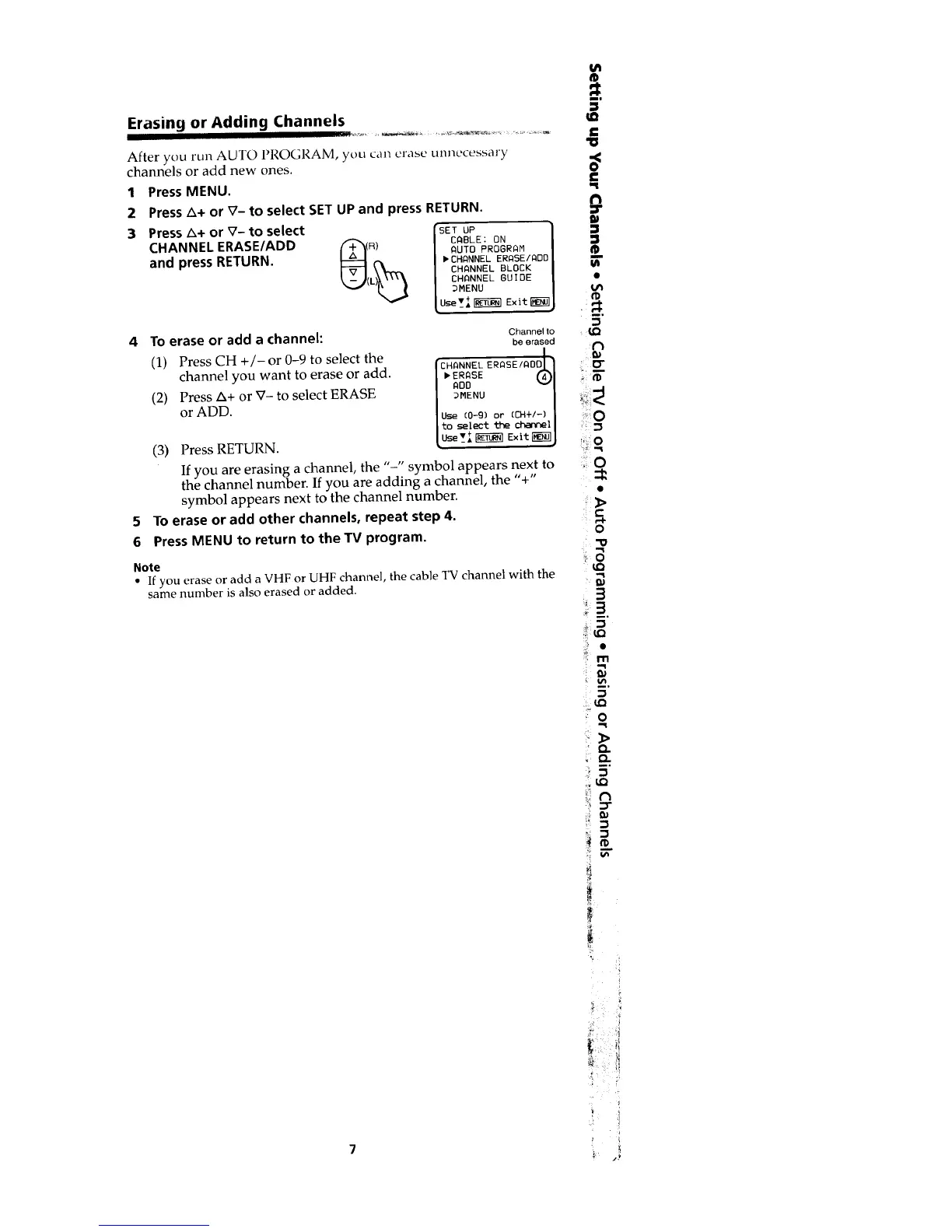
Erasing or Adding Channels
After you run AUTO I_I{OGRAM,you call erase unnecessary
channels or add new ones.
1
2
3
Press MENU.
Press _+ or V- to select SET UP and press RETURN.
Press _+ or V- to select /SETUP
CHANNEL ERASE/ADD f_'x_n) [ CABLE : ON
AUTO PROGRAM
and press RETURN. bCHANNELERASE/ADO
L)_ CHANNEL BLOCK
_._( CHANNEL GUIDE
_MENU
Llsev_I _j_] Exit_
4 TOerase or add a channel:
(1) Press CH +/-or 0-9 to select the
channel you want to erase or add.
(2) Press A+ or V- to select ERASE
or ADD.
(3) Press RETURN.
5
6
Channel to
be erased
ERASE _1
ADD ""1
_MENU [
Use (0-9) or (CH+I-) [
to select the chattel[
use'_A+F_ Exit_J
If you are erasing a channel, the "-" symbol appears next to
the channel number. If you are adding a channel, the '%"
symbol appears next to the channel number.
To erase or add other channels, repeat step 4.
Press MENU to return to the TV program.
Note
• If you erase or add a VHF or UHF channel, the cable TV channel with the
same number is also erased or added.
0
o
Q
0
70
Q
o
: 0
LO
.3
5"








 To Next Page