i
Antenna _ . ,,,,k n.a VCR
Cable , L(_ Cable _ V......... I
L'_(_ _ VHFI1JHF OUT S-V_DEO {
I / AUD_O-RAUDIO-LVIDEO I
s-vmeo v,e_o,IN , t t
I@®@@l
AUD}O-RAUD_O-LWDEOJ (Rear of'rv) AUDIO _ _ VIDEO
_ t--'_ (black) VV (yellow)
AUDIO _ _ VIDEO V
(black) V V (ye''ow) 1 Formodels
_/ Video Cable (not supplied) / with menD
"( | l inputs
AUDIO-R AUDIO-L VIDEO AUDIO-R AUDIO-L VIDEO
(red) (white) (yellow) (red) (white) (yellow)
_ For modelsVideo Cable (not supplied) with stereo
| inputs
| only
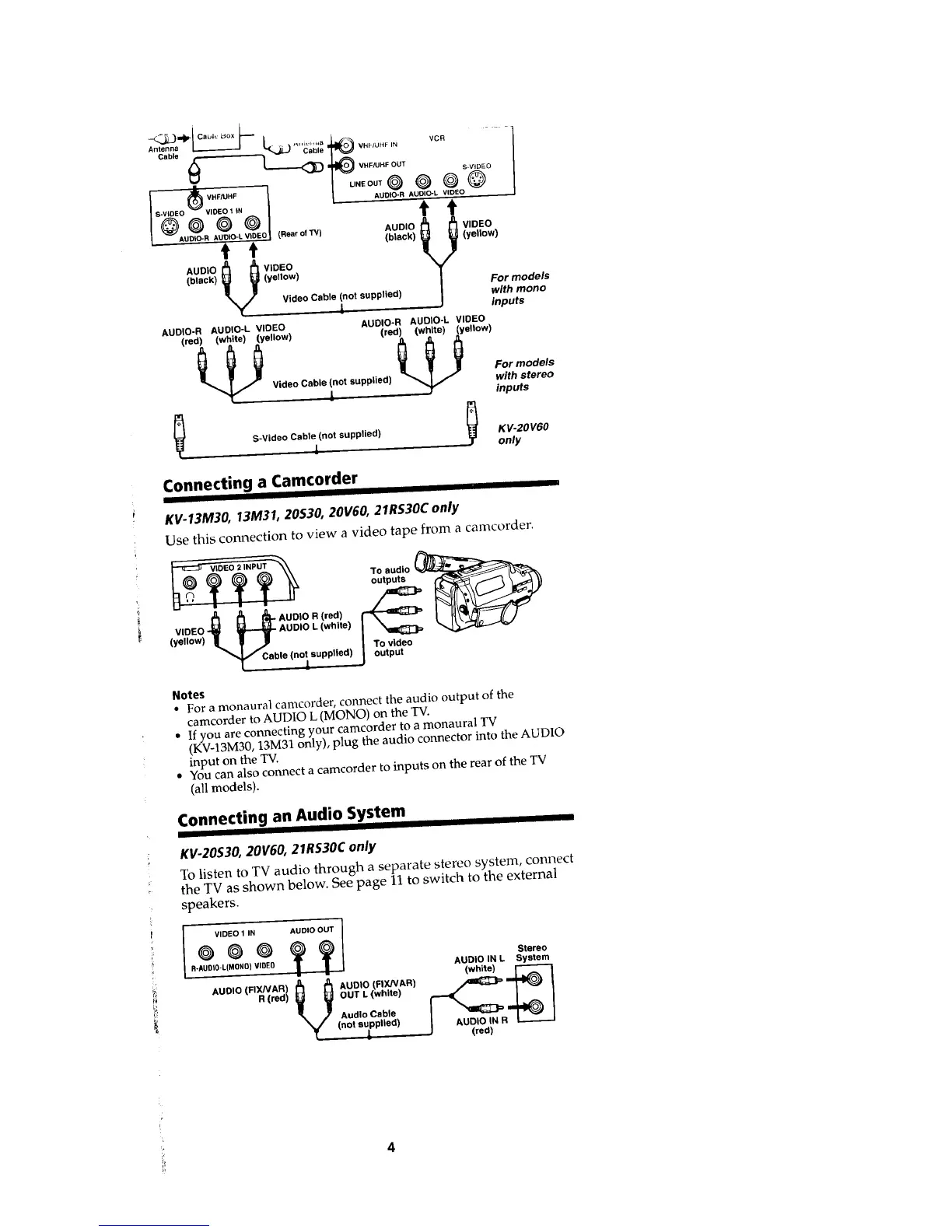
Connecting a Camcorder
KV-13M30, 13M31, 20530, 20V60, 21RS30C only
Use this connection to view a video tape from a camcorder.
_-_N VIDEO 2 INPUT ToOtpute
J_ [5 _ AUDIO R (red)
VIDEO _ _ AUDIO L (white)
<ye,,ow)k l J
"K C bleC.oyu.p,Ied)j
Notes
, For a monaural camcorder, connect the audio output of the
camcorder to AUDIO L (MONO) on the TV.
• If you are connecting your camcorder to a monaural TV
(KV-13M30, 13M31 only), plug the audio connector into the AUDIO
input on the TV.
• You can also connect a camcorder to inputs on the rear of the TV
(all models).
Connecting an Audio System
I I
KV-20S30, 20V60, 21RS30Conly
To listen to TV audio through a separate stereo system, connect
the TV as shown below. See page 11 to switch to the external
speakers.
i
I
VIDEO 1 IN AUDIO OUT I
°°°??1 s=
0-AUDIO-L{MDNO)VIDEO AUDIO IN L System
(white)
R (red) OUT L (white)
Audio Cable
(not supplied) L__.___.J
4








 To Next Page