Step 1:
Connecting
the TV
The
following
steps guide
you through your
initial
set up.
Check the model
number of
your TV (located on the front
of this manual)
and select
the appropriate diagram.
Connecting an Indoor,
Outdoor
or Cable
Antenna
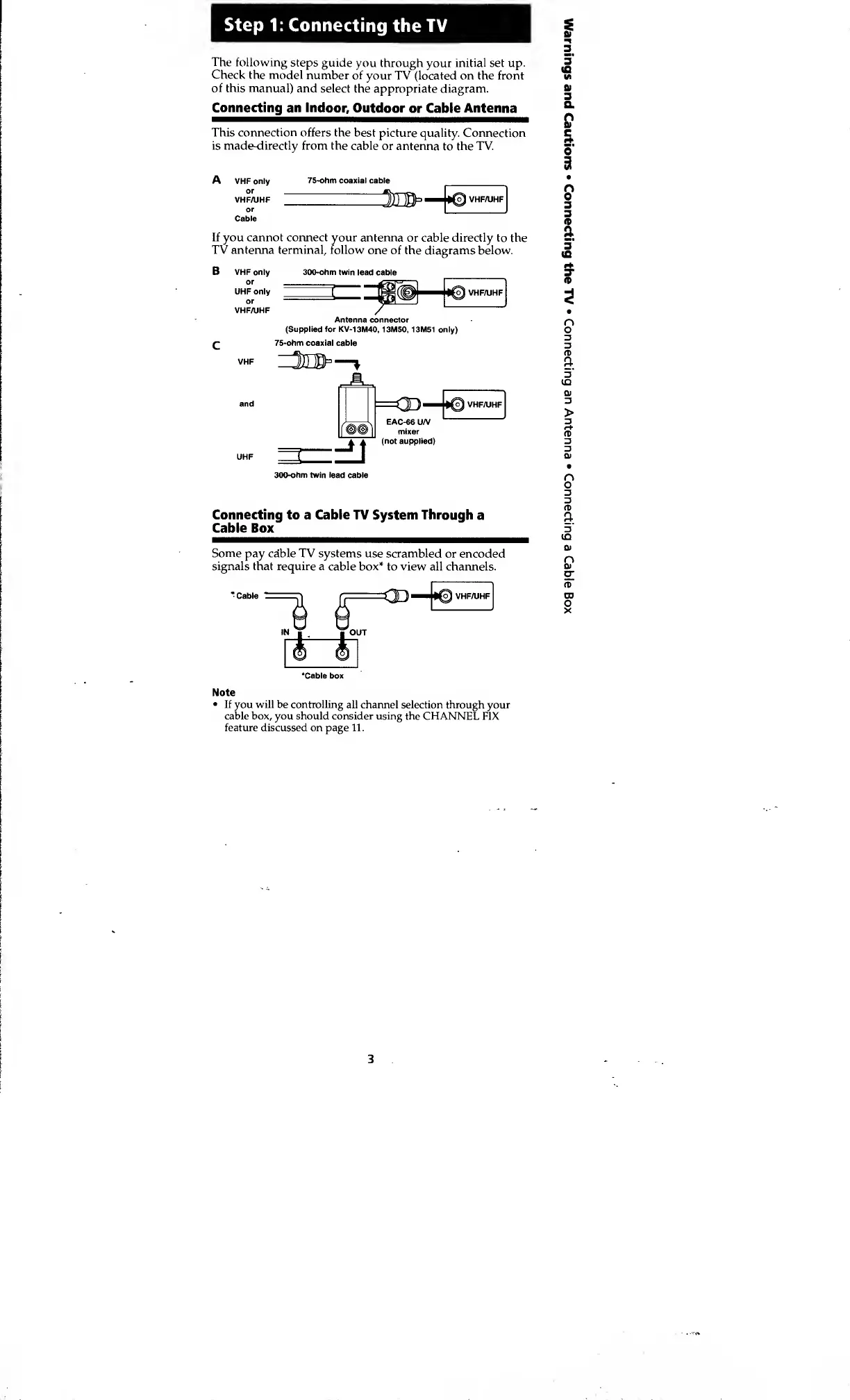
This
connection
offers the best
picture quality. Connection
is made-directly from the cable
or antenna
to
the TV.
A
VHF only
75-ohm coaxial cable
JH^—
•©VHF/UHF
If you cannot connect your antenna
or cable directly to the
TV antenna terminal, follow
one of the diagrams below.
B VHF only
or
UHF only
or
VHF/UHF
300-ohm twin
lead cable
Antenna connector
(Supplied for KV-13M40,
13M50, 13M51 only)
75-ohm coaxial cable
300-ohm twin lead
cable
Connecting to a Cable TV System Through
a
Cable Box
Some
pay cable TV systems use scrambled
or encoded
signals that require a cable
box* to view all channels.
*
Cable
'Cable box
Note
•
If you will be controlling
all channel selection through your
cable box, you should consider using the
CHANNEL FIX
feature discussed on page 11.
3








 To Next Page