EasyManua.ls Logo

Sony TRINITRON KV-25FX30B - Page 5

Sony TRINITRON KV-25FX30B
58 pages
Print Icon
To Next Page IconTo Next Page
To Previous Page IconTo Previous Page
Loading...
FE-2
SELF
DIAGNOSTIC
SOFTWARE
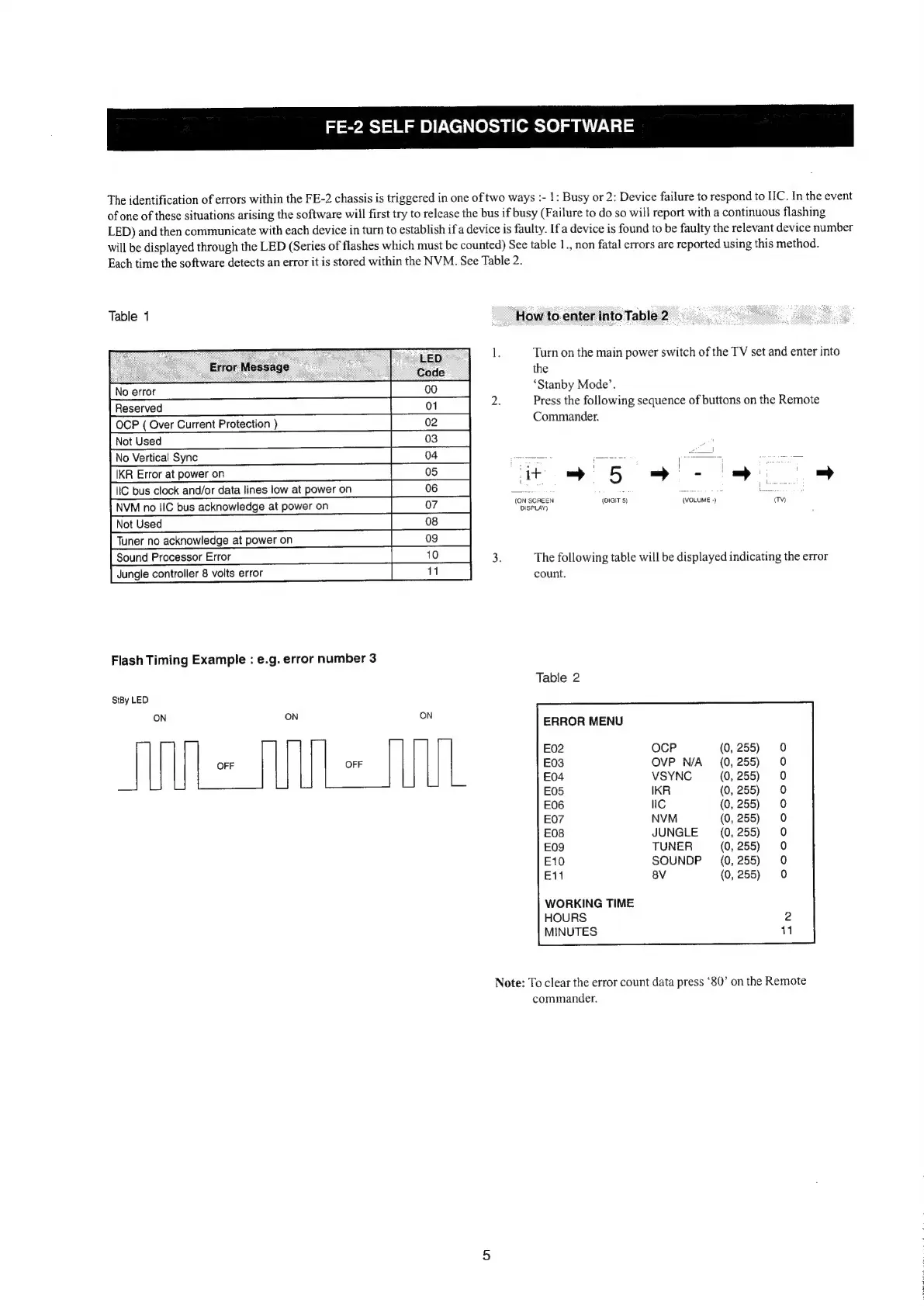
The
identification
of
errors
within
the
FE-2
chassis
is
triggered
in
one
of
two
ways
:-
1:
Busy
or
2:
Device
failure
to
respond
to
IIC.
In
the
event
of
one
of
these
situations
arising
the
software
will
first
try
to
release
the
bus
if
busy
(Failure
to
do
so
will
report
with
a
continuous
flashing
LED)
and
then
communicate
with
each
device
in
turn
to
establish
if
a
device
is
faulty.
If
a
device
is
found
to
be
faulty
the
relevant
device
number
will
be
displayed
through
the
LED
(Series
of
flashes
which
must
be
counted)
See
table
1.,
non
fatal
errors
are
reported
using
this
method.
Each
time
the
software
detects
an
error
it
is
stored
within
the
NVM.
See
Table
2.
Table
1
.
ee
eLeo
—
:
ee
Code
ee
ee
OCP
(
Over
Current
Protection
)
|}
02
|
Error
Message
—
01
02
ee
aT
ee
i
bus
clock
andlor
dala
ies
ow
atpoweron
|
08
Nees
ner
ne
acknowledge
aipoweren
_——«dY|
Flash
Timing
Example
:
e.g.
error
number
3
StBy
LED
ON
ON ON
AN=NN=
Sinn.
How
to
enter
into
Table
2
1.
Turn
on
the
main
power
switch
of
the
TV
set
and
enter
into
the
‘Stanby
Mode’.
2.
Press
the
following
sequence
of
buttons
on
the
Remote
Commander.
=»
5
se
(ON
SCREEN
{DIGIT
5)
(VOLUME
-)
(TV)
DISPLAY)
3.
The
following
table
will
be
displayed
indicating
the
error
count.
Table
2
ERROR
MENU
E02
E03
E04
E05
E06
E07
E08
£09
E10
E11
nN
ol
a
NNM
aan
or
ol
Or
oooocooo°o°0o9d
ooooooo°ce°o
(
(
(
(
(
(
(
(
(
(
WORKING
TIME
HOURS
MINUTES
Note:
To
clear
the
error
count
data
press
*80’
on
the
Remote
commander.