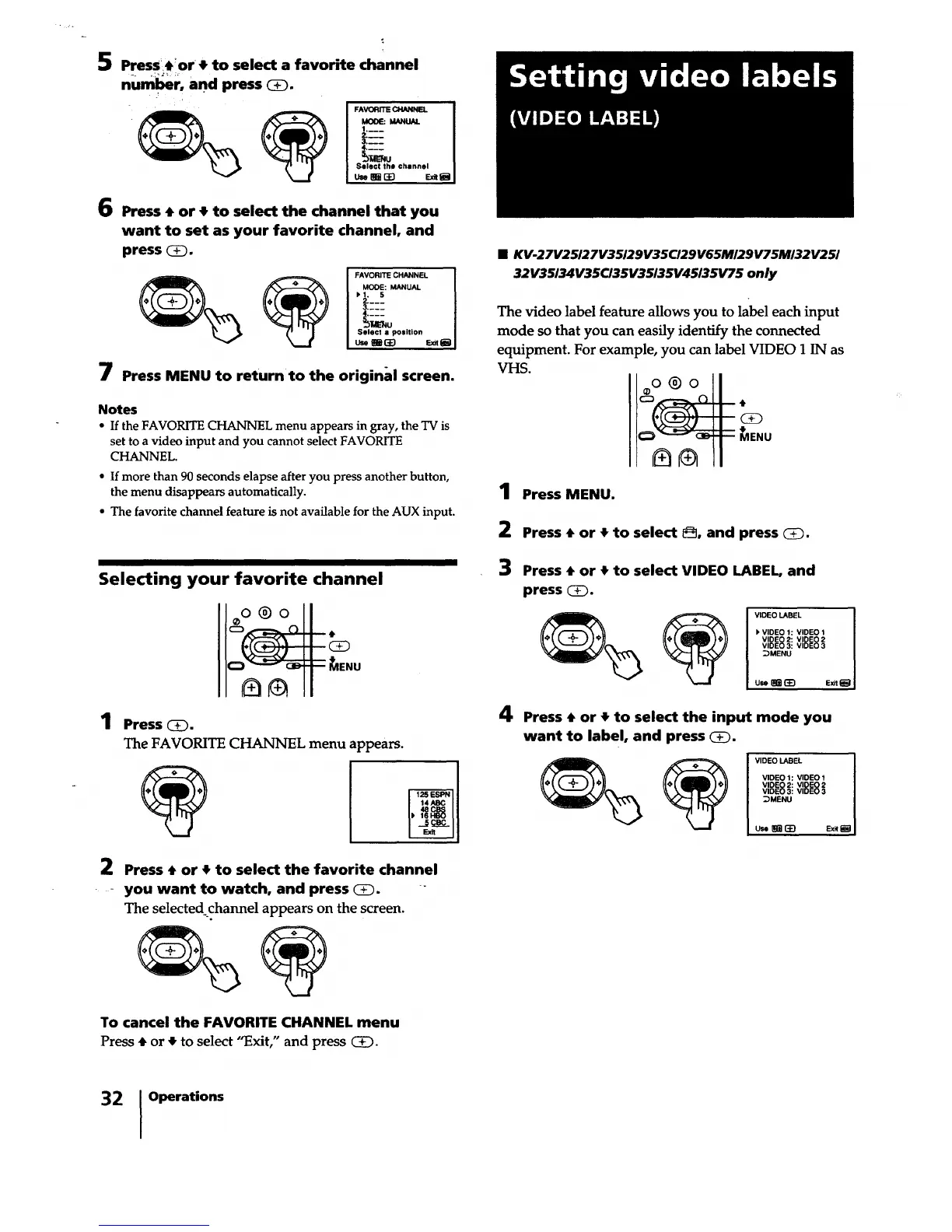
5 Presst!or t to select a favorite channel
num_r, and press (i).
FAVORITE CHANNEL I
MOOE: MANUAL I
1.___ i
L-:
Sel0ct 1he channel i
_uo_ _1
6 Press t or t to select the channel that you
want to set as your favorite channel, and
press _.
FAVORITE CHANNEL I
MODE: MANUAL I
Select • position I
u._ _1
7 Press MENU to return to the original screen.
Notes
• If the FAVORITE CHANNEL menu appears in gray, the TV is
set to a video input and you cannot select FAVORITE
CHANNEL.
a Ifmore than 90 seconds elapse after you press another button,
the menu disappears automatically.
• The favorite channel feature is not available for the AUX input.
Selecting your favorite channel
o®o
1 Press (3_.
The FAVORITE CHANNEL menu appears.
%
2 Press t or • to select the favorite channel
- you want to watch, and press (_.
The selected channel appears on the screen.
To cancel the FAVORITE CHANNEL menu
Press t or • to select "Exit," and press _.
• KV-27V25/27V35/29V35C/29V65M/29V75M/32V25/
32V35134V35CI35V35135V45/35V75 only
The video label feature allows you to label each input
mode so that you can easily identify the connected
equipment. For example, you can label VIDEO 1 IN as
VHS.
oo®o I
Ic:_ ._-._-._. (_11 ,I,
- II
1 Press MENU.
2 Press t or • to select @, and press _.
3 Press t or • to select VIDEO LABEL, and
press (_.
VIDEO LABEL I
I_ VIDEO 1: VIDEO 1 I
VIDEO 2: VIDEO 2 I
VIDEO 3: VIDEO 3 I
_MENU 1
u_r_ Ex._ I
4 Press t or t to select the input mode you
want to label, and press (_.
VIDEO LABEL I
VIDEO 1: VIDEO 1 I
VIDEO 2: VIDEO 2 I
VIDEO 3: VIDEO 3 I
;)MENU [
uc._ _ Ex__ I
32 Operations






 To Next Page