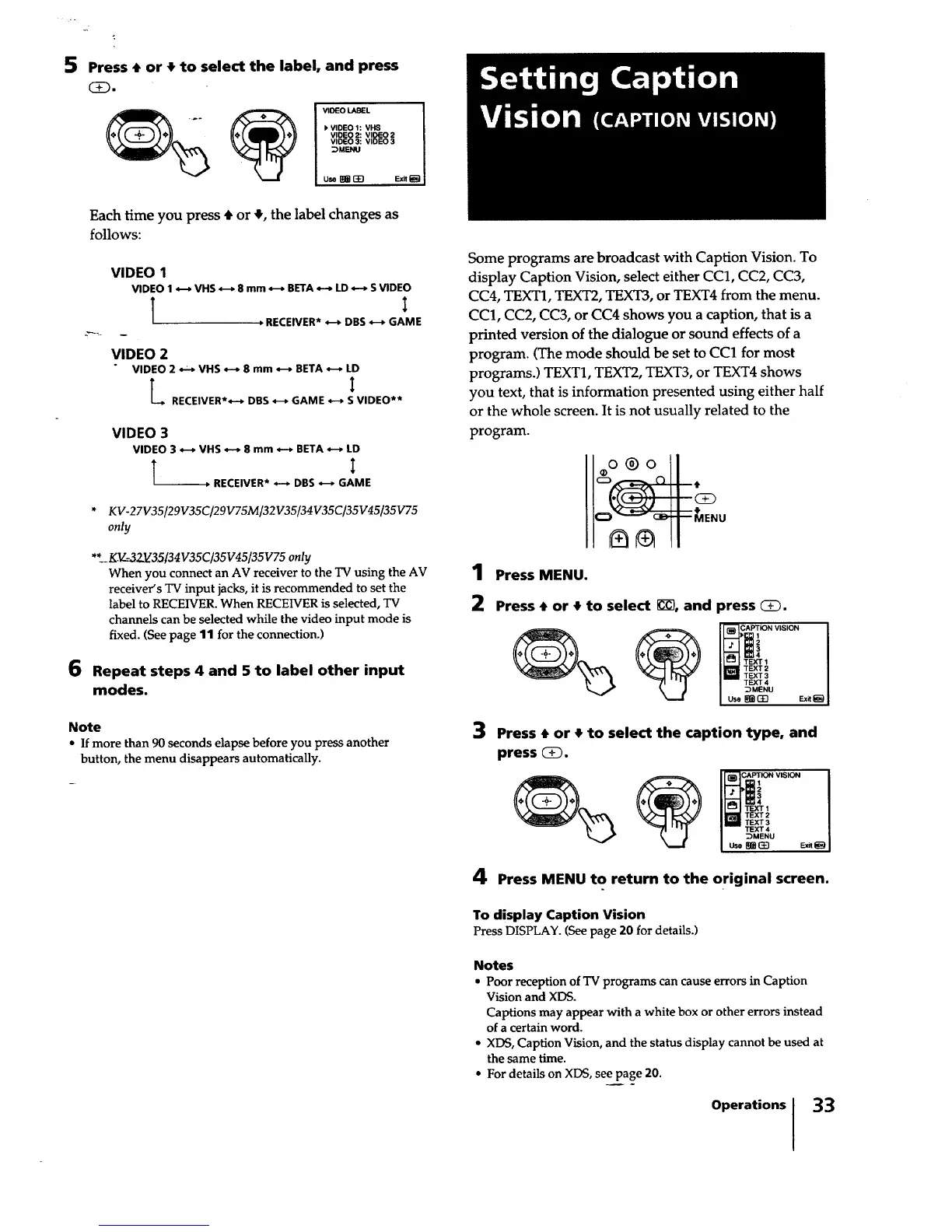
5 Press • or • to select the label, and press
VIDEO LABEL I
VIDEO 1: VHS
VIDEO 2:VIOEO2
VIDEO 3: VIDEO 3
_MENU
use _ r-4n Ex.iiJ
Each time you press 4, or ,I,,the label changes as
follows:
VIDEO 1
VIDEO 1 *--_ VHS *-* 8 mm *--* BETA _ LD *-* S VIDEO
l i
, RECEIVER* *-* DBS *-_ GAME
VIDEO 2
VIDEO 2 *--* VHS _ 8 mm *-_ BETA *-* LD
RECEIVER**-* DBS *-_ GAME _ S VIDEO**
6
VIDEO 3
VIDEO 3 4--* VHS *--* 8 mm *-* BETA *-p LD
l i
, RECEIVER* *-* DBS *-p GAME
* KV-27V35/29V35C/29V75M/32V35/34V35C/35V45[35V75
only
** KV_=3-2_35[34V35C/35V45/35V75 only
When you connect an AV receiver to the TV using the AV
receiver's TV input jacks, it is recommended to set the
label to RECEWER. When RECEIVER is selected, TV
channels can be selected while the video input mode is
fixed. (See page 11 for the connection.)
Repeat steps 4 and 5 to label other input
modes.
Note
* Ifmore than 90 seconds elapse before you press another
button, the menu disappears automatically.
Some programs are broadcast with Caption Vision. To
display Caption Vision, select either CC1, CC2, CC3,
CC4, TEXT1, TEXT2, TEXT3, or TEXT4 from the menu.
CC1, CC2, CC3, or CC4 shows you a caption, that is a
printed version of the dialogue or sound effects of a
program. (The mode should be set to CC1 for most
programs.) TEXT1, TEXT2, TEXT3, or TEXT4 shows
you text, that is information presented using either half
or the whole screen. It is not usually related to the
program.
oo®o I
1 Press MENU.
2 Press • or • to select _C7,and press _.
TEXT2
TEXT3
TEXT4
_MENU
use _r'_n Exit_l
3 Press • or • to select the caption type, and
press _.
TEXT 2
TEXT 3
TEXT 4
_MENU
Use _ _E] Exit
4 Press MENU to return to the original screen.
To display Caption Vision
Press DISPLAY. (See page 20 for details.)
Notes
• Poor receptionofTV programscan causeerrorsin Caption
Visionand XDS.
Captionsmay appear with a white box orothererrorsinstead
ofa certainword.
• XDS, Caption Vision, and the status display cannotbe used at
thesame time.
• For detailson XDS,see page 20.
Operationsl 33






 To Next Page