EasyManua.ls Logo

Sony TRINITRON KV-29C5A - Picture and Sound Adjustments

Sony TRINITRON KV-29C5A
57 pages
Print Icon
To Next Page IconTo Next Page
To Previous Page IconTo Previous Page
Loading...
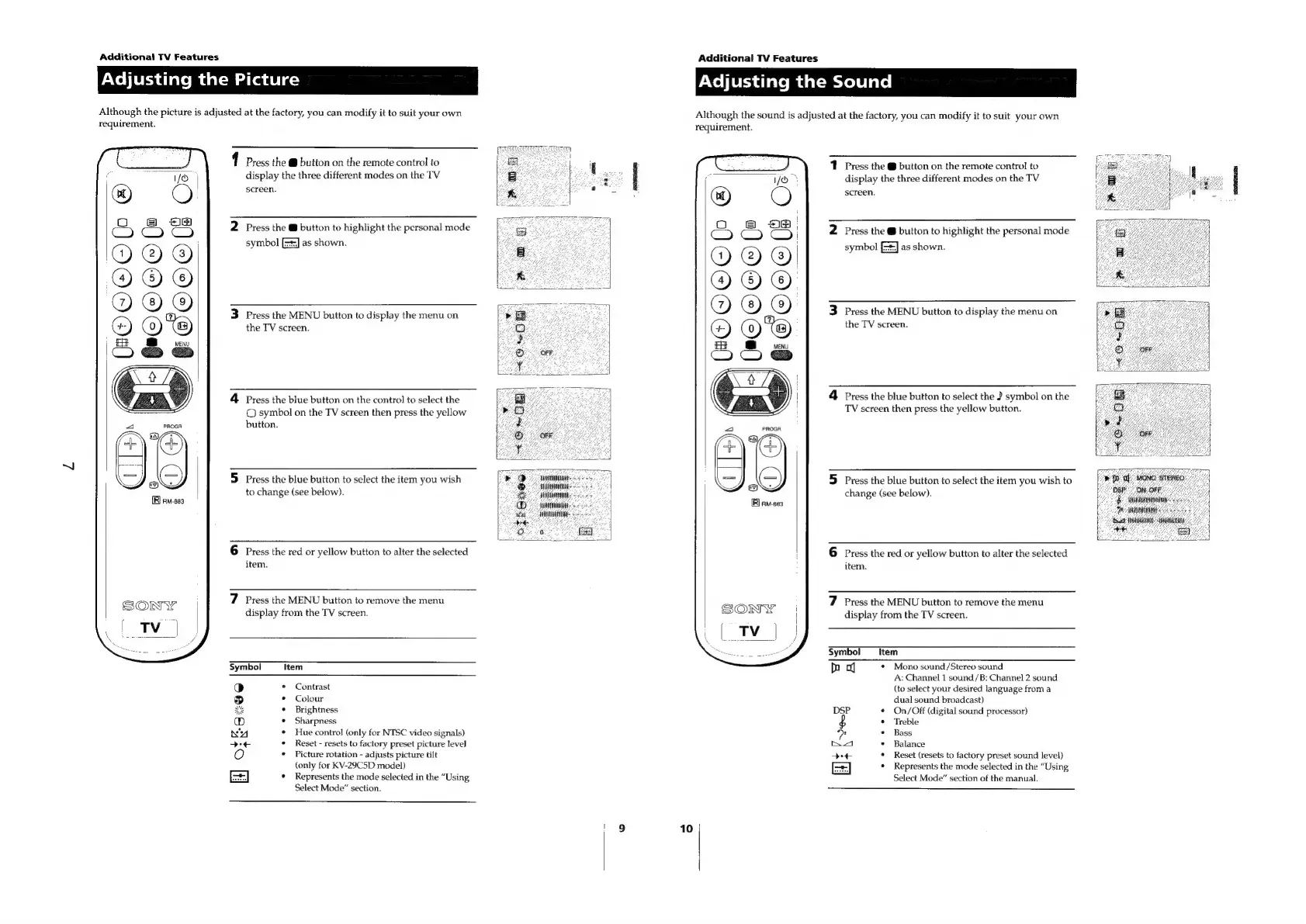
Additional
TV
Features
Adjusting
the
Picture
Although
the
picture
is
adjusted
at
the
factory,
you
can
modify
it
to
suit
your
own
requirement.
HOCCEC
(oc
@
|HO000
€€oOoe(s
1
Press
the
@
button
on
the
remote
control
to
display
the
three
different
modes
on
the
TV
screen.
2
Press
the
@
button
to
highlight
the
personal
mode
symbol
as
shown.
3
Press
the
MENU
button
to
display
the
menu
on
the
TV
screen.
4
Press
the
blue
button
on
the
control
to
select
the
©
symbol
on
the
TV
screen
then
press
the
yellow
button.
5
Press
the
blue
button
to
select
the
item
you
wish
to
change
(see
below).
Additional
TV
Features
PNo
li
Uri
diatom
datsmetel
ll
ale]
Although
the
sound
is
adjusted
at
the
factory,
you
can
modify
it
to
suit
your
own
6
Press
the
red
or
yellow
button
to
alter
the
selected
item.
7
Press
the
MENU
button
to
remove
the
menu
display
from
the
TV
screen.
Symbol
Item
*
Contrast
¢
Colour
°
Brightness
*
Sharpness
¢
Hue
control
(only
for
NTSC
video
signals)
¢
Reset
-
resets
to
factory
preset
picture
level
*
Picture
rotation
-
adjusts
picture
tilt
(only
for
KV-29C5D
model)
¢
Represents
the
mode
selected
in
the
“Using
Select
Mode”
section.
requirement.
ATER
A
S
a
ate
1
Press
the
@
button
on
the
remote
control
to
E-
by
a
display
the
three
different
modes
on
the
TV
ge
A
2
screen.
oso
aoe
“a
i
eS
& &
28
2
Press
the
@
button
to
highlight
the
personal
mode
E=ee
@
@)
()
|
symbol
as
shown.
ie
OO
©
ES
ae
oS
eT
@
@)
3
Press
the
MENU
button
to
display
the
menu
on
oO
()
@)
the
TV
screen.
2
4
BS
ivecw
7
OFF:
Clo
&
eae
ae
4
Press
the
blue
button
to
select
the
J
symbol
on
the
ro
TV
screen
then
press
the
yellow
button.
“@,
2
OFF
:
ee
7
¥
4
2
;
5
Press
the
blue
button
to
select
the
item
you
wish
to
&
eae
i
change
(see
below).
5
Sannin
pee
eee
ree
Onn
0
6
Press
the red
or
yellow
button
to
alter
the
selected
item.
7
Press
the
MENU
button
to
remove
the
menu
display
from
the
TV
screen.
Symbol
Item
bb
*
Mono
sound/Stereo
sound
A:
Channel
1
sound/B:
Channel
2
sound
(to
select
your
desired
language
froma
dual
sound
broadcast)
DSP
¢
On/Off
(digital
sound
processor)
$
¢
Treble
wa
°
Bass
nA
°
Balance
Sy
¢
Reset
(resets
to
factory
preset
sound
level)
[=]
*
Represents
the
mode
selected
in
the
“Using
Select
Mode”
section
of
the
manual.

Related product manuals