EasyManua.ls Logo

Sony TRINITRON KV-29C5E - General Information

Sony TRINITRON KV-29C5E
57 pages
Print Icon
To Next Page IconTo Next Page
To Previous Page IconTo Previous Page
Loading...
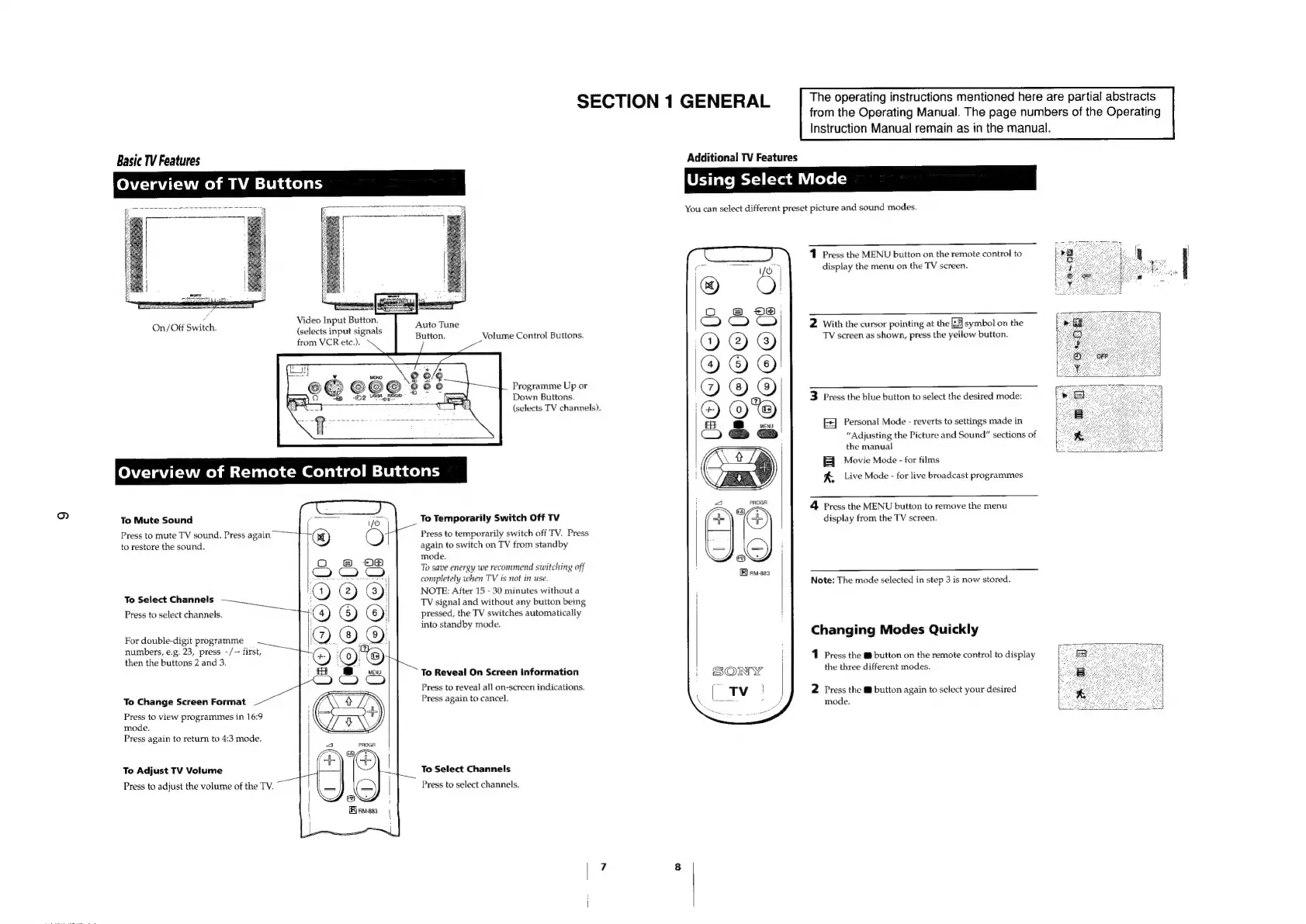
Basic
TV
Features
Overview
of
TV
Buttons
from
VCR
etc.)
Video
Input
Button.
(selects
input
signals
SECTION
1
GENERAL
Instruction
Manual
remain
as
in
the
manual.
Additional
TV
Features
Using
Select
Mode
You
can
select
different
preset
picture
and
sound
modes.
1
Press
the
MENU
button
on
the
remote
control
to
display
the
menu
on
the
TV
screen.
=~
The
operating
instructions
mentioned
here
are
partial
abstracts
from
the
Operating
Manual.
The
page
numbers
of
the
Operating
Auto
Tune
Button.
2
With
the
cursor
pointing
at
the
[:2]
symbol
on
the
TV
screen
as
shown,
press
the
yellow
button.
Volume
Control
Buttons.
Programme
Up
or
Down
Buttons.
3
Press
the
blue
button
to
select
the
desired
mode:
To
Mute
Sound
Press
to
mute
TV
sound.
Press
again
to
restore
the
sound.
To
Select
Channels
Press
to
select
channels.
For
double-digit
programme
=
__
numbers,
e.g.
23,
press
-/--
first,
then
the
buttons
2
and
3.
To
Change
Screen
Format
Press
to
view
programmes
in
16:9
mode.
Press
again
to
return
to
4:3
mode.
To
Adjust
TV
Volume
Press
to
adjust
the
volume
of
the
TV.
|
(e@OC@Ole
=
S|
EGOOOCB
(selects
TV
channels).
Personal
Mode
-
reverts
to
settings
made
in
“Adjusting
the
Picture
and
Sound”
sections
of
the
manual
fF
Movie
Mode
-
for
films
f,
Live
Mode
-
for
live
broadcast
programmes
(BOOOOL
®@
|
=|
#OQOCOO
PROGR
i
a
To
Temporarily
Switch
Off
TV
ob.
“(+)
Press
to
temporarily
switch
off
TV.
Press
again
to
switch
on
TV
from
standby
mode.
NS
To
save
energy
we
recommend
switching
off
completely
when
TV
is
not
in
use.
NOTE:
After
15
-
30
minutes
without
a
TV
signal
and
without
any
button
being
pressed,
the
TV
switches
automatically
into
standby
mode.
4
Press
the
MENU
button
to
remove
the
menu
display
from
the
TV
screen.
[R)
am-sas
Note:
The
mode
selected
in
step
3
is
now
stored.
Changing
Modes
Quickly
1
Press
the
™@
button
on
the
remote
control
to
display
To
Reveal
On
Screen
Information
the
three
different
modes.
Press
to
reveal
all
on-screen
indications.
P
ain
to
1
2
Press
the
@
button
again
to
select
your
desired
Tess
agal
cancel.
mode.
To
Select
Channels
Press
to
select
channels.

Related product manuals