EasyManua.ls Logo

Sony TRINITRON KV-29C5E - Test Mode 2 Operations

Sony TRINITRON KV-29C5E
57 pages
Print Icon
To Next Page IconTo Next Page
To Previous Page IconTo Previous Page
Loading...
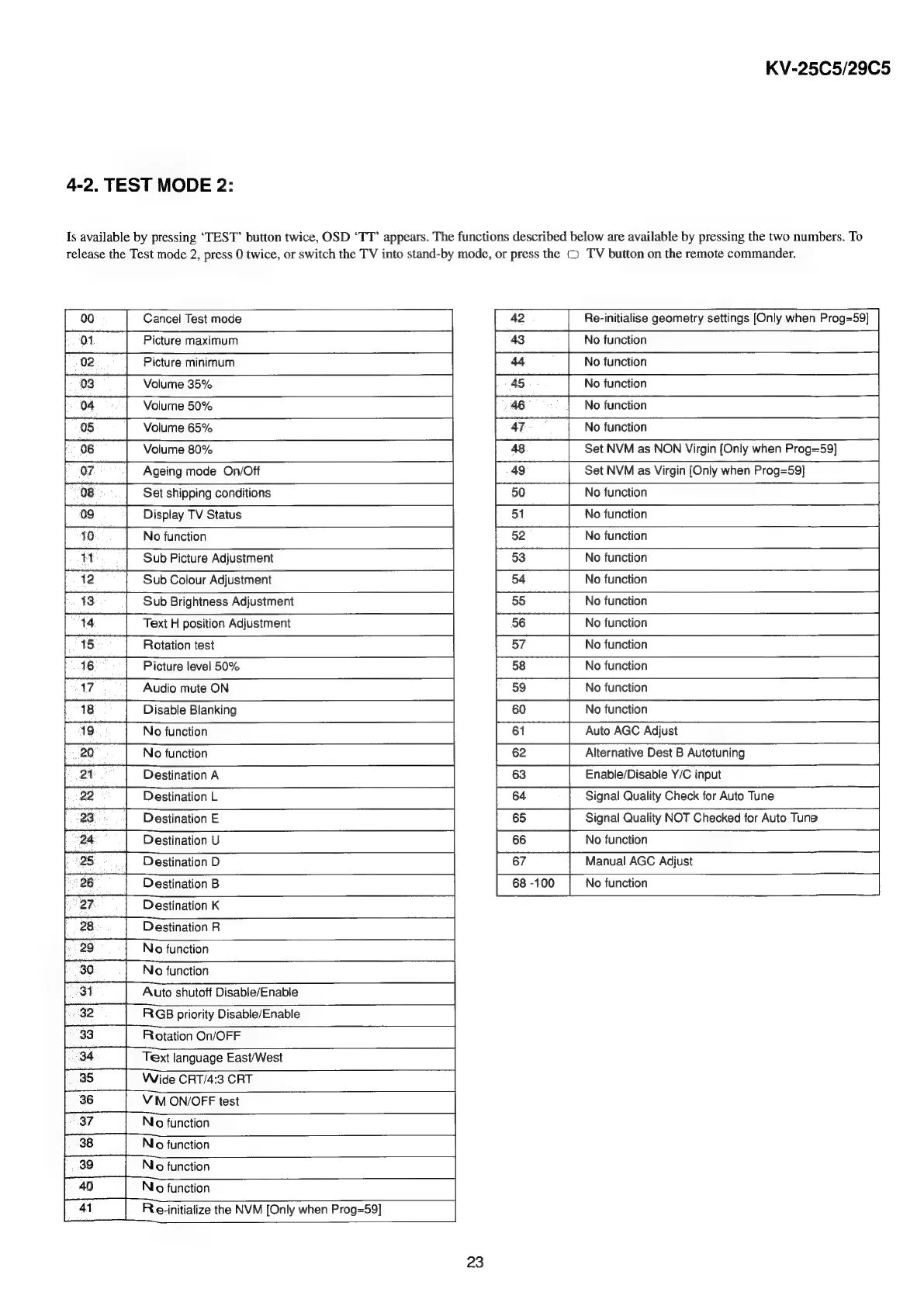
4-2.
TEST
MODE
2:
KV-25C5/29C5
Is
available
by
pressing
‘TEST’
button
twice,
OSD
‘TT’
appears.
The
functions
described
below
are
available
by
pressing
the
two
numbers.
To
release
the
Test
mode
2,
press
0
twice,
or
switch
the
TV
into
stand-by
mode,
or
press
the
©
TV
button
on
the
remote
commander.
Cancel
Test
mode
Picture
maximum
Picture
minimum
Volume
35%
Volume
50%
Volume
65%
Volume
80%
Ageing
mode
On/Off
Set
shipping
conditions
Display
TV
Status
No
function
00
7]
ca
Po]
Sub
Picture
Adjustment
12
1
Sub
Brightness
Adjustment
14
15:
Sub
Colour
Adjustment
Text
H
position
Adjustment
Rotation
test
Picture
level
50%
Audio
mute
ON
Disable
Blanking
9
2
No
function
Oo
No
function
Destination
A
22
23
24
Destination
L
Destination
E
Destination
U
Re-initialise
geometry
settings
[Only
when
Prog=59]
No
function
No
function
No
function
No
function
~
aa
No
function
25
Destination
D
8
Destination
B
nN
ee}
Destination
K
N
oa
Destination
R
No
function
No
function
Auto
shutoff
Disable/Enable
RGB
priority
Disable/Enable
Rotation
On/OFF
Text
language
East/West
Wide
CRT/4:3
CRT
VM
ON/OFF
test
3
32
34
ary
w
on
b
o
aoe.
Ao
|
a5
eee
eke
ew
of
NL
o@
37
Niro
function
39
No
function
OQ
Niro
function
Re-initialize
the
NVM
[Only
when
Prog=59]
41
23
48
Set
NVM
as
NON
Virgin
[Only
when
Prog=59]
49
Set
NVM
as
Virgin
[Only
when
Prog=59]
50
No
function
No
function
52
No
function
53
No
function
[55
|
Notuneion
a
88
Notuneion
a
|
Retain
Alternative
Dest
B
Autotuning
Enable/Disable
Y/C
input
Signal
Quality
Check
for
Auto
Tune
|
6
|
Signal
Quality
NOT
Checked
for
Auto
Tune
66
No
function
67
Manual
AGC
Adjust
No
function

Related product manuals