EasyManua.ls Logo

Sony TRINITRON KV-29C5E - Deflection System Adjustments

Sony TRINITRON KV-29C5E
57 pages
Print Icon
To Next Page IconTo Next Page
To Previous Page IconTo Previous Page
Loading...
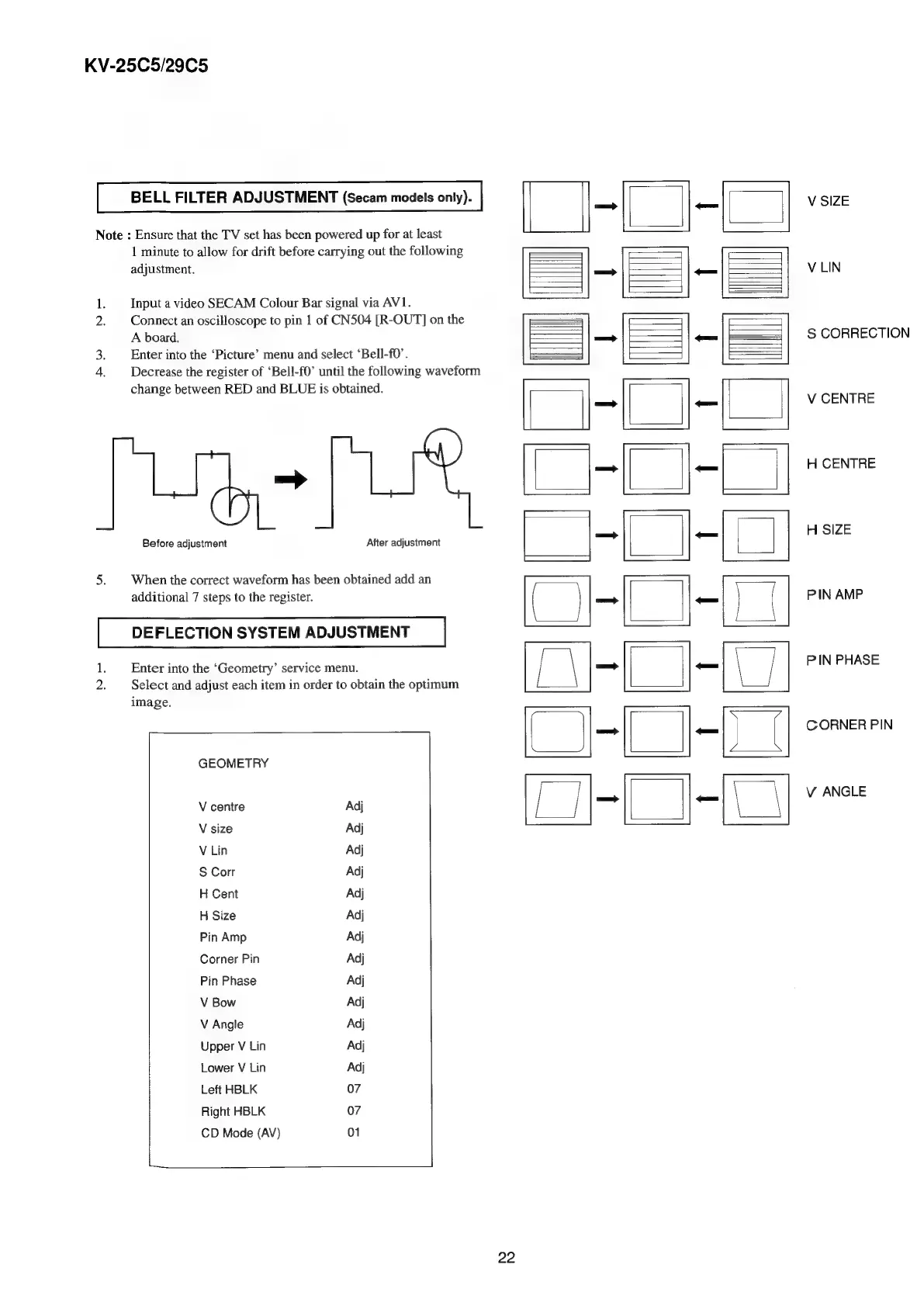
KV-25C5/29C5
BELL
FILTER
ADJUSTMENT
(Secam
models
only).
Note
:
Ensure
that
the
TV
set
has
been
powered
up
for
at
least
No
pe?
Before
adjustment
1
minute
to
allow
for
drift
before
carrying
out
the
following
Input
a
video
SECAM
Colour
Bar
signal
via
AV1.
Connect
an
oscilloscope
to
pin
1
of
CN504
[R-OUT]
on
the
Enter
into
the
‘Picture’
menu
and
select
‘Bell-f0’.
Decrease
the
register
of
‘Bell-f0’
until
the
following
waveform
change
between
RED
and
BLUE
is
obtained.
=>
After
adjustment
When
the
correct
waveform
has
been
obtained
add
an
additional
7
steps
to
the
register.
DEFLECTION
SYSTEM
ADJUSTMENT
1,
2.
Enter
into
the
‘Geometry’
service
menu.
Select
and
adjust
each
item
in
order
to
obtain
the
optimum
GEOMETRY
V
centre
V
size
V
Lin
S
Corr
H
Cent
H
Size
Pin
Amp
Corner
Pin
Pin
Phase
V
Bow
V
Angle
Upper
V
Lin
Lower
V
Lin
Left
HBLK
Right
HBLK
CD
Mode
(AV)
22
OVE
IAL
i
V
SIZE
V
LIN
S
CORRECTION
V
CENTRE
H
CENTRE
H
SIZE
PIN
AMP
PIN
PHASE
CORNER
PIN
V
ANGLE

Related product manuals