EasyManua.ls Logo

Sony TRINITRON KV-29C5E - Page 21

Sony TRINITRON KV-29C5E
57 pages
Print Icon
To Next Page IconTo Next Page
To Previous Page IconTo Previous Page
Loading...
KV-25C5/29C5
Note:
Ensure
that
no
signal
is
applied
to
the
Antenna
socket
while
carrying
out
the
following
IF
adjustments.
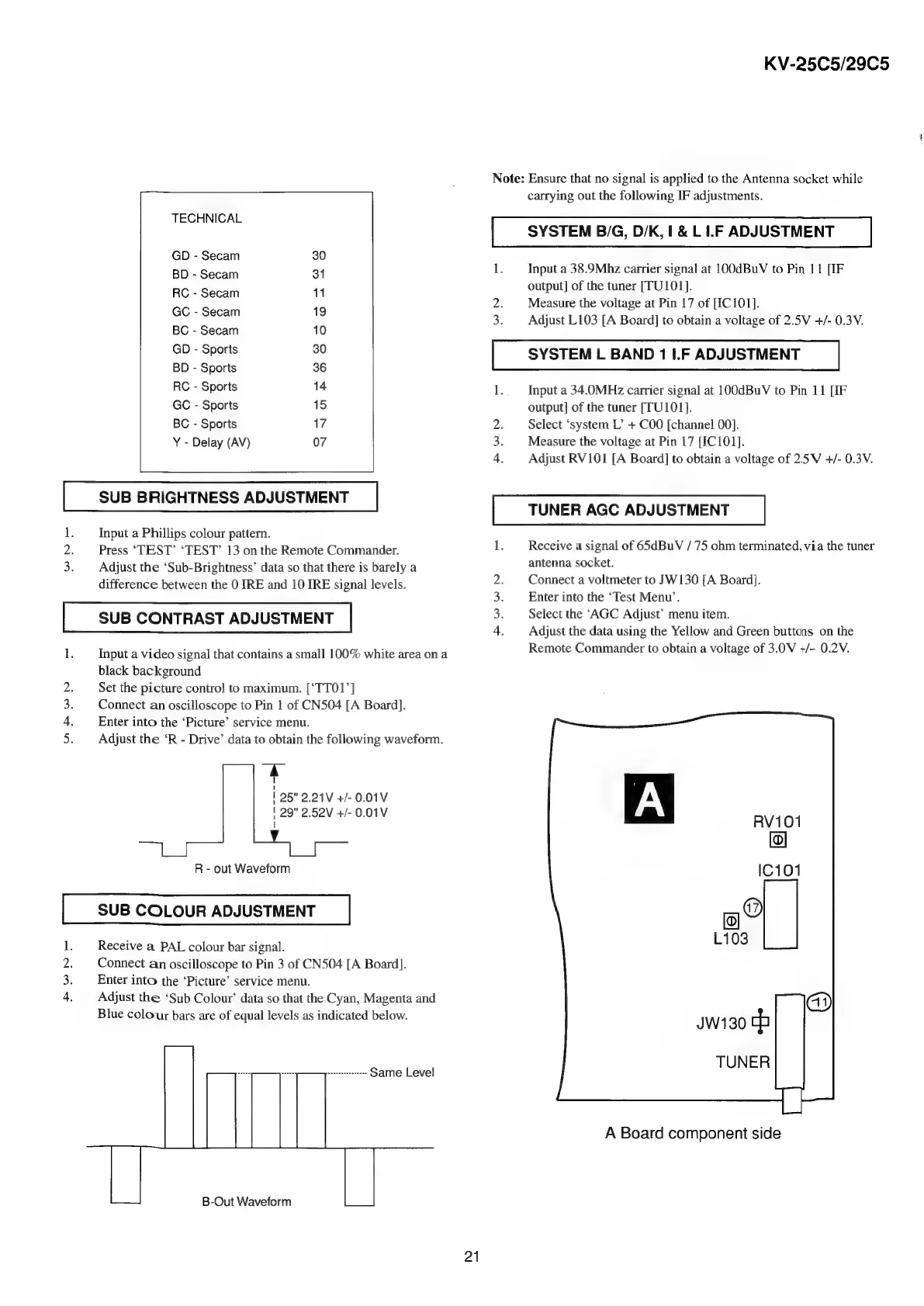
TECHNICAL
SYSTEM
B/G,
D/K,
1
&
L
1.F
ADJUSTMENT
GD
-
Secam
30
:
1
Input
a
38.9Mhz
carrier
signal
at
100dBuV
to
Pin
11
[IF
BD
-
Secam
31
otic’
ITU101}
RC-S
11
output]
of
the
tuner
;
i
aia
_
2.
Measure
the
voltage
at
Pin
17
of
[ICIOI].
eeean
3.
Adjust
L103
[A
Board]
to
obtain
a
voltage
of
2.5V
4/-
0.3V.
BC
-
Secam
10
SOspens
SYSTEM
L
BAND
1
I.F
ADJUSTMENT
BD
-
Sports
36
RC
-
Sports
14
1.
Input
a
34.0MHz
carrier
signal
at
100dBuV
to
Pin
11
[IF
GC
-
Sports
15
output]
of
the
tuner
[TU101}.
BC
-
Sports
17
2.
Select
‘system
L’
+
COO
[channel
00].
Y
-
Delay
(AV)
07
3.
Measure
the
voltage
at
Pin
17
[IC101].
4.
Adjust
RV101
[A
Board]
to
obtain
a
voltage
of
2.5V
+/-
0.3V.
SUB
BRIGHTNESS
ADJUSTMENT
:
pe
BUEN
TUNER
AGC
ADJUSTMENT
1.
Input
a
Phillips
colour
pattern.
: ;
;
2.
Press
‘TEST’
‘TEST’
13
on
the
Remote
Commander.
Receive
a
signal
of
65dBuV
/
75
ohm
terminated,
via
the
tuner
3.
Adjust
the
‘Sub-Brightness’
data
so
that
there
is
barely
a
antenna
socket.
difference
between
the
0
IRE
and
10
IRE
signal
levels.
Connect
a
voltmeter
to
SW130
[A
Board].
Enter
into
the
‘Test
Menu’.
SUB
CONTRAST
ADJUSTMENT
Select
the
‘AGC
Adjust’
menu
item.
Adjust
the
data
using
the
Yellow
and
Green
buttons
on
the
1.
Input
a
video
signal
that
contains
a
small
100%
white
area
on
a
black
background
Remote
Commander
to
obtain
a
voltage
of
3.0V
+/-
0.2V.
Set
the
picture
control
to
maximum.
[‘TTO1’]
Connect
an
oscilloscope
to
Pin
1
of
CN504
[A
Board].
Enter
into
the
‘Picture’
service
menu.
Adjust
the
‘R
-
Drive’
data
to
obtain
the
following
waveform.
-
1
25"
2.21V
+/-
0.01V
'
29"
2.52V
+/-
0.01V
|
ra
Fe
bo
ial
Ne
R
-
out
Waveform
SUB
COLOUR
ADJUSTMENT
Receive
a
PAL
colour
bar
signal.
Connect
an
oscilloscope
to
Pin
3
of
CN504
[A
Board].
Enter
into
the
‘Picture’
service
menu.
Adjust
the
‘Sub
Colour’
data
so
that
the
Cyan,
Magenta
and
Blue
colour
bars
are
of
equal
levels
as
indicated
below.
aa
da
a
Same
Level
A
Board
component
side
B-Out
Waveform
21

Related product manuals