EasyManua.ls Logo

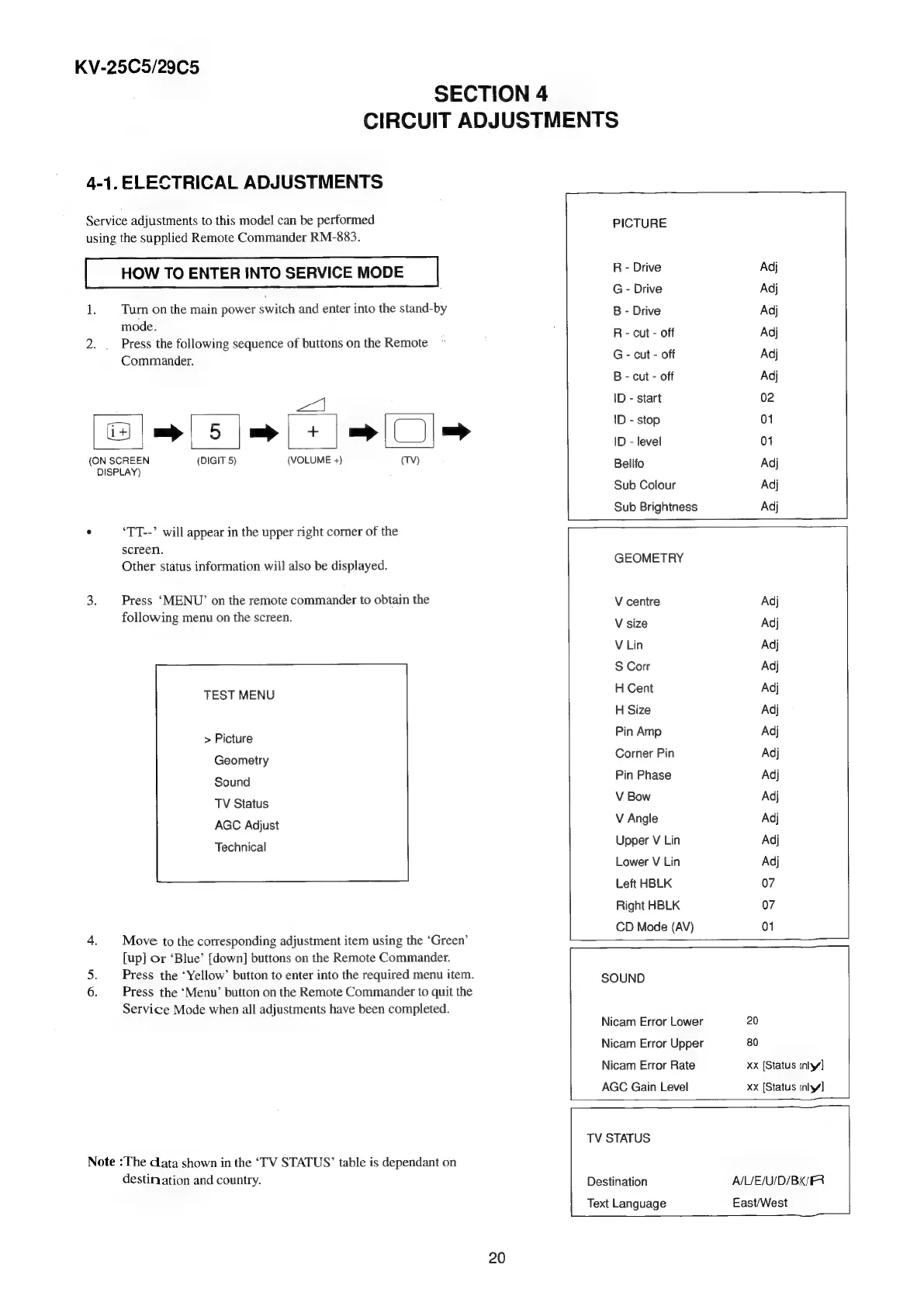
Sony TRINITRON KV-29C5E - Circuit Adjustments; Electrical Adjustments

Sony TRINITRON KV-29C5E
57 pages
Print Icon
To Next Page IconTo Next Page
To Previous Page IconTo Previous Page
Loading...
KV-25C5/29C5
SECTION
4
CIRCUIT
ADJUSTMENTS
4-1.
ELECTRICAL
ADJUSTMENTS
Service
adjustments
to
this
model
can
be
performed
using
the
supplied
Remote
Commander
RM-883.
HOW
TO
ENTER
INTO
SERVICE
MODE
1.
Turn
on
the
main
power
switch
and
enter
into
the
stand-by
mode.
2.
.
Press
the
following
sequence
of
buttons
on
the
Remote
Commander.
ee
Se
Se
A
(ON
SCREEN
(DIGIT
5)
(VOLUME
+)
(TV)
DISPLAY)
°
‘TT--’
will
appear
in
the
upper
right
corner
of
the
screen.
Other
status
information
will
also
be
displayed.
3.
|
Press
‘MENU’
on
the
remote
commander
to
obtain
the
following
menu
on
the
screen.
TEST
MENU
>
Picture
Geometry
Sound
TV
Status
AGC
Adjust
Technical
4.
Move
to
the
corresponding
adjustment
item
using
the
‘Green’
[up]
Or
‘Blue’
[down]
buttons
on
the
Remote
Commander.
im
6.
Press
the
‘Menu’
button
on
the
Remote
Commander
to
quit
the
Service
Mode
when
all
adjustments
have
been
completed.
Note
:The
data
shown
in
the
‘TV
STATUS’
table
is
dependant
on
destination
and
country.
Press
the
‘Yellow’
button
to
enter
into
the
required
menu
item.
Nicam
Error
Lower
Nicam
Error
Upper
Nicam
Error
Rate
AGC
Gain
Level
PICTURE
R
-
Drive
Adj
G
-
Drive
Adj
B
-
Drive
Adj
R
-
cut
-
off
Adj
G
-
cut
-
off
Adj
B
-
cut
-
off
Adj
ID
-
start
02
ID
-
stop
01
ID
-
level
01
Bellfo
Adj
Sub
Colour
Adj
Sub
Brightness
Adj
GEOMETRY
V
centre
Adj
V
size
Adj
V
Lin
Adj
S
Corr
Adj
H
Cent
Adj
H
Size
Adj
Pin
Amp
Adj
Corner
Pin
Adj
Pin
Phase
Adj
V
Bow
Adj
V
Angle
Adj
Upper
V
Lin
Adj
Lower
V
Lin
Adj
Left
HBLK
07
Right
HBLK
07
CD
Mode
(AV)
01
SOUND
20
80
xx
[Status
inly]
xx
[Status
inly]
TV
STATUS
Destination
A/UE/U/D/BKIFR
lL
Text
Language
East/West
20

Related product manuals