5
Connections
KV-25FS150/KV-29FS150
2-898-781-21(1)
Connecting Additional Equipment
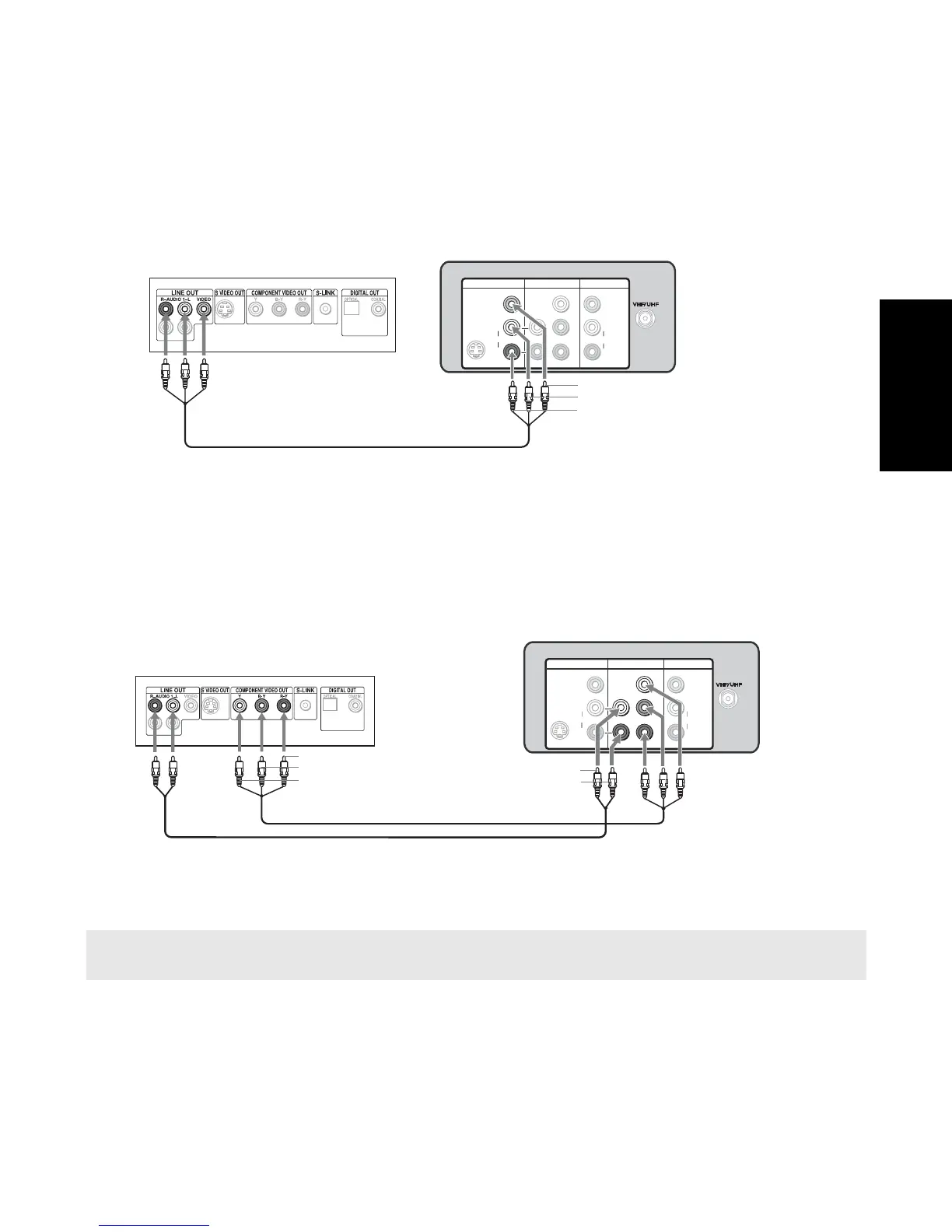
Connecting a DVD Player using Composite Video (VIDEO/AUDIO L(MONO), R)
Use audio/video cables (not supplied) connect AUDIO/VIDEO OUT on your DVD player to VIDEO IN
on your TV.
Optional connection
❏ For better picture quality, use S VIDEO instead of the yellow video cable. S VIDEO does not provide
sound, so you still must connect the audio cables
Connecting a DVD Player using Component Video (YPBPR/R,L)
If your DVD player is equipped with video outputs (YPBPR), you can improve the picture quality by
using component video cables (480i only).
1 Connect YPBPR OUT on your DVD Player to YPBPR IN on your TV using component video cables
(not supplied).
2
Connect AUDIO OUT on your DVD player to AUDIO IN on your TV.
✍ The YPBPR outputs on your DVD player are sometimes labeled Y, CB and CR or Y, B-Y, and R-Y. If so, connect the
cables to like color of the jacks.
VIDEO 1 IN
VIDEO 3 IN MONITOR OUT
Y
PB
P
R
VIDEO
AUDIO
L
(MONO)
R
VIDEO
AUDIO
(MONO)
L
R
S VIDEO
Video (yellow)
Audio L (white)
Audio R (red)
Rear of DVD Player
Rear of TV
VIDEO 1 IN
VIDEO 3 IN MONITOR OUT
Y
PB
P
R
VIDEO
AUDIO
L
(MONO)
R
VIDEO
AUDIO
(MONO)
L
R
S VIDEO
Audio R (red)
Audio L (white)
Y (green)
P
B (blue)
P
R (red)
Rear of DVD Player
Rear of TV
1
2







 To Next Page