— 11 —
KV-27FV15/29FV10/29FV15/29FV15C/29FV15K
26
Using Your Menus (continued)
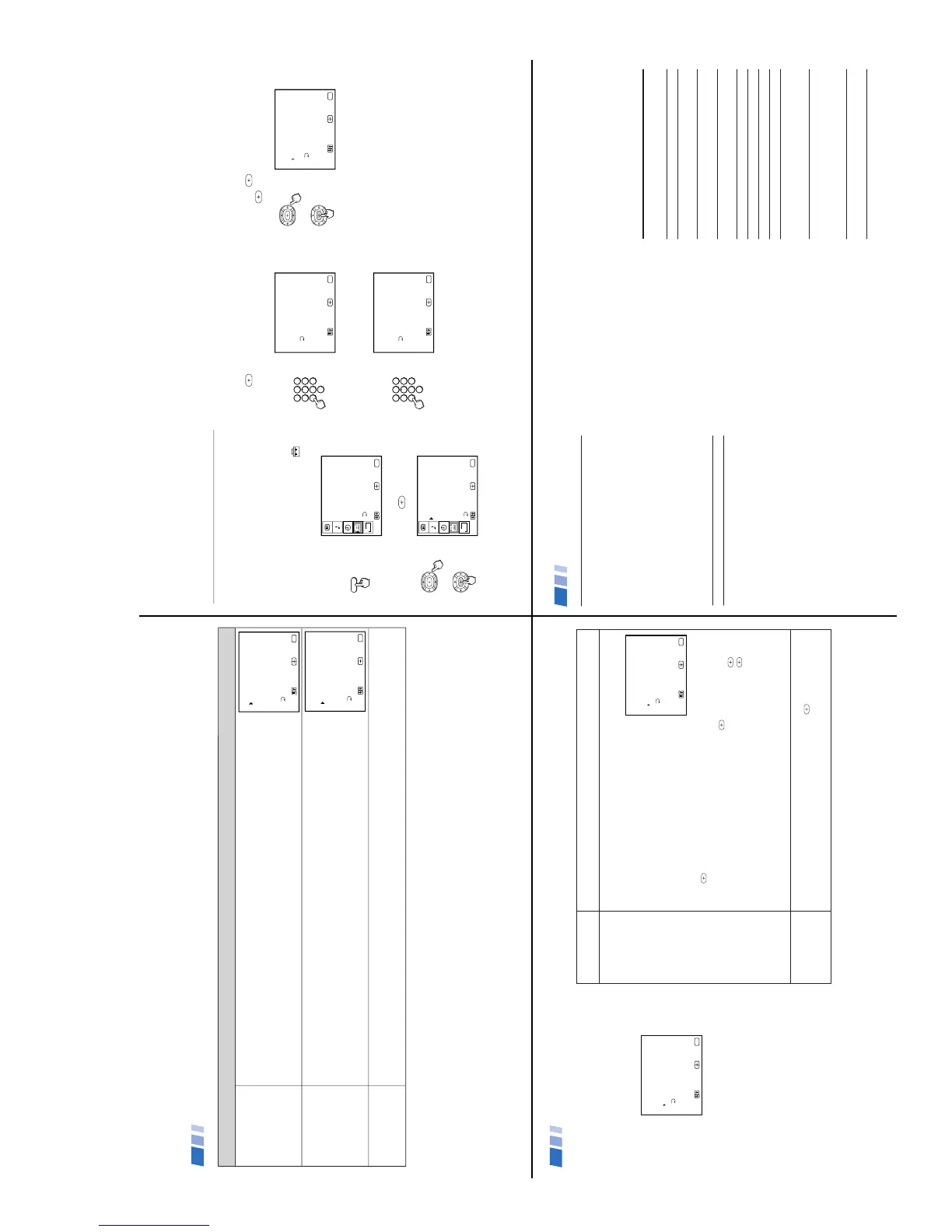
ENGLISH RATINGS
For Canadian programs
that are broadcast in
English
FRENCH RATINGS
For Canadian programs
that are broadcast in
French
U.S.A. RATINGS
For programs from the
United States
(Canadian models only)
C: All children.
C8+: Children 8 years and older.
G: General programming.
PG: Parental Guidance.
14+: Viewers 14 and older.
18+: Adult programming.
(Canadian models only)
G: General programming.
8 ans+: Not recommended for young children.
13 ans+: Not recommended for ages under 13.
16 ans+: Not recommended for ages under 16
18 ans+: Programming restricted to adults.
(Canadian models only)
Please see TV RATINGS on page 25 for information on U.S.A. RATINGS.
Overview of the Ratings
ENGLISH RATINGS
G:
Move Exit
MENU
Select
MENU
C8+:
C:
18+:
14+:
PG:
Select rating
_
_
_
_
_
_
FRENCH RATINGS
8 ans+:
Move Exit
MENU
Select
MENU
G:
18+:
16 ans+:
13 ans+:
Select rating
_
_
_
_
_
27
Using the PARENTAL CONTROL
menu
This section shows you how to access the
PARENTAL CONTROL menu. After you
follow the example below, the next section
shows you how to adjust your TV’s rating.
1
Press MENU and select the SET UP
menu.
MENU
SET UP
CHANNEL SET UP
CAPTION VISION: CC1
PARENTAL CONTROL
VIDEO LABEL
TILT CORRECTION
MENU
Move Exit
MENU
Select
LANGUAGE: ENGLISH
DEMO
B
2
Point the cursor to PARENTAL
CONTROL and press
.
SET UP
CHANNEL SET UP
CAPTION VISION: CC1
PARENTAL CONTROL
VIDEO LABEL
TILT CORRECTION
MENU
Move Exit
MENU
Select
FAVORITE CHANNEL
LANGUAGE: ENGLISH
DEMO
B
You will be asked to enter a 4-digit password
for any future access into the PARENTAL
CONTROL menu.
3
Press
and use the 0-9 buttons to enter
your 4-digit password.
1 2 3
4 5 6
7 8
0
9
PARENTAL CONTROL
PASSWORD: _ _ _ _
Use the [0-9] buttons to
enter a new four-digit
password
Move Exit
MENU
Select
MENU
4
Confirm your password by entering it
again.
1 2
3
4 5 6
7 8
0
9
PARENTAL CONTROL
PASSWORD: X X X _
Confirm password
Move Exit
MENU
Select
MENU
Once your password is set correctly, you
will be taken into the PARENTAL
CONTROL menu.
In order to change the RATING you will need
to set PARENTAL LOCK to ON.
5
Point the cursor at PARENTAL LOCK
and press
. Press V or v to ON and
press
.
CHANGE PASSWORD
PARENTAL CONTROL
RATING: CHILD
Move Exit
MENU
Select
MENU
PARENTAL LOCK: ON
See pages 25-26 for an overview of the
Parental Guideline ratings.
Tip z
Keep this instruction manual in a safe place.
In the event that you forget your password,
please see page 33.
28
PARENTAL LOCK
Turns ratings on/off
RATING
CHANGE
PASSWORD
Setting the TV’s RATING
This section provides information on how to
set the TV’s RATING and how to change
your password.
Note
Entering your password to view a blocked
program will temporarily turn PARENTAL
LOCK to OFF. To reactivate your
PARENTAL CONTROL settings, turn the TV
off then back on; the TV will restore your
rating settings.
ON: Select to activate the RATING.
OFF: Turns off current ratings.
If you are not familiar with the Parental Guideline rating system, you should use
one of the following preselected categories to help simplify the rating selection.
The following maximum ratings will be allowed:
CHILD: TV-Y, TV-G, G (U.S. models only),
TV-Y, G (Canadian models only).
YOUTH: TV-PG, PG (U.S. models only),
TV-PG, PG, 8 ans+ (Canadian models only).
YOUNG ADULT: TV-14, PG-13 (U.S. models only),
TV-14, 14+, 13 ans+ (Canadian models only).
CUSTOM: If you prefer to set more restrictive ratings, highlight CUSTOM and
press
. See pages 25-26, for an overview of the rating systems available.
In the CUSTOM RATINGS menu:
1 Select the desired rating category and press
.
2 Press V or v to select the maximum rating or content and press
.
3 Press V or v to block or unblock the rating or content and press
.
Once you have blocked a rating or content, all higher ratings or contents will be
automatically blocked.
To view a blocked program:
Press ENTER on the remote control, then use the 0-9 buttons to enter your
password.
To reset your password:
1 Move the cursor to CHANGE PASSWORD press
.
2 Use the 0-9 buttons to create a new password, enter again to confirm.
In the event that you forget your password, see page 33.
CHANGE PASSWORD
PARENTAL CONTROL
RATING: CHILD
Move Exit
MENU
Select
MENU
PARENTAL LOCK: ON
CHANGE PASSWORD
PARENTAL CONTROL
RATING: CHILD
Move Exit
MENU
Select
MENU
PARENTAL LOCK: ON
Using Your Menus (continued)
29
Programming the remote
You can use the supplied remote control to
operate Sony or non-Sony video equipment.
Operating Video Equipment
1
Press CODE SET.
2
Press VTR/DVD (FUNCTION).
3
Use the 0-9 buttons to key in the
manufacturer's code number from the
following chart.
4
Press ENTER.
VCR code numbers
Manufacturer Code
Sony 301, 302, 303
Admiral (M. Ward) 327
Aiwa 338, 344
Audio Dynamic 314, 337
Broksonic 319, 317
Canon 309, 308
Citizen 332
Craig 302, 332
Criterion 315
Curtis Mathes 304, 338, 309
Daewoo 341, 312, 309
DBX 314, 336, 337
Dimensia 304
Emerson 319, 320, 316, 317, 318, 341
Fisher 330, 335
Funai 338
General Electric 329, 304, 309
Go Video 322, 339, 340
Goldstar 332
Hitachi 306, 304, 305,338
Instant Replay 309, 308
JC Penney 309, 305, 304, 330, 314, 336, 337
JVC 314, 336, 337, 345, 346, 347
Kenwood 314, 336, 332, 337
LXI (Sears) 332, 305, 330, 335, 338
Magnavox 308, 309, 310
Marantz 314, 336, 337
Marta 332
Memorex 309, 335
Minolta 305, 304
Mitsubishi/MGA 323, 324, 325, 326
Multitech 325, 338, 321
NEC 314, 336, 337
Olympic 309, 308
Optimus 327
Panasonic 308, 309, 306, 307
Pentax 305, 304
Philco 308, 309
Philips 308, 309, 310
Pioneer 308
Quasar 308, 309, 306
RCA/PROSCAN 304, 305, 308, 309, 311,
312, 313, 310, 329
Realistic 309, 330, 328, 335, 324, 338
Sansui 314
Samsung 322, 313, 321
Sanyo 330, 335
Scott 312, 313, 321, 335, 323, 324, 325, 326
Sharp 327, 328
Shintom 315
Signature 2000 (M. Ward) 338, 327
SV2000 338
Sylvania 308, 309, 338, 310
Symphonic 338
Tashiro 332
Tatung 314, 336, 337
Teac 314. 336, 338, 337
Technics 309, 308
Toshiba 312, 311
Wards 327, 328, 335, 331, 332
Yamaha 314, 330, 336, 337
Zenith 331
Operating a VCR
To turn on or off
To select a
channel directly
To change
channels
To record
To play
To stop
To fast forward
To rewind the tape
To pause
To scan
To change input
mode
Buttons on the
remote control
Press VTR/DVD (POWER).
Press the 0-9 buttons.
Press CH +/–.
Press ( and r
simultaneously.
Press (.
Press p.
Press ).
Press 0.
Press P.
To resume normal playback,
press again or press (.
Press ) or 0 during
playback.
To resume normal playback,
release the button.
Press TV/VTR.





 To Next Page