KV-27FV15/29FV10/29FV15/29FV15C/29FV15K
— 29 —
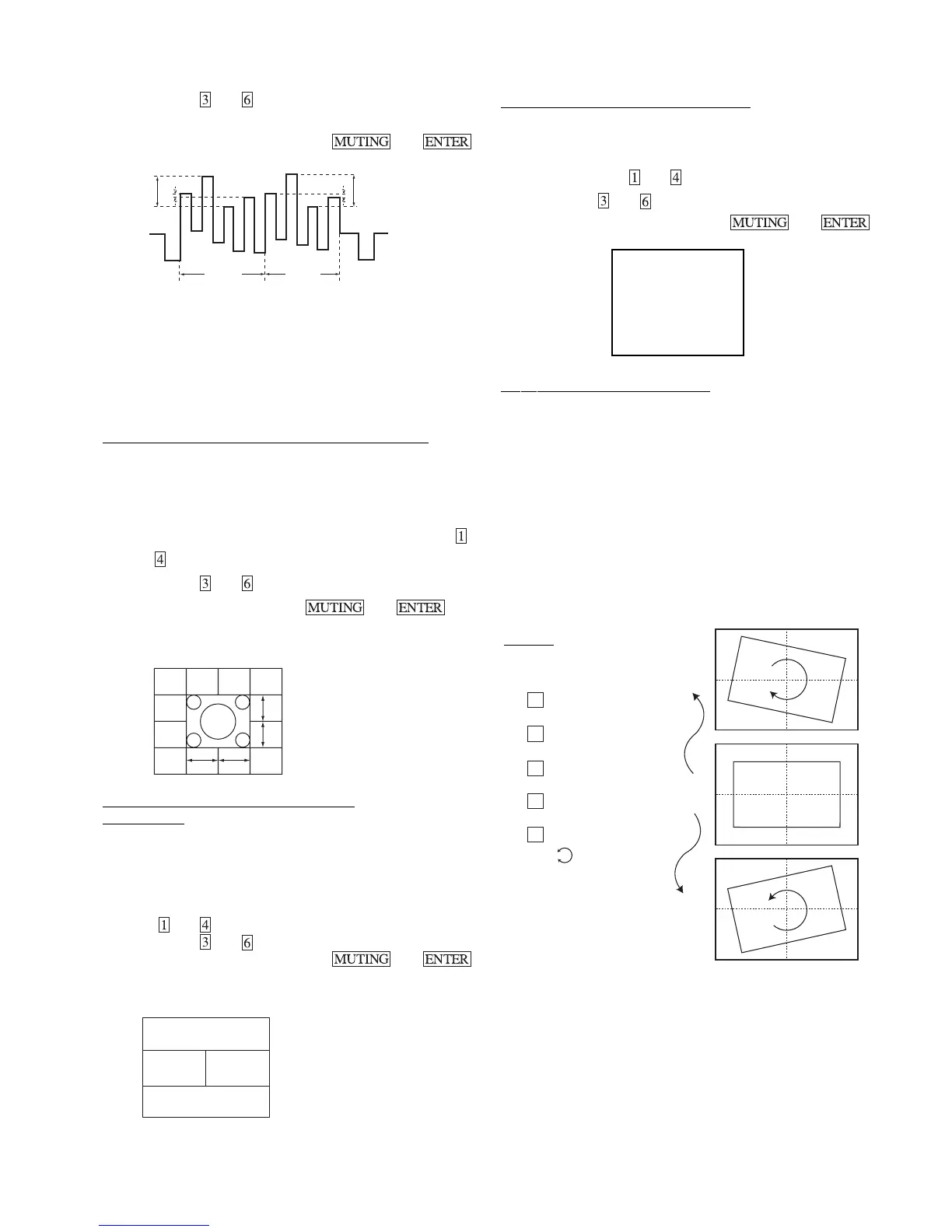
6. Adjust with and .
7. After adjust write MSHU and ISHU data 1 step down.
8. Write into the memory by pressing then .
V1
V3
V4
V1’
V3’
V4’
SUB MAIN
SUB COLOR
V1–V4= ±0.1V
V1’–V4’= ±0.1V
SUB HUE
V3–V2= ±0.1V n 1 STEP DOWN
V3’–V2’= ±0.1V n1 STEP DOWN
P&P ACQUISITION ADJUSTMENT (MAHP, MAVP)
1. Input a Monoscope signal.
2. Set PICTURE = 100%.
3. Set P&P mode and set CHANNEL INDEX mode.
4. Set to Service Mode and select MAHP and MAVP with
and .
5. Adjust with
and for the best center (main window).
6. Write the memory by pressing
then .
NEED TO ADJUST AFTER
GEOMETRIC ADJUST
A–B = ±0.2 sg
C–D = ±0.2 sg
A
B
C
D
P&P WHITE BALANCE ADJUSTMENT
(IUPE, IVPE)
1. Input a 40 IRE white signal.
2. Set to VIDEO mode = STANDARD.
3. Set to P&P mode.
4. Set to Service Mode and select IUPE IVPE (sub window)
with
and .
5. Adjust with
and for white balance.
6. Write into the memory by pressing
then .
NEED TO ADJUST AFTER
MAIN PICTURE (NOT P&P)
W/B ADJUST
SUB WINDOW
MAIN WINDOW
*9300 degrees K +8 MPCD
OSD POSITION ADJUSTMENT (DISP)
1. Input a color bar signal.
2. Set to Service adjustment Mode.
3. Select DISP with
and .
4. Adjust with
and for the bar center.
5. Write into the memory by pressing then .
ROTATION COIL ADJUSTMENT
1. Input a monoscope signal.
2. Push Menu button on the Remote (RM-Y171).
3. Select "Set Up" Mode.
4. Select "Tilt Correction". Confirm that number (0) color
changes to red.
5. Push > (+) on the Remote (RM-Y171). Confirm that number
increases up to +5 and picture rotates clockwise.
6. Push . (+) on the Remote (RM-Y171). Confirm that number
decreases up to -5 and picture rotates counterclockwise.
7. Push > (+) on the Remote (RM-Y171). Return to 0.
SET-UP
SERVICE VP AFC 0
1000 0000
|||||||||||||||------------
+5
0
-5
Channel Set-up
Favorite Channel
Video Label
Language: English
Tilt Correction : 0
Menu
**CAUTION**
Geom. adjustment
condition must be 0.







 To Next Page