— 6 —
KV-27FV15/29FV10/29FV15/29FV15C/29FV15K
6
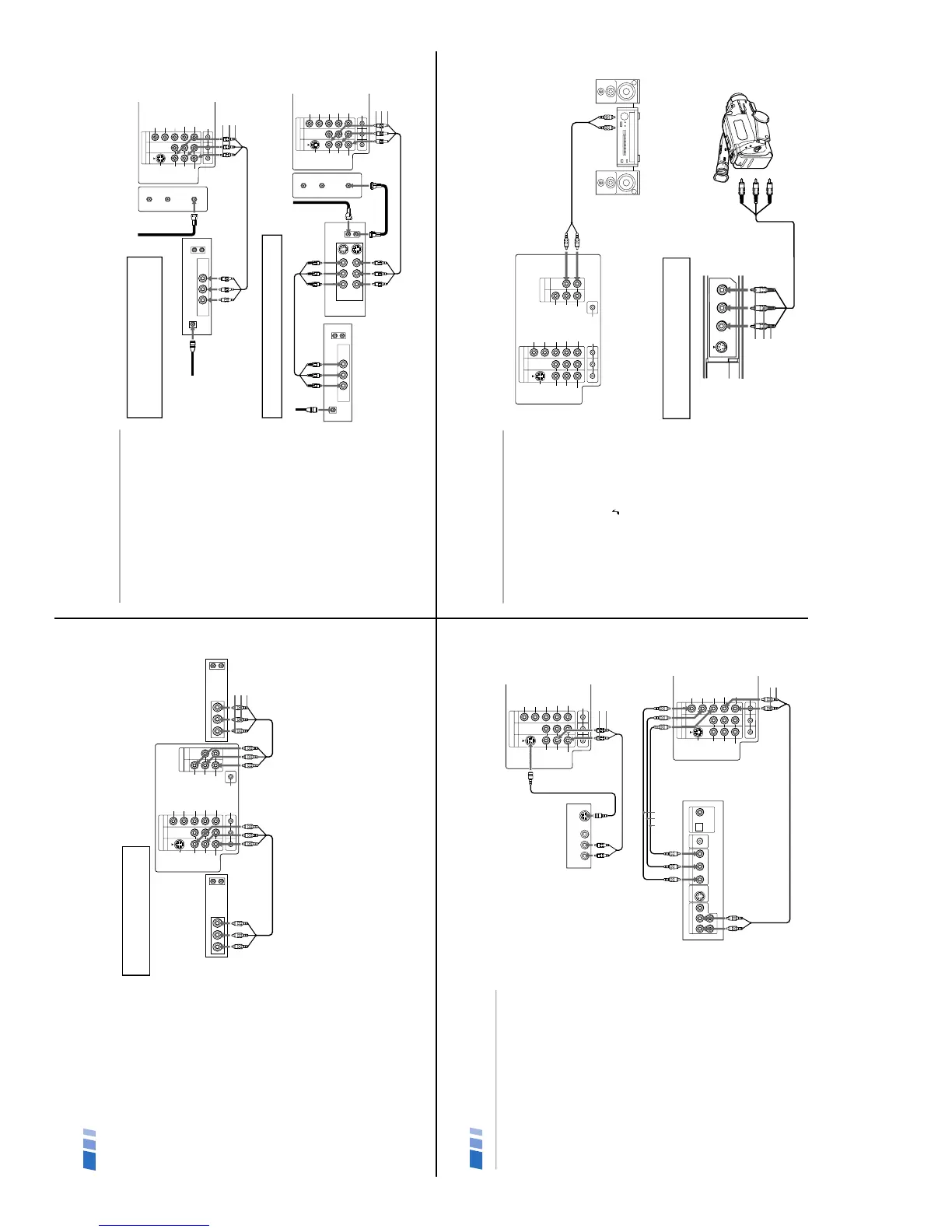
Connecting two VCRs for tape editing
MONITOR OUT gives you the ability to use a
second VCR to record a program being played
by the primary VCR or to perform tape
editing and dubbing.
1 Connect the VCR intended for playback
using the connection instructions on
page 5 of this manual.
2 Using A/V connectors, connect AUDIO
and VIDEO IN on your VCR intended for
recording to MONITOR AUDIO and
VIDEO OUT on your TV.
Note
You cannot record signals from equipment
connected to the Y, P
B, PR input.
Connecting and Installing the TV (continued)
OUT
MONITOR
AUDIO
(
VAR/FIX
)
VIDEO IN
134
IN
L
R
(
MONO
)
VIDEO VIDEO
S VIDEO
OUT
AUDIO
L
R
(
MONO
)
AUDIO
L
R
Y
P
B
P
R
AUDIO
S- LINK
CONTROL S
LINE
OUT
OUT
IN
LINE
IN
OUT
IN
AUDIO R AUDIO L VIDEO AUDIO R AUDIO L VIDEO
VCR (for playback)
VCR (for recording)
(Rear of TV)
1
2
AUDIO-R (red)
AUDIO-L (white)
VIDEO (yellow)
To perform tape editing; set the
TV to the video input intended for
playback by pressing TV/VIDEO.
7
Satellite Receiver Connections
Connecting a satellite receiver
1
Connect the cable from your satellite
antenna to SATELLITE IN on your receiver.
2
Attach the coaxial connector from your
cable or antenna to VHF/UHF on your TV.
3
Using A/V connectors, connect AUDIO
and VIDEO OUT on your receiver to
AUDIO and VIDEO IN on your TV.
Connecting a satellite receiver and
a VCR
1
Connect the cable from your satellite
antenna to SATELLITE IN on your receiver
.
2
Attach the coaxial connector from your
cable or antenna to IN on your VCR.
3
Using a coaxial connector, connect OUT
on your VCR to VHF/UHF on your TV.
4
Using A/V connectors, connect AUDIO
and VIDEO OUT on your receiver to
AUDIO and VIDEO IN on your VCR.
5
Using A/V connectors, connect AUDIO
and VIDEO OUT on your VCR to AUDIO
and VIDEO IN on your TV.
VIDEO IN
134
L
R
(
MONO
)
VIDEO
S VIDEO
OUT
AUDIO
L
R
Y
P
B
PR
AUDIO
S- LINK
CONTROL S
AUX
TO
CONVERTER
VHF/UHF
AUDIO R AUDIO L VIDEO
AUDIO R AUDIO L VIDEO
SATELLITE IN
VHF/UHF
S VIDEO
OUT
IN
LINE OUT
LINE IN
VHF/UHF
OUT
IN
LINE OUT
1
2
3
4
5
(Rear of TV)
Satellite receiver
VCR
AUDIO-R (red)
AUDIO-L (white)
VIDEO (yellow)
VIDEO IN
134
L
R
(
MONO
)
VIDEO
S VIDEO
OUT
AUDIO
L
R
Y
P
B
P
R
AUDIO
S- LINK
CONTROL S
AUX
TO
CONVERTER
VHF/UHF
VHF/UHF
OUT
IN
LINE OUT
SATELLITE IN
AUDIO R AUDIO L VIDEO
Satellite receiver
(Rear of TV)
Satellite
antenna
cable
1
3
2
AUDIO-R (red)
AUDIO-L (white)
VIDEO (yellow)
For optimum picture quality, use S VIDEO
instead of the yellow A/V cable. S Video does
not provide sound, your audio connectors
must still be connected.
Pressing TV/VIDEO on the remote control will allow
you to view from the satellite receiver or VCR.
9
Additional Connections
Connecting an audio system
For an enhanced sound, connect your audio
system to your TV.
1
Using AUDIO connectors, connect AUDIO
OUT on your TV to one of the unused Line
inputs (e.g. Tape-2, AUX1, etc.) on your
stereo.
2
Set your stereo to the chosen Line input
and use the AUDIO
menu to set your
audio output, (see page 20).
Connecting a camcorder
This connection is convenient for viewing a
picture directly from your camcorder.
Using A/V connectors, connect AUDIO and
VIDEO OUT on your camcorder to AUDIO
and VIDEO IN on your TV.
Tip z
If you are connecting a monaural camcorder, connect
only the single white audio output to the left input on
your TV.
VIDEO IN
134
OUT
MONITOR
AUDIO
(
VAR/FIX
)
IN
L
R
(
MONO
)
VIDEO VIDEO
S VIDEO
OUT
AUDIO
L
R
(
MONO
)
AUDIO
L
R
Y
P
B
P
R
AUDIO
S- LINK
CONTROL S
HRD
Line
input
AUDIO-R (red)
AUDIO-L (white)
(Rear of TV)
1
2
VIDEO 2 INPUT
VIDEO L
(MONO)
-AUDIO-R
S VIDEO
A/V output
AUDIO-R (red)
AUDIO-L (white)
VIDEO (yellow)
If you have an S VIDEO equipped camcorder,
you can use an S Video cable for optimum
picture quality.
8
DVD Player Connections
Connecting a DVD Player
1
Using audio connectors, connect AUDIO
OUT on your DVD player to AUDIO IN on
your TV.
2
Using an S VIDEO cable, connect S VIDEO
on your DVD player to S VIDEO on your TV.
Connecting a DVD Player with
component video output connectors
Except KV-27FV15
This connection option offers the highest
quality DVD picture.
1
Using AUDIO connectors, connect AUDIO R
and L of the LINE OUT on your DVD player
to AUDIO R and L on the VIDEO IN 4 panel
at the rear of your TV.
2
Using three VIDEO connectors, connect
Y, P
B
, and P
R
on the COMPONENT VIDEO
OUT on your DVD player to Y, P
B
, and P
R
on the VIDEO IN 4 panel at the rear of your
TV.
Note
Some DVD player terminals may be labeled Y,
C
B
, and C
R
, or Y, B-Y, and R-Y. If so, connect
them by matching the colors.
Connecting and Installing the TV (continued)
134
L
R
(
MONO
)
VIDEO
S VIDEO
OUT
AUDIO
L
R
Y
PB
PR
AUDIO
S- LINK
CONTROL S
LINE OUT
S VIDEO OUT
S-LINK
DIGITAL OUT
R–AUDIO 1–L VIDEO
OPTICAL COAXIAL
VIDEO IN
R-YY B-Y
COMPONENT VIDEO OUT
DVD
(Rear of TV)
Video connectors
1
2
AUDIO-R (red)
AUDIO-L (white)
134
L
R
(
MONO
)
VIDEO
S VIDEO
OUT
AUDIO
L
R
Y
PB
PR
AUDIO
S- LINK
CONTROL S
VIDEO IN
AUDIO R AUDIO L VIDEO
S VIDEO
LINE OUT
1
(Rear of DVD player)
AUDIO-R (red)
AUDIO-L (white)
(Rear of TV)
S VIDEO cable







 To Next Page