EasyManua.ls Logo

Sony TRINITRON KV-M1450D - IF Adjustment (Automatic); Deflection System Adjustment

Sony TRINITRON KV-M1450D
50 pages
Print Icon
To Next Page IconTo Next Page
To Previous Page IconTo Previous Page
Loading...
KV-M145
IF
ADJUSTMENT
(AUTOMATIC)
|
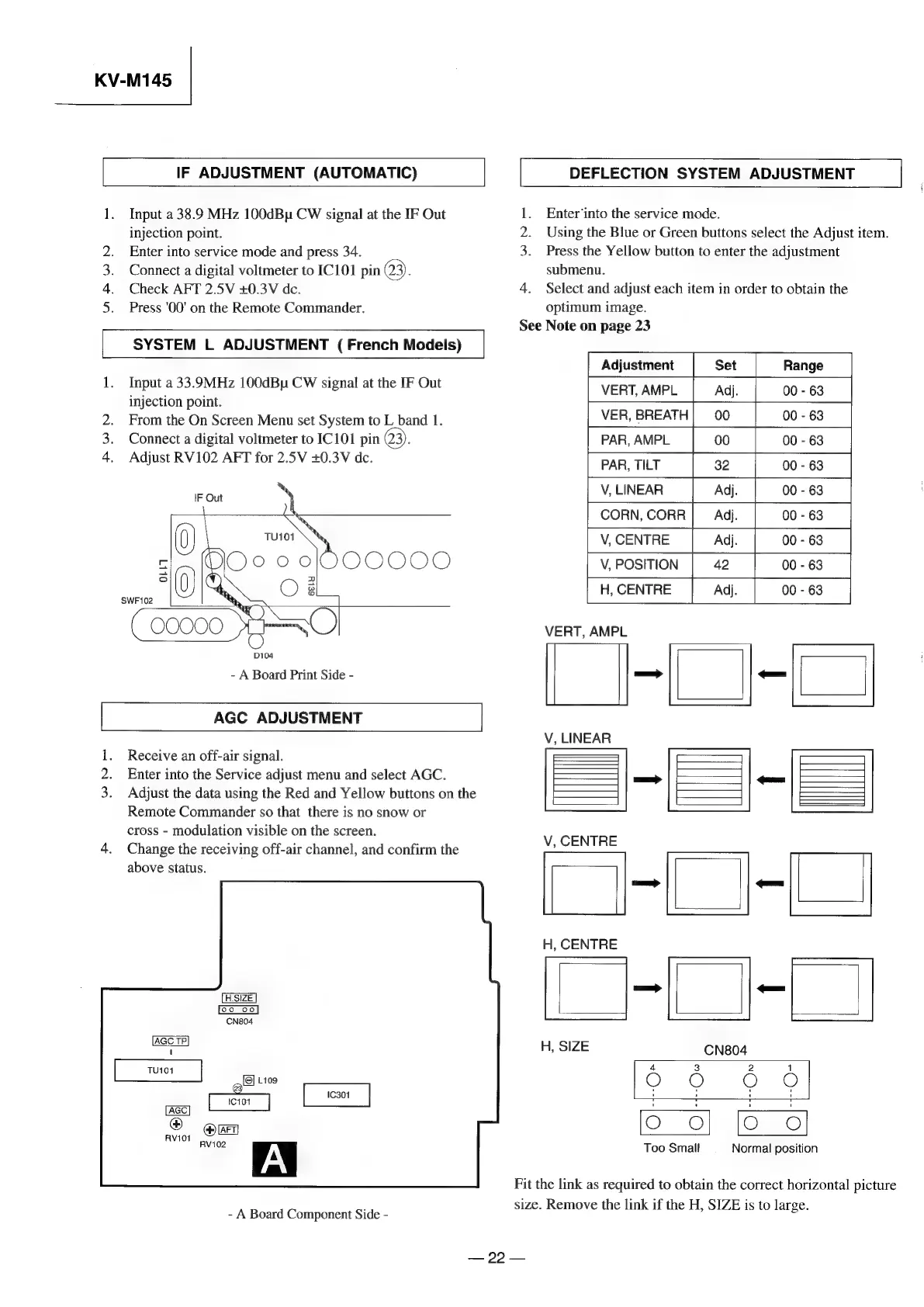
1.
Input
a
38.9
MHz
100dBu
CW
signal
at
the
IF
Out
injection
point.
Enter
into
service
mode
and
press
34.
Connect
a
digital
voltmeter
to
IC101
pin
23).
Check
AFT
2.5V
+0.3V
dc.
Press
'00'
on
the
Remote
Commander.
SYSTEM
L
ADJUSTMENT
(
French
Models)
1.
Input
a
33.9MHz
100dBu
CW
signal
at
the
IF
Out
injection
point.
2.
From
the
On
Screen
Menu
set
System
to
L
band
1.
Connect
a
digital
voltmeter
to
IC101
pin
Q3).
4.
Adjust
RV102
AFT
for
2.5V
+0.3V
de.
Ee
OS
Oo
IF
Out
OOOO0O
SWF102
-
A
Board
Print
Side
-
AGC
ADJUSTMENT
Receive
an
off-air
signal.
2.
Enter
into
the
Service
adjust
menu
and
select
AGC.
3.
Adjust
the
data
using
the
Red
and
Yellow
buttons
on
the
Remote
Commander
so
that
there
is
no
snow
or
cross
-
modulation
visible
on
the
screen.
4.
Change
the
receiving
off-air
channel,
and
confirm
the
above
status.
-
A
Board
Component
Side
-
|
DEFLECTION
SYSTEM
ADJUSTMENT
|
Enter‘into
the
service
mode.
Using
the
Blue
or
Green
buttons
select
the
Adjust
item.
3.
Press
the
Yellow
button
to
enter
the
adjustment
submenu.
4.
Select
and
adjust
each
item
in
order
to
obtain
the
optimum
image.
See
Note
on
page
23
Sod
a
Adjustment
Set
Range
VERT,
AMPL
Adj.
00
-
63
VER,
BREATH|
00
00
-
63
PAR,
AMPL
00
00
-
63
PAR,
TILT
32 00
-
63
V,
LINEAR
Adj.
00
-
63
CORN,
CORR
Adj.
00
-
63
V,
CENTRE
Adj.
00
-
63
V,
POSITION
42
00
-
63
H,
CENTRE
Adj.
00
-
63
VERT,
AMPL
:
:
u
V,
LINEAR
ill
V,
CENTRE
H,
CENTRE
ae
®
N
m
CN804
4
3 2
1
Orr
Or
©
Too
Small
Normal
position
Fit
the
link
as
required
to
obtain
the
correct
horizontal
picture
size.
Remove
the
link
if
the
H,
SIZE
is
to
large.
22
4

Related product manuals