– 11 –
KV-PG14P40/PG14L70/PG14L70/H
RM-952
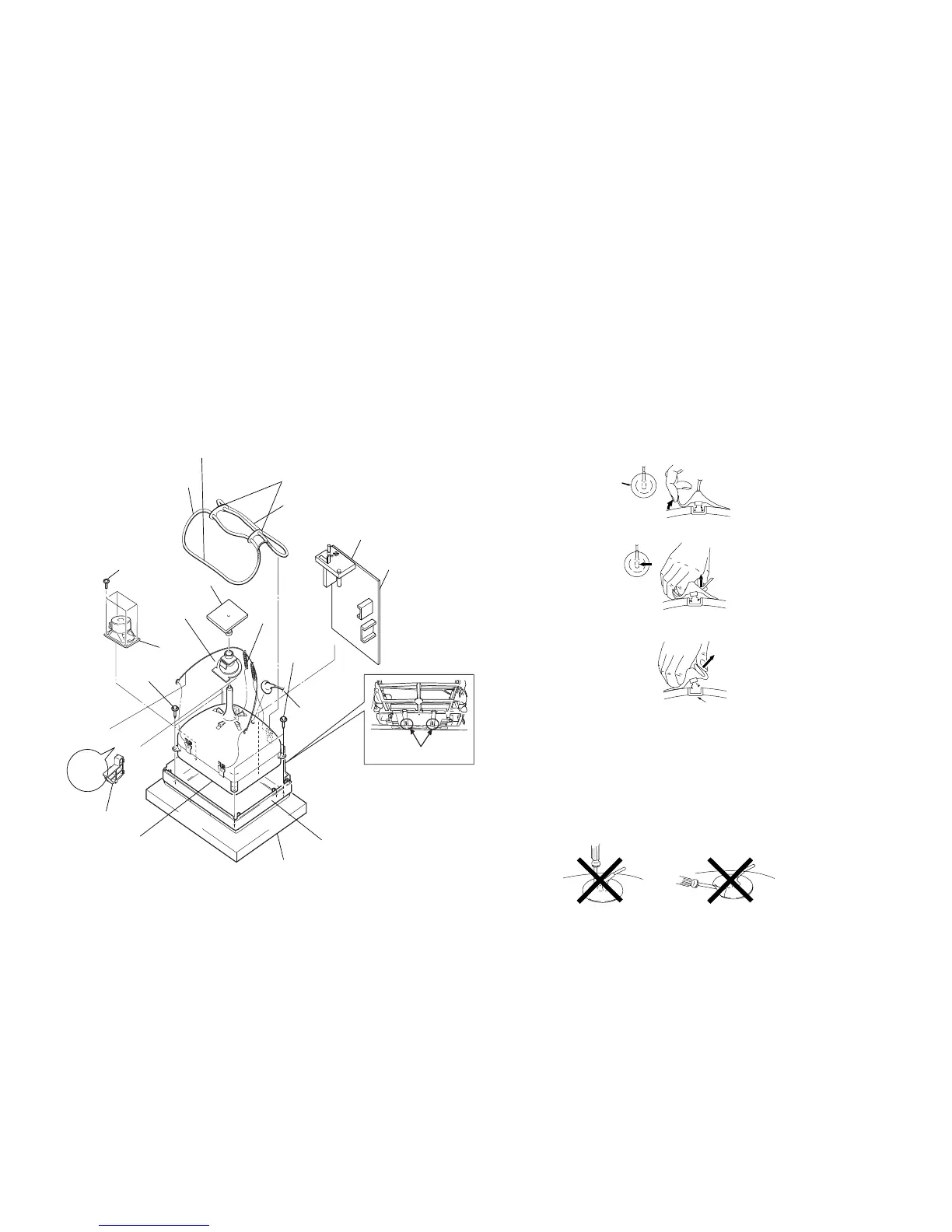
2-7. PICTURE TUBE REMOVAL
Note:
• Please make sure the TV set is not in standing position before removing necessary
CRT support located on bottom right and left.
• REMOVAL OF ANODE-CAP
NOTE : After removing the anode, short circuit the anode of the picture tube and
the anode cap to the metal chassis, CRT shield or carbon paint on the
CRT.
• REMOVING PROCEDURES
1 Do not damage the surface of anode-caps with sharp shaped objects.
2 Do not press the rubber too hard so as not to damage the inside of anode-cap.
A metal fitting called the shatter-hook terminal is built into the rubber.
3 Do not turn the foot of rubber over too hard.
The shatter-hook terminal will stick out or damage the rubber.
• HOW TO HANDLE AN ANODE-CAP
3 When one side of the rubber cap is separated from the anode button, the anode-cap
can be removed by turning up the rubber cap and pulling it up in the direction of the
arrow c.
2 Using a thumb pull up the rubber cap firmly in the direction indicated by the arrow b.
1 Turn up one side of the rubber cap in the direction indicated by the arrow a.







 To Next Page