EasyManua.ls Logo

Sony Trinitron KV-X2971A - Page 7

Sony Trinitron KV-X2971A
158 pages
Print Icon
To Next Page IconTo Next Page
To Previous Page IconTo Previous Page
Loading...
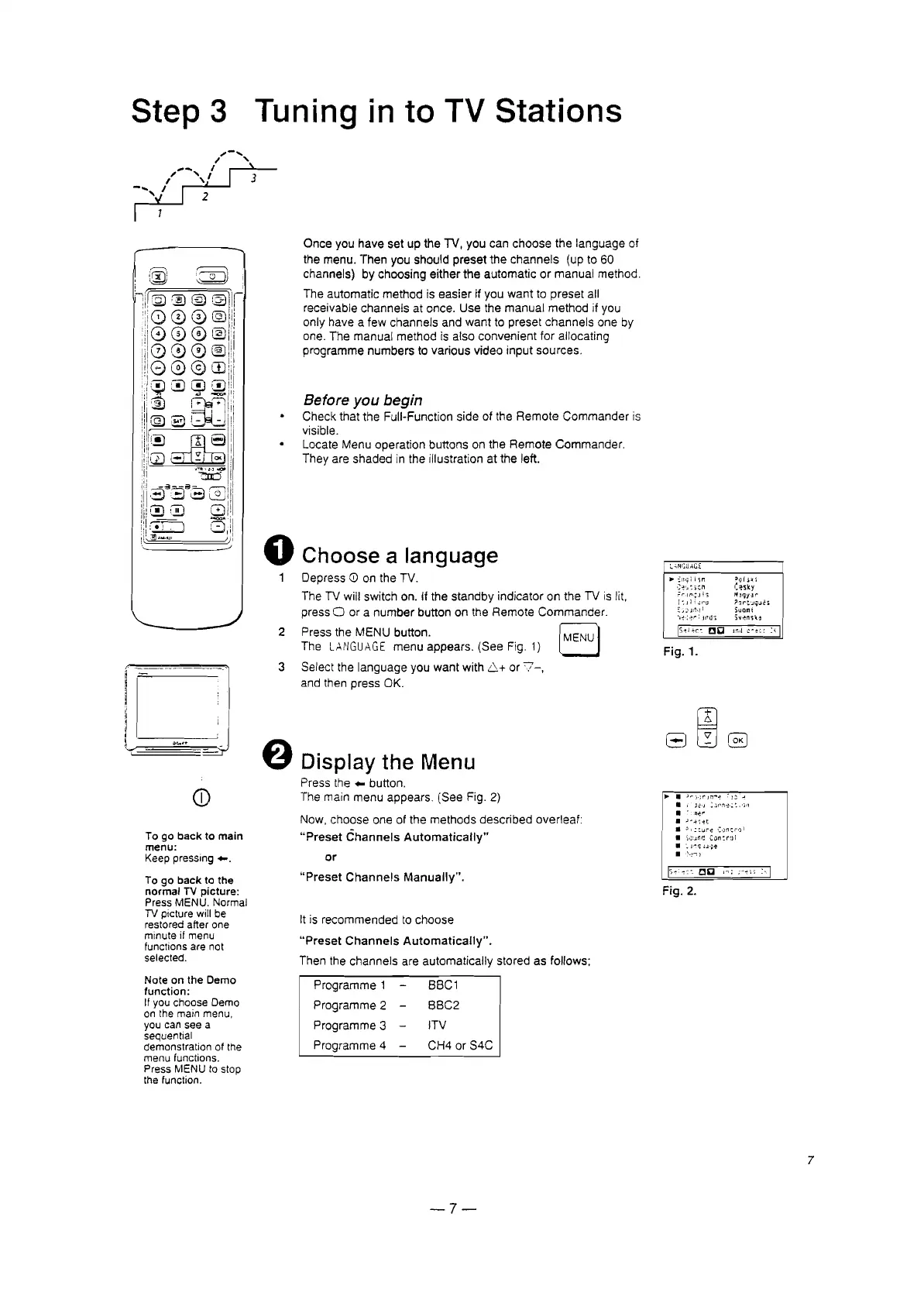
Step 3
Tuning in to TV Stations
3
Fig.
2.
:-1
1:1,)(
i~,
i
C~sky
M,Jqy:lr
jl'Jr::~qlJr!i
Suomi
Svensce
..
:nqi
i'ir!
':~,~:
,en
':"'lfl<;J''i
[:J]iJr'O
~,;
~
moi
'l-:-;~r:
reus
...
).-
)·:r
);'1""-:
:
l;:'
c'
s .l':-J
~"I'~~'::.
')11
"
.~o!
..
)~~';H
J I c
ru-e
':,)!1~""11
)i;:;r1l;! Con:r:)1
',
J~q
'J';;~
'!.~'"l)
Fig.
1.
Before
you
begin
Check
that
the Full-Function
side
of the
Remote
Commander
is
visible.
Locate
Menu
operation
buttons
on
the
Remote
Commander.
They
are
shaded
in the illustration at the left.
Choose a language
Depress
CD
on the TV.
The TV will switch on. if the
standby
indicator
on the TV is lit,
press
0 or a
number
button on the
Remote
Commander.
Press the
MENU
button. IMENUI
The
LANGUAGE
menu
appears.
(See
Fig. 1)
Select the
language
you
want
with
6.+ or
'7-,
and then
press
OK.
Once
you
have
set up the TV, you can
choose
the
language
of
the menu.
Then
you should
preset
the
channels
(up to 60
channels) by
choosing
either
the
automatic
or
manual
method.
The
automatic
method
is
easier
if you
want
to
preset
all
receivable
channels
at once.
Use
the
manual
method
if you
only
have
a
few
channels
and
want
to
preset
channels
one by
one. The
manual
method
is also
convenient
for allocating
programme
numbers
to
various
video
input
sources.
Display the Menu
Press the
...
button.
The main
menu
appears.
(See
Fig. 2)
Now.
choose
one of the
methods
described
overleaf:
"Preset
Channels
Automatically"
or
"Preset
Channels
Manually".
It is
recommended
to
choose
"Preset
Channels
Automatically".
Then the
channels
are
automatically
stored as follows;
2
3
o
CD
To go back to main
menu:
Keep pressing
...
To go back to the
normal
TV picture:
Press MENU. Normal
TV picture will be
restored after one
minute if menu
functions are not
selected.
Note on the Demo
function:
If you choose Demo
on the main menu.
you can see a
sequential
demonstration of the
menu functions.
Press MENU
to stop
the function.
Programme
1
Programme
2
Programme
3 -
Programme
4 -
BBC1
BBC2
lTV
CH4 or S4C
7
-7-

Related product manuals