With this method, you
can preset
all receivable
channels at once,
To
stop
automatic
channel
presetting:
Press"
on the Remote
Commander.
Notes:
• After presetting the
channels automatically,
you can check which
channels are stored on
which programme
posuions. For details,
see "Using the
Programme Table" on
page 16.
• You can sort the
programme positions to
have them appear on
screen in the order you
like. For details, see
"Sorting Programme
Positions" on page 1
O.
• Programme names are
automatically taken from
Teletext if available. If not
please refer to page 11
"Captioning a station
name" for further
information.
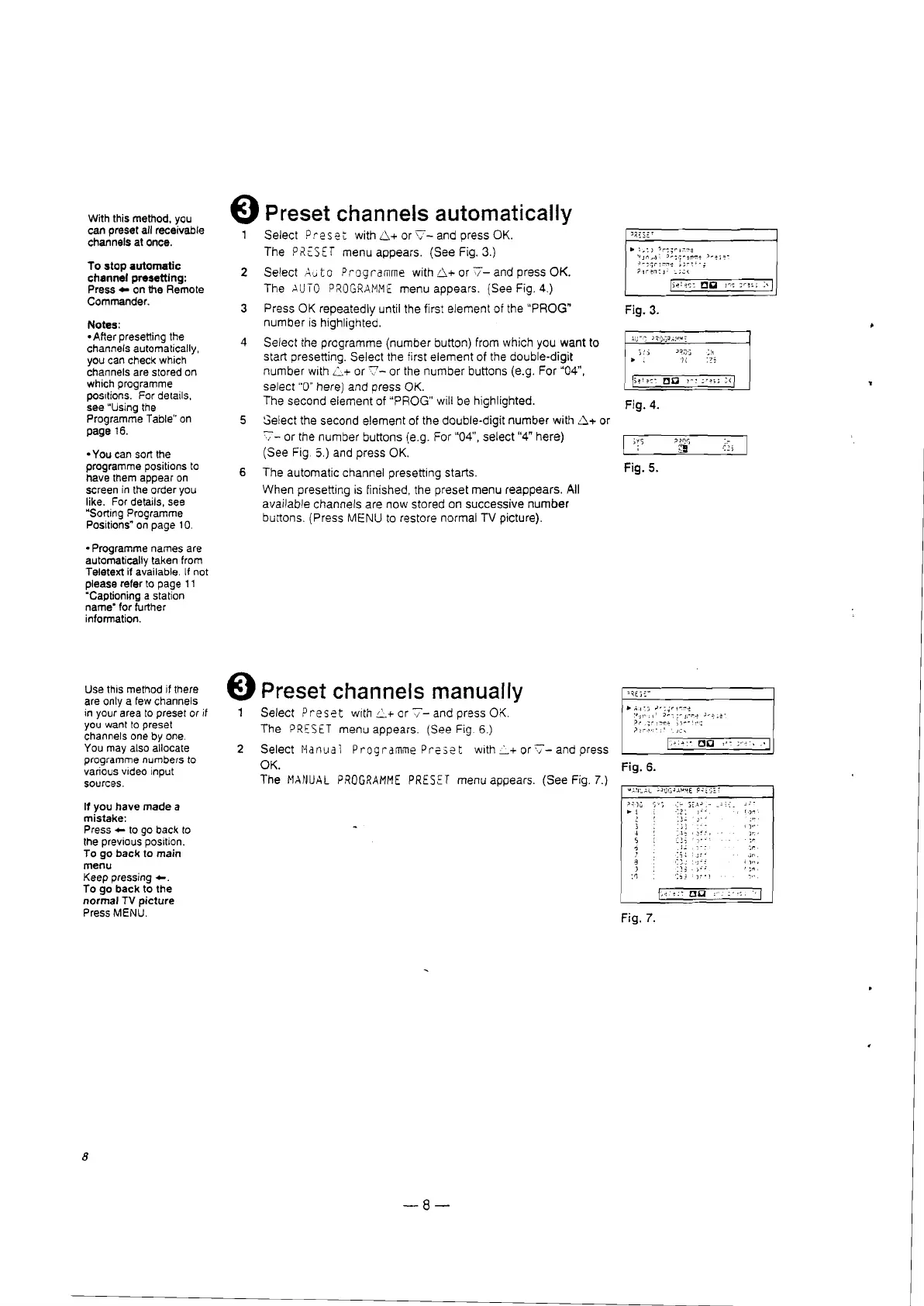
€) Preset channels automatically
Select Pre
set
with
6+
or
v-and
press OK.
The
P,~tSET
menu appears. (See Fig. 3.)
2 Select
Aut
o Programme with
6+
or
v-and
press OK.
The
AUTO
PROGRM1ME
menu appears. (See Fig. 4.)
3 Press OK repeatedly until the first element of the
"PROG"
number
is highlighted.
4 Select the programme (number button) from which you
want
to
start presetting. Select the first element of the double-digit
number
with
L+
or
7-
or the
number
buttons (e.g. For ·04",
select "0" here) and press OK.
The second element of "PROG" will be highlighted.
5 Select the second element of the double-digit
number
with 6'1- or
'7-
or the number buttons (e.g. For "04", select "4" here)
(See Fig.
5.) and press OK.
6 The automatic channel presetting starts.
When presetting is finished, the preset menu reappears.
All
available channels are now stored on successive
number
buttons. (Press MENU to restore normal TV picture).
..
~.:)
':Ir
~;
r r.v-a
'~Jr1
...,l:
~""::;~~rI'~~
) ..ese-
c
~
;.:;r
!,";,r:l~
;;
r t f n;
;:llr~n:
j:
'..;.:
{
,.,...,.--==----....,...,
Fig.
3.
)!:i
J,!,}j
::"'1
.. ; H
'7~
Fig. 4.
Fig. 5.
Use this method jf there
are only a few channels
in your area to preset
or if
you want to preset
channels one by one.
You may also allocate
programme numbers to
various video input
sources.
11
you have
made
a
mistake:
Press
..
to go back to
the previous position.
To go
back
to main
menu
Keep
pressing".
To go
back
to the
normal
TV
picture
Press MENU.
8
E)
Preset channels manually
1 Select
Preset
wlthL+orv-andpressOK.
,.,,,.
The
PRESET
menu appears. (See Fig. 6.)
2 Select Hanual Programme
Preset
with:::"+or'7-andpress
OK.
Fig.
6.
The
~lANUAl
PROGRAMME
PRESET
menu appears. (See Fig. 7.)
,
)
:0
Fig. 7.
-8-
I)"
)'"
il'"
';"







 To Next Page