EasyManua.ls Logo

Sony TRINITRON PVM-1443MD - Page 4

Sony TRINITRON PVM-1443MD
10 pages
Print Icon
To Next Page IconTo Next Page
To Previous Page IconTo Previous Page
Loading...
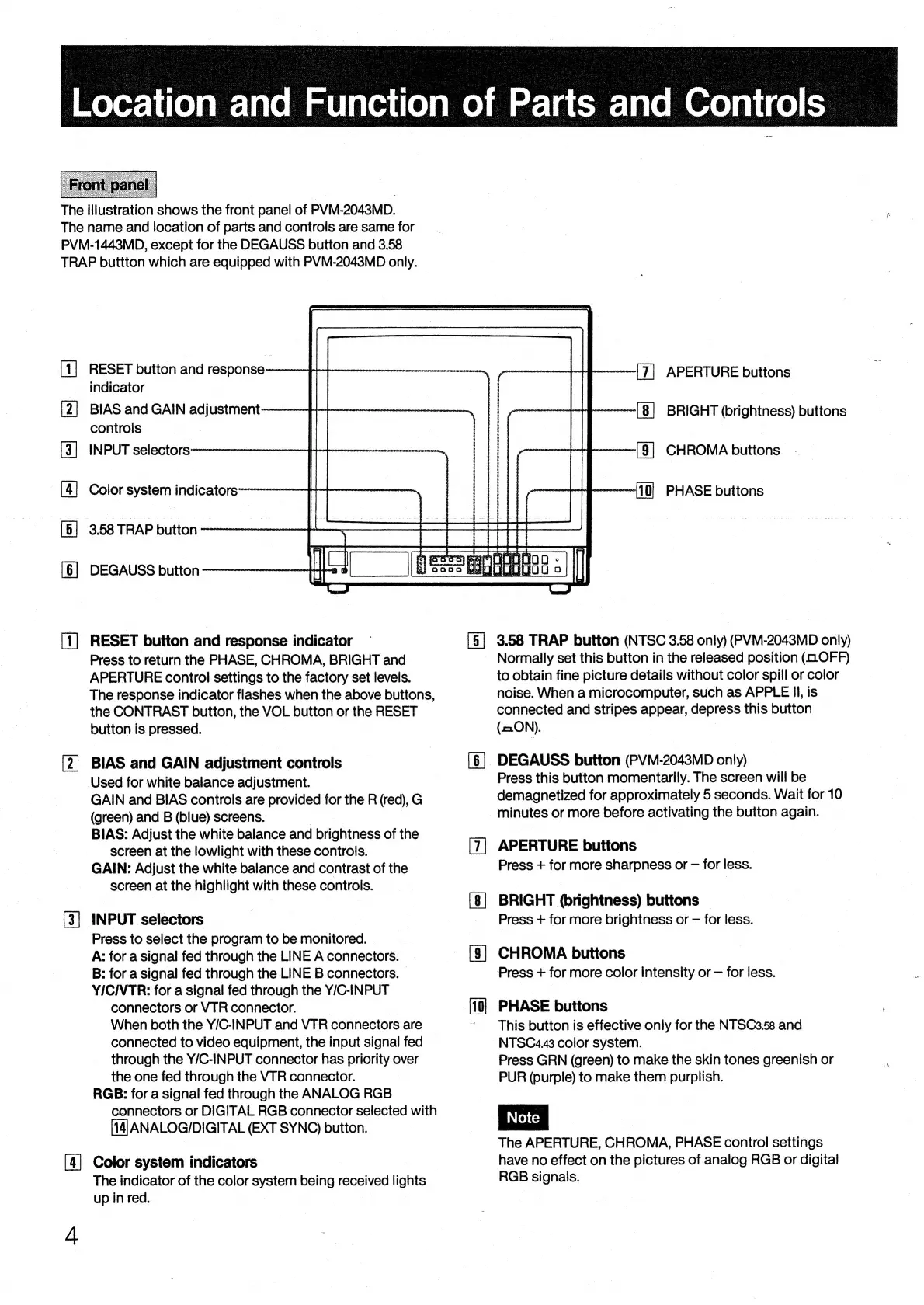
The
illustration
shows
the
front
panel
of
PVM-2043MD.
The
name
and
location
of
parts
and
controls
are
same
for
PVM-1443MD,
except
for
the
DEGAUSS
button
and
3.58
TRAP
buttton
which
are
equipped
with
PVM-2043MD
only.
RESET
button
and
response
indicator
BIAS
and
GAIN
adjustment
controls
INPUT
selectors
Color
system
indicators~
3.58
TRAP
button
SF
&
&
&
NM
FE
DEGAUSS
button
[—|
RESET
button
and
response
indicator
Press
to
return
the
PHASE,
CHROMA,
BRIGHT
and
APERTURE
control
settings
to
the
factory
set
levels.
The
response
indicator
flashes
when
the
above
buttons,
the
CONTRAST
button,
the
VOL
button
or
the
RESET
button
is
pressed.
[2]
BIAS
and
GAIN
adjustment
controls
(Used
for
white
balance
adjustment.
GAIN
and
BIAS
controls
are
provided
for
the
R
(red),
G
(green)
and
B
(blue)
screens.
BIAS:
Adjust
the
white
balance
and
brightness
of
the
screen
at
the
lowlight
with
these
controls.
GAIN:
Adjust
the
white
balance
and
contrast
of
the
screen
at
the
highlight
with
these
controls.
[3]
INPUT
selectors
Press
to
select
the
program
to
be
monitored.
A:
for
a
signal
fed
through
the
LINE
A
connectors.
B:
for
a
signal
fed
through
the
LINE
B
connectors.
YIC/VTR:
for
a
signal
fed
through
the
Y/C-INPUT
connectors
or
VTR
connector.
When
both
the
Y/C-INPUT
and
VTR
connectors
are
connected
to
video
equipment,
the
input
signal
fed
through
the
Y/C-INPUT
connector
has
priority
over
the
one
fed
through
the
VTR
connector.
RGB:
for
a
signal
fed
through
the
ANALOG
RGB
connectors
or
DIGITAL
RGB
connector
selected
with
[14]
ANALOG/DIGITAL
(EXT
SYNC)
button.
[4]
Color
system
indicators
The
indicator
of
the
color
system
being
received
lights
up
in
red.
[5]
S|
S|
ia
APERTURE
buttons
;
BRIGHT
(brightness)
buttons
—-(§]
CHROMA
buttons
-
PHASE
buttons
3.58
TRAP
button
(NTSC
3.58
only)
(PVM-2043MD
only)
Normally
set
this
button
in
the
released
position
(GOFF)
to
obtain
fine
picture
details
without
color
spill
or
color
noise.
When
a
microcomputer,
such
as
APPLE
Il,
is
connected
and
strines
annear,
depress
this
button
Sed
WF
SWI
WS
WT Ew
Uw
etinetlieted
alll
atacand
Mieattindl
wihdinatindinnd
se
ow
we
(=ON).
DEGAUSS
button
(PVM-2043MD
only)
Press
this
button
momentarily.
The
screen
will
be
demagnetized
for
approximately
5
seconds.
Wait
for
10
minutes
or
more
before
activating
the
button
again.
APERTURE
buttons
Press
+
for
more
sharpness
or
for
less.
BRIGHT
(brightness)
buttons
|
Press
+
for
more
brightness
or
for
less.
CHROMA
buttons
Press
+
for
more
color
intensity
or
for
less.
PHASE
buttons
This
button
is
effective
only
for
the
NTSC3.58
and
NTSC4.43
color
system.
Press
GRN
(green)
to
make
the
skin
tones
greenish
or
PUR
(purple)
to
make
them
purplish.
The
APERTURE,
CHROMA,
PHASE
control
settings
have
no
effect
on
the
pictures
of
analog
RGB
or
digital
RGB
signals.

Related product manuals